
I prefer those Supermicro boards with up to 12 SATA ports onboard. Beyond that it’s HBAs, of course.
Okay, so Multi Report, if I’m reading the email correctly, says I have two drives that are fine, two drives that are a touch warm, and three drives that are on fire.
I have it in the Server Build on page 10. I have three drives in the bottom cages (used to be four, one of them is the drive I’ve RMA’d), two drives attached to the roof of the case above the CPU, and two drives in that big vertical column, in the bottom two slots.
The three in the cages are on fire, the two in the column are warm, and the two on the roof are fine.
Where are your fans situated? (and how many do you have?)
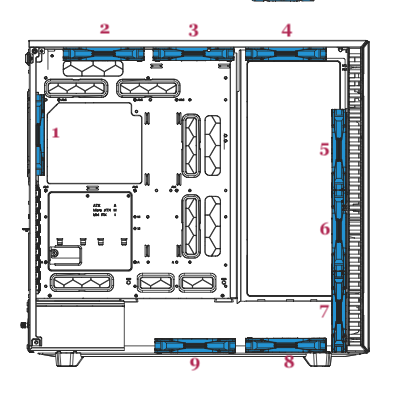
The three that came with the case, installed as depicted in the manual.

Correct.
10-15, as well as fan positions 2 and 3 (which are obviously not visible in the second image). 15 is currently empty, as that’s the drive that went bad. 12-14 were hot and 10/11 were warm according to the first run through Multi Report. The one that just completed has 12-14 as warm and no other issues.
Thank you.
Drivebays 12-14 are all in the “basement” of the chassis, where considering the current fan configuration, there is little to no airflow.
Given the parts you have available I recommend moving them up so that they are in the direct path of the two front fans.
You can experiment with having one empty slot between each drive vs stacking them one atop another, check what the temps are and pick the less warm option.
The drives in fan locations 2 and 3 aren’t positioned that well (given the fan config), but at least they aren’t in an enclosed area. I’d be wary of those, but maybe you can just keep an eye on their temps for now.
They’ve never even run warm, unlike the other drives, so it can’t be that bad. 
These are not options that particularly help with maximising the number of drives in the case…and of course building out the 1-11 stack blocks the fans from the HBAs…
Given the fans and HDDs you currently have in your system you do need to move something around. Either move a fan down a slot so it pulls in air from the front into the basement, or move the drives up into the current airflow path.
As you expand with more HDDs it’s recommended that you expand the cooling solution along side it. Adding more fans in appropriate spots to ensure that all drives get a good amount of air passing along side them to help move heat away.
This case is not particularly good with holding a large number of drives… as you’ll find out when you’ll have to buy extra drive trays for more than the price of the case.
Definitively move or add one fan to position 7 to vent the bottom chamber. Or move the drives out of there.
The HBA wants its own dedicated fan.
I suppose that they benefit from the CPU cooler moving air in their area, and possibly from convection out of the top.
It was specifically recommended to me as a case for holding a large number of drives.  As were the HBAs, which it turns out also suck.
Can I just whack any fan there? Or do I need something specific? When I bought the fan splitter cable the other day so I could attach the second front fan to the motherboard (which is also worth noting, the fan in position 6 has only been connected for a few days), they only had a three-way splitter cable so I do have an extra I can plug another fan into. Assuming I can physically get a fan into that spot, which might be a challenge.
I’m still not really sure what to do there. The whole 3D-printing/jury-rigging thing isn’t my cup of tea.
Basically yes. It should be a matter of removing a section of the floor of the main chamber.
For a start, you may just move the fans from 5-6 to 6-7. And space drives 10-11 one slot apart (9-11).
Zip-tie a fan to the heat sink, or use some mounting bracket in a PCIe slot to have a fan blow sideways or from below.
That link just goes to a bunch of computer cases?
Also, how many fans can I actually safely run off this motherboard? I assume I can’t just use infinite splitters.
Then the output unpredictably depends on cookies in the local browser. I hate this tracking “personalised advertisement” stuff. I got that, and many similar products, among a few irrelevant suggestions:

As many as the power requirements of the fans allow.
The case should have a fan control board with its own power input, circumventing motherboard limitations.
Well…yes. But how do I know what that limit is? Just “if you smell smoke, you’ve gone too far”?
Should it?
You look up the specifications of your fans and of your motherboard. What’s computer building without a bit of fun with documentation? 
At the very least it CAN, since the fans will be powered directed from the PSU.
Fractal Design expects you to use this control board with ONE 4-pin header plugged into the motherboard for PWM control according to the fan curve of your choice, which is then applied to ALL fans—that’s why the Define cases ship with 3-pin fans, not 4-pin.
Do I seem like someone who would be able to make sense of any of that information? I’m very clearly way out of my depth here. I’m not even sure what I’d be looking for, or where to look, particularly for the fans that came with the case.
I have absolutely no idea what this means. This is my problem. I can read all the technical documents I want, but without an array of ELI5’s I’m not going to glean much. PWM? Fan curve? 3-pin/4-pin?
Best I can tell there’s a fan thingy in the case, which I’ve heretofore been unaware of, and I plug that into one of the mobo fan ports, and then all my fans into that thing, though presumably it can still only take so many fans, either in terms of power supply or physical connectors. And I don’t know what a fan curve or a PWM is, or what the differences in pins are. Am I even close here?
You are.
Mobo → fan thingy → all fans.
That’s why fan thingy exists, to drive more fans than can be connected to the motherboard.
4-pin vs. 3-pin are two different ways to regulate a fan’s speed. Most motherboards have 4-pin connectors. You have to use the right connector for the fan - or when adding fans to infrastructure already present - buy the right fans.
So mobo 4-pin → fan thingy → 3 pin fans is correct if that is what you have. You cann add fans up to the number of connectors on that small unit and they all must match the number of pins (assuming 3 - correct?).
HTH,
Patrick
You’re asking the wrong person! I’ve never even heard of fan thingy until an hour ago!