A few months ago I created a bridge for my VM with Home Assistant and everything worked great.
Last month I noticed that the Apps were having problems running. Immich and cloudflared stoped after “deploying”. The error is the following:
Error response from daemon: failed to create task for container: failed to create shim task: OCI runtime create failed: runc create failed: unable to start container process: error during container init: error running hook #0: error running hook: exit status 1, stdout: , stderr: failed to set gateway while updating gateway: route for the gateway 127.16.1.1 could not be found: invalid argument: unknown
I searched a lot online and only found a solution for cloudflared which was enabling the setting “Host Network” in Network Configuration of the app configuration.
This setting is not available in the Immich configuration. I tried to add the TrueNAS Scale IP in “Host IP’s” config but it doesn’t work.
Any idea how to fix this? I have a lot of photos in Immich that I don’t want to loose (I still have not found the best way to backup them periodically…).
From the DataStore the photos are still there (is there also a way to backup those).
Some notes:
TrueNAS version: Electric Eel 24.10
I have available 2 Ethernet Network Interfaces (is it possible to bridge one to VM and the other for apps)
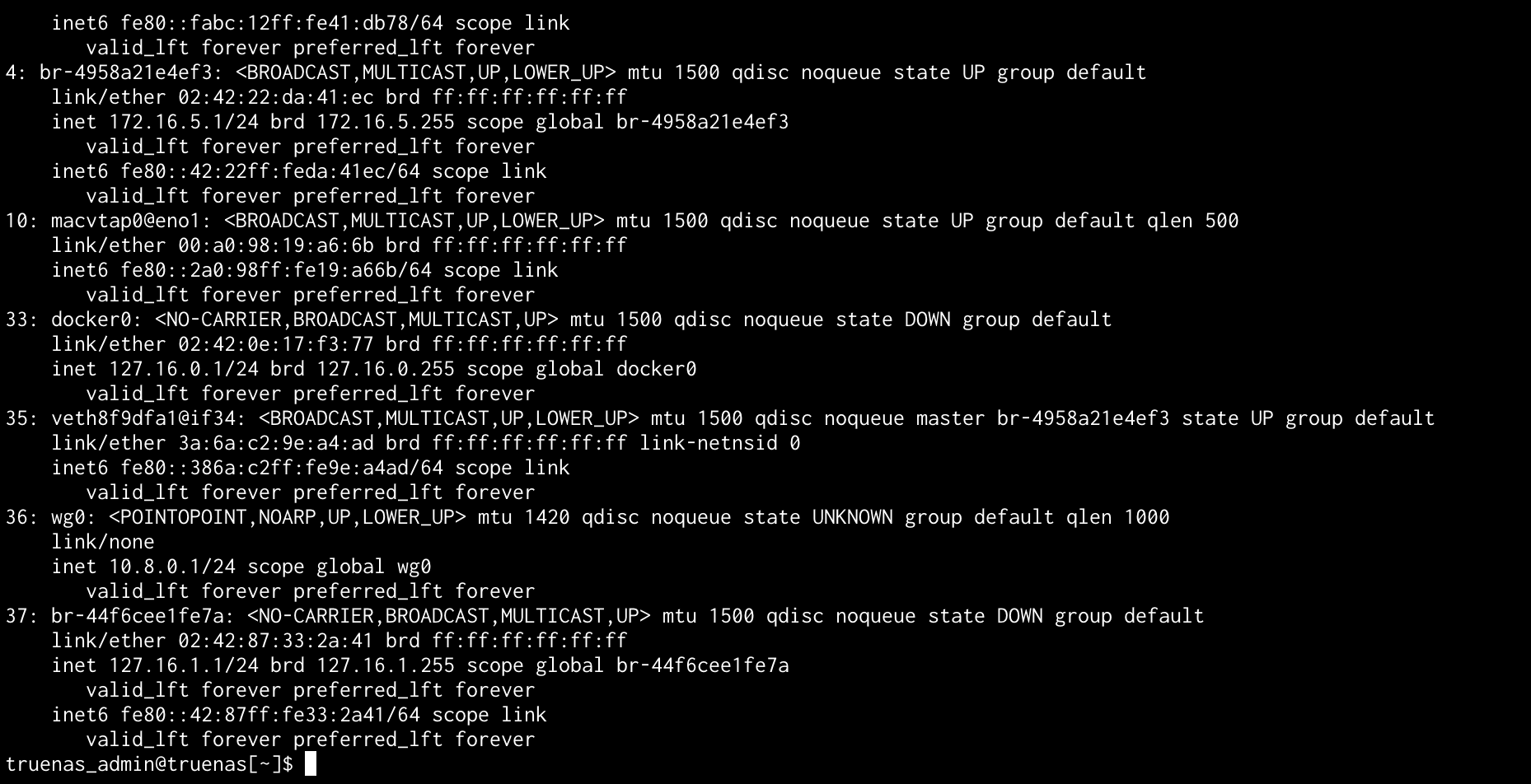
If i use “ip a” in the shell I get the following interface that has the IP of the complained gateway 192.16.1.1. (is this the reason why it’s not working):
37: br-44f6cee1fe7a: <NO-CARRIER,BROADCAST,MULTICAST,UP> mtu 1500 qdisc noqueue state DOWN group default
link/ether 02:42:87:33:2a:41 brd ff:ff:ff:ff:ff:ff
inet 127.16.1.1/24 brd 127.16.1.255 scope global br-44f6cee1fe7a
valid_lft forever preferred_lft forever
inet6 fe80::42:87ff:fe33:2a41/64 scope link
valid_lft forever preferred_lft forever
Okay, one more time, please post a screenshot of the Network page, and details of the configured interfaces. ip a output, while interesting, is not a replacement.
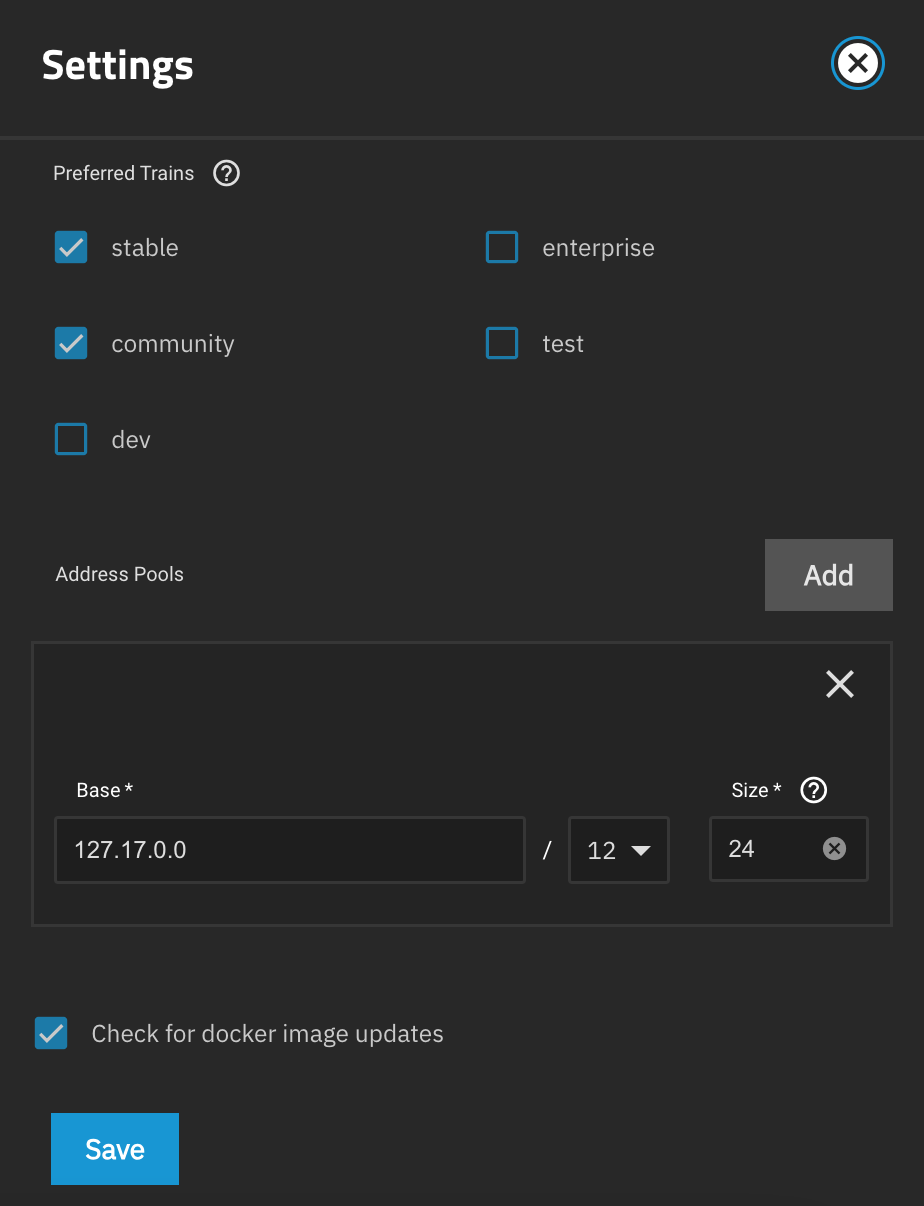
An additional screenshot of interest is Apps → Configuration → Settings.
So looking at the new screenshots it’s evident that you haven’t created any bridge (at least not using any supported method), and you have two interfaces (eno1 and eno2) both on the same network (which isn’t supported).
Your apps network has been changed from the default 172.17.0.0/12 so that it’s in the local 127 loopback network range instead, not sure why one would do that.
Given those discrepancies, the automatically created br-########### being on two different network swaths, as well as the wireguard and macvtap interfaces visible, I suspect that you have a rather complex network configuration. Are you perhaps also defining your own apps networks in yamls or the like?
Whatever the goal was, I think it reached a boiling point and would now advice you to rethink your setup simply it, and rebuild it from scratch, using the GUI.
How you best backup your immich photos seems unrelated, but the short answer would be to look at where the app is set to store the photos (look in the TrueNAS Apps interface). Hopefully you picked a host path dataset as storage. If you picked an ix-volume tread very carefully.
The issue was the IP, don’t know why it was 127.*** Since think I never changed it. I only started messing around when it failed, only did updates and added the bridge for the HA VM.
I removed the bridge because I thought it could be because of that, the same with the second network.