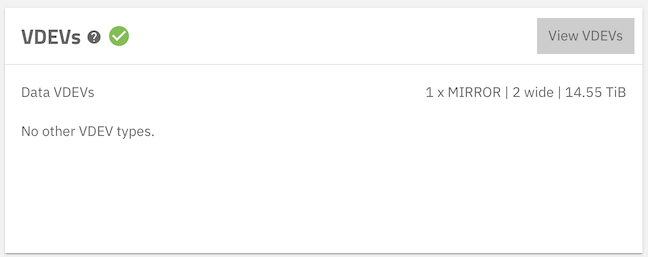
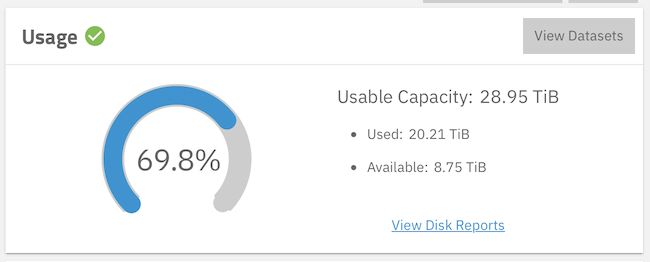
On my Storage Dashboard I have these:
How does a mirror made of 14 TB drives give me 29 TB of capacity? It should give me 14 TB of capacity, shouldn’t it?
This is of particular concern, because I am trying to retire this two-drive NAS by replicating it to a four-drive NAS, which now looks like this:
How can I be running out of capacity on a system with twice the actual capacity, when it is supposed to be a storage replica of the smaller one?
There is a replication task ongoing currently. I have no idea, when it will be finished. With it running, I have deleted as many snapshots on the source system as were not busy. I am hoping that the next replication task will remove those snapshots from the target system, as well.
I really want to the get to the point, where I can retire the two-drive NAS.
jro
April 24, 2026, 4:08pm
2
Can you post the output of zfs list -o space -r -t all on each system? That will give us a better idea of what is going on behind the scenes.
Here goes:
On the 2-drive source NAS
truenas_admin@truenasmini[~]$ zfs list -o space -r -t all
NAME AVAIL USED USEDSNAP USEDDS USEDREFRESERV USEDCHILD
Internal 8.62T 21.1T 0B 112K 0B 21.1T
Internal@auto-20260410.000000 - 0B - - - -
Internal/.system 8.62T 4.32G 1.69G 1.73G 0B 923M
Internal/.system@auto-20260223.231925 - 1.69G - - - -
Internal/.system/configs-ae32c386e13840b2bf9c0083275e7941 8.62T 33.6M 872K 32.7M 0B 0B
Internal/.system/configs-ae32c386e13840b2bf9c0083275e7941@auto-20260213.120742 - 0B - - - -
Internal/.system/configs-ae32c386e13840b2bf9c0083275e7941@auto-20260213.130000 - 0B - - - -
Internal/.system/configs-ae32c386e13840b2bf9c0083275e7941@auto-20260214.130000 - 64K - - - -
Internal/.system/configs-ae32c386e13840b2bf9c0083275e7941@auto-20260215.130000 - 64K - - - -
Internal/.system/configs-ae32c386e13840b2bf9c0083275e7941@auto-20260216.130000 - 64K - - - -
Internal/.system/configs-ae32c386e13840b2bf9c0083275e7941@auto-20260217.130000 - 72K - - - -
Internal/.system/configs-ae32c386e13840b2bf9c0083275e7941@auto-20260218.130000 - 64K - - - -
Internal/.system/configs-ae32c386e13840b2bf9c0083275e7941@auto-20260219.130000 - 72K - - - -
Internal/.system/configs-ae32c386e13840b2bf9c0083275e7941@auto-20260220.130000 - 64K - - - -
Internal/.system/configs-ae32c386e13840b2bf9c0083275e7941@auto-20260221.130000 - 64K - - - -
Internal/.system/configs-ae32c386e13840b2bf9c0083275e7941@auto-20260222.130000 - 64K - - - -
Internal/.system/configs-ae32c386e13840b2bf9c0083275e7941@auto-20260223.231925 - 72K - - - -
Internal/.system/cores 888M 136M 90.8M 45.4M 0B 0B
Internal/.system/cores@auto-20260213.120742 - 0B - - - -
Internal/.system/cores@auto-20260213.130000 - 0B - - - -
Internal/.system/cores@auto-20260214.130000 - 0B - - - -
Internal/.system/cores@auto-20260215.130000 - 0B - - - -
Internal/.system/cores@auto-20260216.130000 - 0B - - - -
Internal/.system/cores@auto-20260217.130000 - 0B - - - -
Internal/.system/cores@auto-20260218.130000 - 0B - - - -
Internal/.system/cores@auto-20260219.130000 - 0B - - - -
Internal/.system/cores@auto-20260220.130000 - 0B - - - -
Internal/.system/cores@auto-20260221.130000 - 0B - - - -
Internal/.system/cores@auto-20260222.130000 - 0B - - - -
Internal/.system/cores@auto-20260223.231925 - 0B - - - -
Internal/.system/netdata-ae32c386e13840b2bf9c0083275e7941 8.62T 752M 446M 306M 0B 0B
Internal/.system/netdata-ae32c386e13840b2bf9c0083275e7941@auto-20260213.120742 - 132K - - - -
Internal/.system/netdata-ae32c386e13840b2bf9c0083275e7941@auto-20260213.130000 - 140K - - - -
Internal/.system/netdata-ae32c386e13840b2bf9c0083275e7941@auto-20260214.130000 - 224K - - - -
Internal/.system/netdata-ae32c386e13840b2bf9c0083275e7941@auto-20260215.130000 - 280K - - - -
Internal/.system/netdata-ae32c386e13840b2bf9c0083275e7941@auto-20260216.130000 - 244K - - - -
Internal/.system/netdata-ae32c386e13840b2bf9c0083275e7941@auto-20260217.130000 - 216K - - - -
Internal/.system/netdata-ae32c386e13840b2bf9c0083275e7941@auto-20260218.130000 - 260K - - - -
Internal/.system/netdata-ae32c386e13840b2bf9c0083275e7941@auto-20260219.130000 - 216K - - - -
Internal/.system/netdata-ae32c386e13840b2bf9c0083275e7941@auto-20260220.130000 - 168K - - - -
Internal/.system/netdata-ae32c386e13840b2bf9c0083275e7941@auto-20260221.130000 - 200K - - - -
Internal/.system/netdata-ae32c386e13840b2bf9c0083275e7941@auto-20260222.130000 - 268K - - - -
Internal/.system/netdata-ae32c386e13840b2bf9c0083275e7941@auto-20260223.231925 - 13.3M - - - -
Internal/.system/nfs 8.62T 204K 88K 116K 0B 0B
Internal/.system/nfs@auto-20260213.120742 - 0B - - - -
Internal/.system/nfs@auto-20260213.130000 - 0B - - - -
Internal/.system/nfs@auto-20260214.130000 - 0B - - - -
Internal/.system/nfs@auto-20260215.130000 - 0B - - - -
Internal/.system/nfs@auto-20260216.130000 - 0B - - - -
Internal/.system/nfs@auto-20260217.130000 - 0B - - - -
Internal/.system/nfs@auto-20260218.130000 - 0B - - - -
Internal/.system/nfs@auto-20260219.130000 - 0B - - - -
Internal/.system/nfs@auto-20260220.130000 - 0B - - - -
Internal/.system/nfs@auto-20260223.231925 - 0B - - - -
Internal/.system/samba4 8.62T 796K 348K 448K 0B 0B
Internal/.system/samba4@auto-20260223.231925 - 348K - - - -
Internal/.system/vm 8.62T 96K 0B 96K 0B 0B
Internal/.system/vm@auto-20260223.231925 - 0B - - - -
Internal/AbacusLaw 8.62T 46.1G 8K 46.1G 0B 0B
Internal/AbacusLaw@auto-20260223.231925 - 8K - - - -
Internal/Backup 8.62T 21.0T 120G 20.9T 0B 0B
Internal/Backup@auto-20260223.231925 - 120G - - - -
Internal/BackupDB 8.62T 2.36G 916M 1.47G 0B 0B
Internal/BackupDB@auto-20260223.231925 - 916M - - - -
Internal/KeePass 8.62T 3.75M 140K 3.61M 0B 0B
Internal/KeePass@auto-20260223.231925 - 140K - - - -
Internal/RClone 8.62T 184K 80K 104K 0B 0B
Internal/RClone@auto-20260223.231925 - 80K - - - -
Internal/ix-apps 8.62T 103G 80K 224K 0B 103G
Internal/ix-apps@auto-20260410.000000 - 80K - - - -
Internal/ix-apps/app_configs 8.62T 8.25M 272K 7.99M 0B 0B
Internal/ix-apps/app_configs@auto-20260223.231925 - 272K - - - -
Internal/ix-apps/app_mounts 8.62T 98.4G 0B 96K 0B 98.4G
Internal/ix-apps/app_mounts@auto-20260410.000000 - 0B - - - -
Internal/ix-apps/app_mounts/urbackup 8.62T 98.4G 0B 96K 0B 98.4G
Internal/ix-apps/app_mounts/urbackup@auto-20260410.000000 - 0B - - - -
Internal/ix-apps/app_mounts/urbackup/backups 8.62T 98.2G 8K 98.2G 0B 0B
Internal/ix-apps/app_mounts/urbackup/backups@auto-20260223.231925 - 8K - - - -
Internal/ix-apps/app_mounts/urbackup/database 8.62T 69.2M 8K 69.2M 0B 0B
Internal/ix-apps/app_mounts/urbackup/database@auto-20260223.231925 - 8K - - - -
Internal/ix-apps/app_mounts/urbackup/logs 8.62T 76.0M 104K 75.9M 0B 0B
Internal/ix-apps/app_mounts/urbackup/logs@auto-20260410.000000 - 104K - - - -
Internal/ix-apps/docker 8.62T 3.72G 764K 3.72G 0B 0B
Internal/ix-apps/docker@auto-20260410.000000 - 764K - - - -
Internal/ix-apps/truenas_catalog 8.62T 674M 349M 325M 0B 0B
Internal/ix-apps/truenas_catalog@auto-20260410.000000 - 349M - - - -
On the four-drive target NAS
truenas_admin@qnaptruenas[~]$ zfs list -o space -r -t all
NAME                                                                                             AVAIL   USED  USEDSNAP  USEDDS  USEDREFRESERV  USEDCHILD
Internal                                                                                         10.1T  18.0T        0B    163K             0B      18.0T
Internal@auto-20260410.000000                                                                        -     0B         -       -              -          -
Internal/.system                                                                                 10.1T  2.02G        0B   1.73G             0B       296M
Internal/.system/configs-ae32c386e13840b2bf9c0083275e7941                                        10.1T  4.94M        0B   4.94M             0B         0B
Internal/.system/cores                                                                           1024M   174K        0B    174K             0B         0B
Internal/.system/netdata-ae32c386e13840b2bf9c0083275e7941                                        10.1T   290M        0B    290M             0B         0B
Internal/.system/nfs                                                                             10.1T   169K        0B    169K             0B         0B
Internal/.system/samba4                                                                          10.1T   355K        0B    355K             0B         0B
Internal/.system/vm                                                                              10.1T   140K        0B    140K             0B         0B
Internal/AbacusLaw                                                                               10.1T  46.7G        0B   46.7G             0B         0B
Internal/Backup                                                                                  10.1T  17.9T        0B   17.9T             0B         0B
Internal/KeePass                                                                                 10.1T  3.95M      180K   3.77M             0B         0B
Internal/KeePass@auto-20260223.231925                                                                -   180K         -       -              -          -
Internal/RClone                                                                                  10.1T   151K        0B    151K             0B         0B
Internal/ix-apps                                                                                 10.1T   104G       93K    326K             0B       104G
Internal/ix-apps@ix-apps-backup-system-update--2026-04-21_14:53:36                                   -    93K         -       -              -          -
Internal/ix-apps/app_configs                                                                     10.1T  10.1M      331K   9.76M             0B         0B
Internal/ix-apps/app_configs@ix-apps-backup-system-update--2026-04-21_14:53:36                       -   331K         -       -              -          -
Internal/ix-apps/app_mounts                                                                      10.1T  98.9G        0B    140K             0B      98.9G
Internal/ix-apps/app_mounts@ix-apps-backup-system-update--2026-04-21_14:53:36                        -     0B         -       -              -          -
Internal/ix-apps/app_mounts/urbackup                                                             10.1T  98.9G        0B    140K             0B      98.9G
Internal/ix-apps/app_mounts/urbackup@ix-apps-backup-system-update--2026-04-21_14:53:36               -     0B         -       -              -          -
Internal/ix-apps/app_mounts/urbackup/backups                                                     10.1T  98.7G        0B   98.7G             0B         0B
Internal/ix-apps/app_mounts/urbackup/backups@ix-apps-backup-system-update--2026-04-21_14:53:36       -     0B         -       -              -          -
Internal/ix-apps/app_mounts/urbackup/database                                                    10.1T  69.3M        0B   69.3M             0B         0B
Internal/ix-apps/app_mounts/urbackup/database@ix-apps-backup-system-update--2026-04-21_14:53:36      -     0B         -       -              -          -
Internal/ix-apps/app_mounts/urbackup/logs                                                        10.1T   104M        0B    104M             0B         0B
Internal/ix-apps/app_mounts/urbackup/logs@ix-apps-backup-system-update--2026-04-21_14:53:36          -     0B         -       -              -          -
Internal/ix-apps/docker                                                                          10.1T  4.14G        0B   4.14G             0B         0B
Internal/ix-apps/truenas_catalog                                                                 10.1T   523M        0B    523M             0B         0B
Unfortunately, I really don’t know, what information I can glean from those.
What is the output of zpool -v status and zpool list for each pool.
The values I see look like the first is made of two mirrored pairs of 14tb drives. But I am FAR from an expert in this arena.
This looks like you have block cloning going on with the mirror VDEV.
So I’ve just started messing around with block cloning today and thinking about practically how it would work in my environment. In testing it appears to be working well however I have noticed that ZFS dataset ‘USED’ doesn’t seem to understand whats going on from a reporting point of view. If I take a copy of a file (10GB) on the dataset and duplicate it block cloning is defo working as A. the copy is stupid fast and B. I can see it using zpool get all tank | grep bclone however as far as the da…
So, if the objective is to clone a NAS to another, in order to migrate to new hardware, should I not be using block cloning? The cloning setup I am using was automatically generated by TrueNAS Connect. I realize that TrueNAS Connect may only have backup in mind, not system migration.
I think you have block cloning going on your Mirror VDEV and that is why the space reporting is odd for that pool. @Johnny_Fartpants and @winnielinnie discussed it in the linked threads. It also gave examples of how to pull up the data using the command line.
zpool list -o name,size,cap,alloc,free,bcloneratio,bcloneused,bclonesaved
Replicating the Mirror over to the new one may use the funny ZFS math until the process completes.