Posting this here in case anyone else is having this issue.
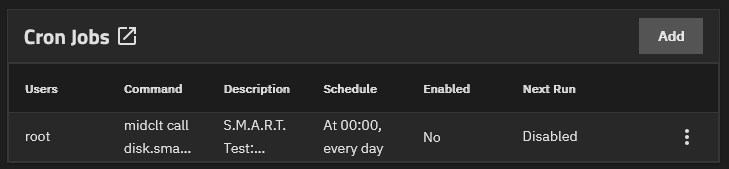
Every night band on 00:00 the system crashes since upgrading to Goldeye Beta 1
I changed the GPU from a Nvidia P600 to a GTX3050
At precisely 12:00 ZFS pool z-flash goes offline. This pool is used to host Apps, Containers and VMS. The system will hang and require a power cycle. When it comes back the z-flash pool will be fine and everything restarts as normal.
z-flash is made up of the following drives:
- Data VDEVs 1 x MIRROR | 2 wide PNY NX10000 2TB NVMe SSD
- Log VDEVs 1 x MIRROR | 2 wide Intel Optane DDR4 PC4-2666 288p DCPMM NMA1XXD128GPS
The log devices are still present but the two NVMe’s have dissipated.
The two NVMe’s are on a pcie x8 card that hosts 4 NVMe drives. The other two are not affected and the pool vol1 1 is unaffected.
vol1 is made up of the following drives:
- Data VDEVs 1 x RAIDZ2 | 12 wide Seagate X16 Exos 14TB SATA Enterprise LFF 512e 6Gb/s HDD ST14000NM001G
- Log VDEVs 1 x MIRROR | 2 wide 16GB Intel Optane Memory M10 NVMe M.2 2242
System:
MB: Supermicro X11SPW-TF
CPU: Intel Xeon Gold 6230 2.1GHz 20-Core 125W
RAM: 265GB 4 x Samsung 64GB 4DRX4 PC4-2666V LRDIMM DDR4
Case: Supermicro CSE-826 12-Bay 3.5" 2-Bay 2.5"
PSU: Dual hot swapable PWS-920-SQ
HBA 1: SAS9300-8i (fw: 16.00.10.00 IT)
NIC: Intel X557 RJ45 10GBase-T
GPU: Nvidia GeForce RTX 3050 6GB GDDR6 LP 70W
Boot: 2 x Intel SSD DC S3500 160GB (1x Mirror)
The below is printed to the console:
root@truenas-01[~]# 2025 Sep  6 00:03:28 truenas-01.breznet.com Process 3881345 (Prowlarr) of user 1201 dumped core.

Module /app/prowlarr/bin/libMonoPosixHelper.so without build-id.
Module /app/prowlarr/bin/libMonoPosixHelper.so
Stack trace of thread 609:
#0  0x00007f24258e842e n/a (/app/prowlarr/bin/libcoreclr.so + 0x39c42e)
#1  0x00007f242568fa06 n/a (/app/prowlarr/bin/libcoreclr.so + 0x143a06)
#2  0x00007f242568e37e n/a (/app/prowlarr/bin/libcoreclr.so + 0x14237e)
#3  0x00007f2425728481 n/a (/app/prowlarr/bin/libcoreclr.so + 0x1dc481)
#4  0x00007f242592fdee n/a (/app/prowlarr/bin/libcoreclr.so + 0x3e3dee)
#5  0x00007f242593127f n/a (/app/prowlarr/bin/libcoreclr.so + 0x3e527f)
#6  0x00007f2425930589 n/a (/app/prowlarr/bin/libcoreclr.so + 0x3e4589)
#7  0x00007f242592ed5a n/a (/app/prowlarr/bin/libcoreclr.so + 0x3e2d5a)
#8  0x00007f242592e5f4 n/a (/app/prowlarr/bin/libcoreclr.so + 0x3e25f4)
#9  0x00007f242593756e n/a (/app/prowlarr/bin/libcoreclr.so + 0x3eb56e)
#10 0x00007f24259374ae n/a (/app/prowlarr/bin/libcoreclr.so + 0x3eb4ae)
#11 0x00007f2425727afa n/a (/app/prowlarr/bin/libcoreclr.so + 0x1dbafa)
#12 0x00007f24255cc7ab n/a (/app/prowlarr/bin/libcoreclr.so + 0x807ab)
#13 0x00007f242568bf6f n/a (/app/prowlarr/bin/libcoreclr.so + 0x13ff6f)
#14 0x00007f24255ec013 n/a (/app/prowlarr/bin/libcoreclr.so + 0xa0013)
#15 0x00007f24255d8f89 n/a (/app/prowlarr/bin/libcoreclr.so + 0x8cf89)
#16 0x00007f242560391c n/a (/app/prowlarr/bin/libcoreclr.so + 0xb791c)
#17 0x00007f24256a7bf4 n/a (/app/prowlarr/bin/libcoreclr.so + 0x15bbf4)
#18 0x00007f24256a88a6 n/a (/app/prowlarr/bin/libcoreclr.so + 0x15c8a6)
#19 0x00007f24256e908f n/a (/app/prowlarr/bin/libcoreclr.so + 0x19d08f)
#20 0x00007f2425660a76 n/a (/app/prowlarr/bin/libcoreclr.so + 0x114a76)
#21 0x00007f24255ee76f n/a (/app/prowlarr/bin/libcoreclr.so + 0xa276f)
#22 0x00007f24256edf28 n/a (/app/prowlarr/bin/libcoreclr.so + 0x1a1f28)
#23 0x00007f24256ed31a n/a (/app/prowlarr/bin/libcoreclr.so + 0x1a131a)
#24 0x00007f242569b4e1 n/a (/app/prowlarr/bin/libcoreclr.so + 0x14f4e1)
#25 0x00007f242569b385 n/a (/app/prowlarr/bin/libcoreclr.so + 0x14f385)
#26 0x00007f242560bd85 n/a (/app/prowlarr/bin/libcoreclr.so + 0xbfd85)
#27 0x00007f242569e1ce n/a (/app/prowlarr/bin/libcoreclr.so + 0x1521ce)
#28 0x00007f242569dc3f n/a (/app/prowlarr/bin/libcoreclr.so + 0x151c3f)
#29 0x00007f24258bd83c n/a (/app/prowlarr/bin/libcoreclr.so + 0x37183c)
#30 0x00007f23b1cbca49 n/a (n/a + 0x0)
#31 0x00007f23abd16900 n/a (n/a + 0x0)
#32 0x00007f23abd16e48 n/a (n/a + 0x0)
#33 0x00007f23abd1707b n/a (n/a + 0x0)
#34 0x00007f23abb26f60 n/a (n/a + 0x0)
#35 0x00007f23abc7ceb4 n/a (n/a + 0x0)
#36 0x00007f23b299ccc7 n/a (n/a + 0x0)
#37 0x00007f23b299ca7f n/a (n/a + 0x0)
#38 0x00007f23b299ca08 n/a (n/a + 0x0)
#39 0x00007f23b299c720 n/a (n/a + 0x0)
#40 0x00007f23b299c591 n/a (n/a + 0x0)
#41 0x00007f23b1cbd97b n/a (n/a + 0x0)
#42 0x00007f23ad41b946 n/a (n/a + 0x0)
#43 0x00007f23b299b9fa n/a (n/a + 0x0)
#44 0x00007f23b28f617c n/a (n/a + 0x0)
#45 0x00007f23b1cbd97b n/a (n/a + 0x0)
#46 0x00007f23ad41b946 n/a (n/a + 0x0)
#47 0x00007f23b29765ec n/a (n/a + 0x0)
#48 0x00007f23b2976419 n/a (n/a + 0x0)
#49 0x00007f23b29762dc n/a (n/a + 0x0)
#50 0x00007f23b1cb6f49 n/a (n/a + 0x0)
#51 0x00007f23b1cb708a n/a (n/a + 0x0)
#52 0x00007f23b1cb6e10 n/a (n/a + 0x0)
#53 0x00007f23b1cb6cb3 n/a (n/a + 0x0)
#54 0x00007f23ad40ff7c n/a (n/a + 0x0)
#55 0x00007f23b1cc19b1 n/a (n/a + 0x0)
#56 0x00007f23b299b58c n/a (n/a + 0x0)
#57 0x00007f23abc3eb1a n/a (n/a + 0x0)
#58 0x00007f23b1c972ce n/a (n/a + 0x0)
#59 0x00007f23b23c4210 n/a (n/a + 0x0)
#60 0x00007f23b1ba4336 n/a (n/a + 0x0)
#61 0x00007f23b2520cc4 n/a (n/a + 0x0)
#62 0x00007f24258bcc13 n/a (/app/prowlarr/bin/libcoreclr.so + 0x370c13)
#63 0x00007f24256ff71d n/a (/app/prowlarr/bin/libcoreclr.so + 0x1b371d)

Stack trace of thread 165:
#0  0x00007f2426148347 n/a (/lib/ld-musl-x86_64.so.1 + 0x68347)
#1  0x00007f238b1e11e0 n/a (n/a + 0x0)
ELF object binary architecture: AMD x86-64

2025 Sep  6 00:57:32 truenas-01.breznet.com Process 15877 (grafana) of user 568 dumped core.

Module /usr/share/grafana/bin/grafana without build-id.
Stack trace of thread 14:
#0  0x00000000094dbb35 n/a (/usr/share/grafana/bin/grafana + 0x92dbb35)
#1  0x00000000094db725 n/a (/usr/share/grafana/bin/grafana + 0x92db725)
#2  0x00000000094db58f n/a (/usr/share/grafana/bin/grafana + 0x92db58f)
#3  0x00000000094dcf32 n/a (/usr/share/grafana/bin/grafana + 0x92dcf32)
#4  0x00000000094cd345 n/a (/usr/share/grafana/bin/grafana + 0x92cd345)
#5  0x00000000094cc9c6 n/a (/usr/share/grafana/bin/grafana + 0x92cc9c6)
#6  0x00000000094f73e6 n/a (/usr/share/grafana/bin/grafana + 0x92f73e6)
#7  0x00000000126dbecd n/a (/usr/share/grafana/bin/grafana + 0x124dbecd)
#8  0x00000000094dc61a n/a (/usr/share/grafana/bin/grafana + 0x92dc61a)
#9  0x00000000094f38aa n/a (/usr/share/grafana/bin/grafana + 0x92f38aa)
ELF object binary architecture: AMD x86-64

2025 Sep  6 02:11:48 truenas-01.breznet.com Process 33140 (dockerd) of user 2147000001 dumped core.

Stack trace of thread 6559:
#0  0x000056101b642bb5 runtime.(*unwinder).initAt (/usr/bin/dockerd + 0x81abb5)
#1  0x000056101b642f65 runtime.(*unwinder).next (/usr/bin/dockerd + 0x81af65)
#2  0x000056101b6447a5 runtime.traceback2 (/usr/bin/dockerd + 0x81c7a5)
#3  0x000056101b644565 runtime.traceback1.func1 (/usr/bin/dockerd + 0x81c565)
#4  0x000056101b6443cf runtime.traceback1 (/usr/bin/dockerd + 0x81c3cf)
#5  0x000056101b645d72 runtime.tracebackothers (/usr/bin/dockerd + 0x81dd72)
#6  0x000056101b636225 runtime.sighandler (/usr/bin/dockerd + 0x80e225)
#7  0x000056101b635889 runtime.sigtrampgo (/usr/bin/dockerd + 0x80d889)
#8  0x000056101b65fc29 n/a (/usr/bin/dockerd + 0x837c29)
#9  0x00007f340900bbf0 n/a (/usr/lib64/libc.so.6 + 0x3ebf0)
#10 0x000056101b642f65 runtime.(*unwinder).next (/usr/bin/dockerd + 0x81af65)
#11 0x000056101b643489 runtime.tracebackPCs (/usr/bin/dockerd + 0x81b489)
#12 0x000056101b64545a runtime.callers.func1 (/usr/bin/dockerd + 0x81d45a)
#13 0x000056101b65c0c7 runtime.systemstack_switch.abi0 (/usr/bin/dockerd + 0x8340c7)
ELF object binary architecture: AMD x86-64

2025 Sep  6 02:11:49 truenas-01.breznet.com Process 38516 (agent) of user 2147000001 dumped core.

Module /app/agent without build-id.
Stack trace of thread 11:
#0  0x0000000000475816 n/a (/app/agent + 0x75816)
#1  0x000000000045987f n/a (/app/agent + 0x5987f)
#2  0x000000000045a079 n/a (/app/agent + 0x5a079)
#3  0x000000000045e2b5 n/a (/app/agent + 0x5e2b5)
#4  0x000000000045f608 n/a (/app/agent + 0x5f608)
#5  0x000000000045f006 n/a (/app/agent + 0x5f006)
#6  0x000000000045ee6f n/a (/app/agent + 0x5ee6f)
#7  0x00000000004608e5 n/a (/app/agent + 0x608e5)
#8  0x000000000043e3c9 n/a (/app/agent + 0x3e3c9)
#9  0x00000000004607e5 n/a (/app/agent + 0x607e5)
#10 0x00000000004527a5 n/a (/app/agent + 0x527a5)
#11 0x0000000000451f26 n/a (/app/agent + 0x51f26)
#12 0x000000000047b8c6 n/a (/app/agent + 0x7b8c6)
#13 0x000000000047b9c0 n/a (/app/agent + 0x7b9c0)
ELF object binary architecture: AMD x86-64

2025 Sep  6 02:11:52 truenas-01.breznet.com Process 534592 (dockerd) of user 2147000001 dumped core.

Stack trace of thread 11780:
#0  0x000055acade1ff16 runtime.pcdatavalue2 (/usr/bin/dockerd + 0x815f16)
#1  0x000055acade1f5ba runtime.pcvalue (/usr/bin/dockerd + 0x8155ba)
#2  0x000055acade24cf3 runtime.(*unwinder).resolveInternal (/usr/bin/dockerd + 0x81acf3)
#3  0x000055acade24f65 runtime.(*unwinder).next (/usr/bin/dockerd + 0x81af65)
#4  0x000055acade267a5 runtime.traceback2 (/usr/bin/dockerd + 0x81c7a5)
#5  0x000055acade26565 runtime.traceback1.func1 (/usr/bin/dockerd + 0x81c565)
#6  0x000055acade263cf runtime.traceback1 (/usr/bin/dockerd + 0x81c3cf)
#7  0x000055acade27ea5 runtime.tracebackothers.func1 (/usr/bin/dockerd + 0x81dea5)
#8  0x000055acade031c9 runtime.forEachGRace (/usr/bin/dockerd + 0x7f91c9)
#9  0x000055acade27da5 runtime.tracebackothers (/usr/bin/dockerd + 0x81dda5)
#10 0x000055acade18225 runtime.sighandler (/usr/bin/dockerd + 0x80e225)
#11 0x000055acade17889 runtime.sigtrampgo (/usr/bin/dockerd + 0x80d889)
#12 0x000055acade41c29 n/a (/usr/bin/dockerd + 0x837c29)
#13 0x00007f735dd81bf0 n/a (/usr/lib64/libc.so.6 + 0x3ebf0)
#14 0x000055acade1f5ba runtime.pcvalue (/usr/bin/dockerd + 0x8155ba)
#15 0x000055acade24cf3 runtime.(*unwinder).resolveInternal (/usr/bin/dockerd + 0x81acf3)
#16 0x000055acade24f65 runtime.(*unwinder).next (/usr/bin/dockerd + 0x81af65)
#17 0x000055acade1af2f runtime.copystack (/usr/bin/dockerd + 0x810f2f)
#18 0x000055acade1be7f runtime.shrinkstack (/usr/bin/dockerd + 0x811e7f)
#19 0x000055acadde3ef2 runtime.scanstack (/usr/bin/dockerd + 0x7d9ef2)
#20 0x000055acadde2ad1 runtime.markroot.func1 (/usr/bin/dockerd + 0x7d8ad1)
#21 0x000055acadde2779 runtime.markroot (/usr/bin/dockerd + 0x7d8779)
#22 0x000055acadde4b14 runtime.gcDrain (/usr/bin/dockerd + 0x7dab14)
#23 0x000055acadde0dfa runtime.gcBgMarkWorker.func2 (/usr/bin/dockerd + 0x7d6dfa)
#24 0x000055acade3e0c7 runtime.systemstack_switch.abi0 (/usr/bin/dockerd + 0x8340c7)
ELF object binary architecture: AMD x86-64

2025 Sep  6 02:11:55 truenas-01.breznet.com Process 538678 (dockerd) of user 2147000001 dumped core.

Stack trace of thread 11787:
#0  0x000055677f869f16 runtime.pcdatavalue2 (/usr/bin/dockerd + 0x815f16)
#1  0x000055677f8695ba runtime.pcvalue (/usr/bin/dockerd + 0x8155ba)
#2  0x000055677f86ecf3 runtime.(*unwinder).resolveInternal (/usr/bin/dockerd + 0x81acf3)
#3  0x000055677f86ef65 runtime.(*unwinder).next (/usr/bin/dockerd + 0x81af65)
#4  0x000055677f8707a5 runtime.traceback2 (/usr/bin/dockerd + 0x81c7a5)
#5  0x000055677f870565 runtime.traceback1.func1 (/usr/bin/dockerd + 0x81c565)
#6  0x000055677f8703cf runtime.traceback1 (/usr/bin/dockerd + 0x81c3cf)
#7  0x000055677f871d72 runtime.tracebackothers (/usr/bin/dockerd + 0x81dd72)
#8  0x000055677f862225 runtime.sighandler (/usr/bin/dockerd + 0x80e225)
#9  0x000055677f861889 runtime.sigtrampgo (/usr/bin/dockerd + 0x80d889)
#10 0x000055677f88bc29 n/a (/usr/bin/dockerd + 0x837c29)
#11 0x00007f0554c35bf0 n/a (/usr/lib64/libc.so.6 + 0x3ebf0)
#12 0x000055677f8695ba runtime.pcvalue (/usr/bin/dockerd + 0x8155ba)
#13 0x000055677f86ecf3 runtime.(*unwinder).resolveInternal (/usr/bin/dockerd + 0x81acf3)
#14 0x000055677f86ef65 runtime.(*unwinder).next (/usr/bin/dockerd + 0x81af65)
#15 0x000055677f86f489 runtime.tracebackPCs (/usr/bin/dockerd + 0x81b489)
#16 0x000055677f87145a runtime.callers.func1 (/usr/bin/dockerd + 0x81d45a)
#17 0x000055677f8880c7 runtime.systemstack_switch.abi0 (/usr/bin/dockerd + 0x8340c7)
ELF object binary architecture: AMD x86-64

2025 Sep  6 02:11:59 truenas-01.breznet.com Process 542892 (dockerd) of user 2147000001 dumped core.

Stack trace of thread 11793:
#0  0x0000556a5aa7bbb5 runtime.(*unwinder).initAt (/usr/bin/dockerd + 0x81abb5)
#1  0x0000556a5aa7bf65 runtime.(*unwinder).next (/usr/bin/dockerd + 0x81af65)
#2  0x0000556a5aa7d7a5 runtime.traceback2 (/usr/bin/dockerd + 0x81c7a5)
#3  0x0000556a5aa7d565 runtime.traceback1.func1 (/usr/bin/dockerd + 0x81c565)
#4  0x0000556a5aa7d3cf runtime.traceback1 (/usr/bin/dockerd + 0x81c3cf)
#5  0x0000556a5aa7ed72 runtime.tracebackothers (/usr/bin/dockerd + 0x81dd72)
#6  0x0000556a5aa6f225 runtime.sighandler (/usr/bin/dockerd + 0x80e225)
#7  0x0000556a5aa6e889 runtime.sigtrampgo (/usr/bin/dockerd + 0x80d889)
#8  0x0000556a5aa98c29 n/a (/usr/bin/dockerd + 0x837c29)
#9  0x00007f24597d7bf0 n/a (/usr/lib64/libc.so.6 + 0x3ebf0)
#10 0x0000556a5aa7bf65 runtime.(*unwinder).next (/usr/bin/dockerd + 0x81af65)
#11 0x0000556a5aa7c489 runtime.tracebackPCs (/usr/bin/dockerd + 0x81b489)
#12 0x0000556a5aa7e45a runtime.callers.func1 (/usr/bin/dockerd + 0x81d45a)
#13 0x0000556a5aa950c7 runtime.systemstack_switch.abi0 (/usr/bin/dockerd + 0x8340c7)
ELF object binary architecture: AMD x86-64
I suspect that it has to do with a scheduled task that kicks off and is attempting to use the GPU.
Bug report - Jira