
I’m on TrueNAS 25.10.0.1 and my widgets are still broken. When I reinstall TrueNAS they work seemingly for a little bit then stop working again in short order. They forever look like below.
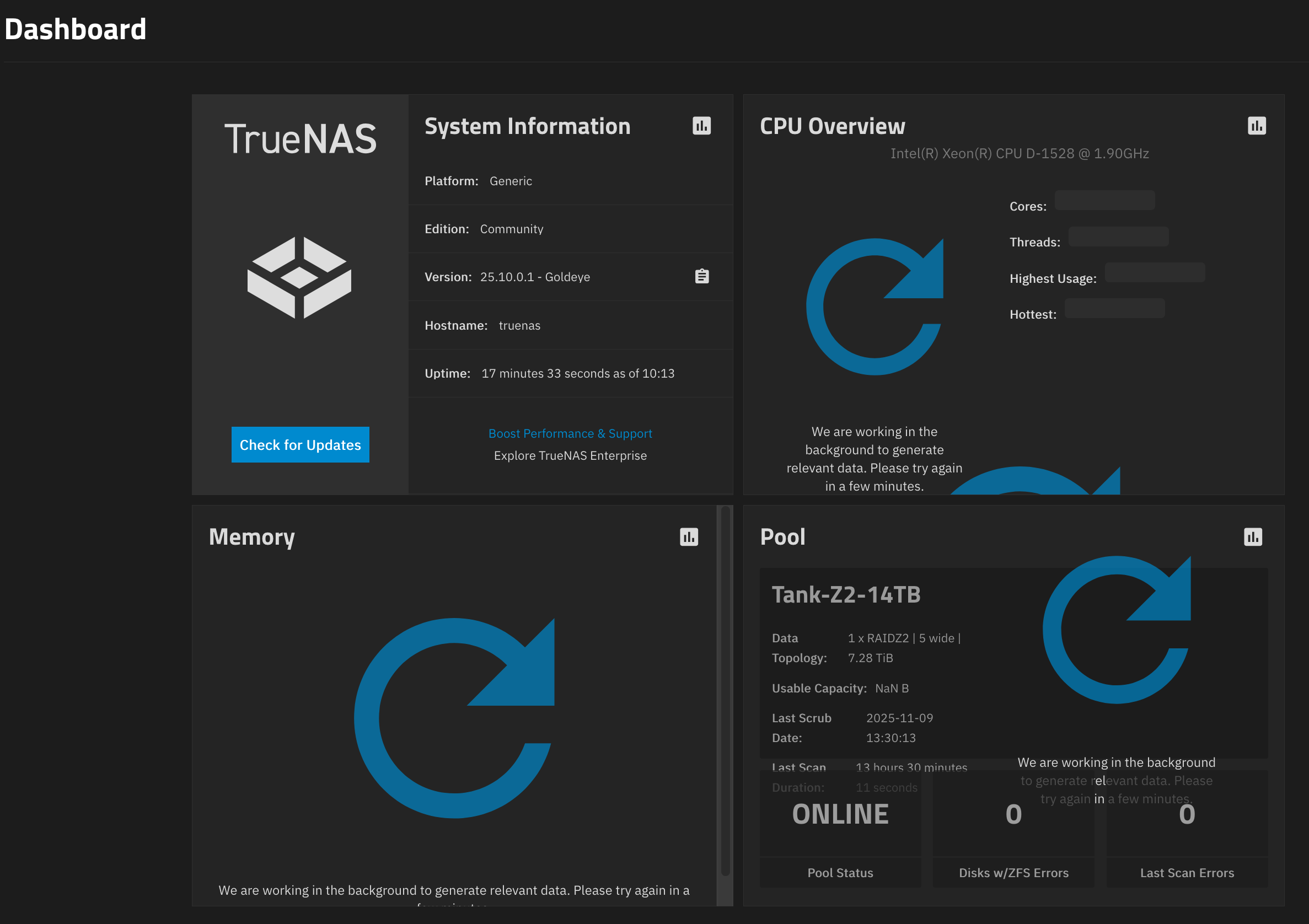
The forum won’t let me attach a photo. The widgets show large blue arrow circles over the widget and says, “We are working in the background to generate relevant data. Please try again in a few minutes.”
Complete the tutorial to which you were invited when registering and you will be allowed to post pictures.
Looked at my email history and never got it. How do I get to it now?
I can attach a photo ok, the forum just says, can’t have the photo inline for some reason.
UPDATE - I can attach photos now, added above
No one else has this issue?
Had it breefly after updating, but i simply cleared my browser cache, logged back into the webui and everything was working fine. Another option you could try is to delete the widgets and re-add them and see if that clears it up.
Thanks for the ideas. I’ve tried clearing browsers, different browsers, and different devices, all with the same results. I’ve also tried deleting the widgets, re-adding them, and of course a fresh install. The only thing that brings them back is a fresh install and eventually they stop working quickly. If I restore from a backup, they don’t work at all from the start.
Are the widgets dependent on internet access? Do they need any special firewall or DNS considerations?
Also, is there anything to consider at the BIOS level? Does Legacy or UEFI matter to get the data to the widget?
They shouldn’t be reliant on internet access, since (as far as i know) use the truenas api calls to request the data they show. Bios should also not matter.
Are there errors in the console log?
Also, someone mentioned it may be NTP, so i swapped the old CMOS battery and set my NTP servers to 0.pool.ntp.org
Here are the logs. Does this have something to do with it?
Dec 2 00:00:03 truenas syslog-ng[3017]: Configuration reload finished;
Dec 2 00:00:05 truenas netdata[149847]: CONFIG: cannot load cloud config ‘/var/lib/netdata/cloud.d/cloud.conf’. Running with internal defaults.
Dec 2 00:00:05 truenas netdata[149847]: Found 0 legacy dbengines, setting multidb diskspace to 256MB
Dec 2 00:00:07 truenas netdata[149860]: CONFIG: cannot load cloud config ‘/var/lib/netdata/cloud.d/cloud.conf’. Running with internal defaults.
Dec 2 00:00:07 truenas netdata[149860]: Found 0 legacy dbengines, setting multidb diskspace to 256MB
Dec 2 00:00:09 truenas netdata[149875]: CONFIG: cannot load cloud config ‘/var/lib/netdata/cloud.d/cloud.conf’. Running with internal defaults.
Dec 2 00:00:09 truenas netdata[149875]: Found 0 legacy dbengines, setting multidb diskspace to 256MB
Dec 2 00:00:11 truenas netdata[149890]: CONFIG: cannot load cloud config ‘/var/lib/netdata/cloud.d/cloud.conf’. Running with internal defaults.
Dec 2 00:00:11 truenas netdata[149890]: Found 0 legacy dbengines, setting multidb diskspace to 256MB
Dec 2 00:00:14 truenas netdata[149906]: CONFIG: cannot load cloud config ‘/var/lib/netdata/cloud.d/cloud.conf’. Running with internal defaults.
Dec 2 00:00:14 truenas netdata[149906]: Found 0 legacy dbengines, setting multidb diskspace to 256MB
Dec 2 00:00:16 truenas netdata[149928]: CONFIG: cannot load cloud config ‘/var/lib/netdata/cloud.d/cloud.conf’. Running with internal defaults.
Dec 2 00:00:16 truenas netdata[149928]: Found 0 legacy dbengines, setting multidb diskspace to 256MB
Dec 2 00:00:18 truenas netdata[149946]: CONFIG: cannot load cloud config ‘/var/lib/netdata/cloud.d/cloud.conf’. Running with internal defaults.
Dec 2 00:00:18 truenas netdata[149946]: Found 0 legacy dbengines, setting multidb diskspace to 256MB
Dec 2 00:00:20 truenas netdata[149960]: CONFIG: cannot load cloud config ‘/var/lib/netdata/cloud.d/cloud.conf’. Running with internal defaults.
Dec 2 00:00:20 truenas netdata[149960]: Found 0 legacy dbengines, setting multidb diskspace to 256MB
Dec 2 00:00:23 truenas netdata[149975]: CONFIG: cannot load cloud config ‘/var/lib/netdata/cloud.d/cloud.conf’. Running with internal defaults.
Dec 2 00:00:23 truenas netdata[149975]: Found 0 legacy dbengines, setting multidb diskspace to 256MB
Dec 2 00:00:25 truenas netdata[149988]: CONFIG: cannot load cloud config ‘/var/lib/netdata/cloud.d/cloud.conf’. Running with internal defaults.
Dec 2 00:00:25 truenas netdata[149988]: Found 0 legacy dbengines, setting multidb diskspace to 256MB
Dec 2 00:00:27 truenas netdata[150000]: CONFIG: cannot load cloud config ‘/var/lib/netdata/cloud.d/cloud.conf’. Running with internal defaults.
Dec 2 00:00:27 truenas netdata[150000]: Found 0 legacy dbengines, setting multidb diskspace to 256MB
Dec 2 00:00:29 truenas netdata[150007]: CONFIG: cannot load cloud config ‘/var/lib/netdata/cloud.d/cloud.conf’. Running with internal defaults.
Dec 2 00:00:29 truenas netdata[150007]: Found 0 legacy dbengines, setting multidb diskspace to 256MB
Dec 2 00:00:32 truenas netdata[150014]: CONFIG: cannot load cloud config ‘/var/lib/netdata/cloud.d/cloud.conf’. Running with internal defaults.
Dec 2 00:00:32 truenas netdata[150014]: Found 0 legacy dbengines, setting multidb diskspace to 256MB
Dec 2 00:00:34 truenas netdata[150018]: CONFIG: cannot load cloud config ‘/var/lib/netdata/cloud.d/cloud.conf’. Running with internal defaults.
Dec 2 00:00:34 truenas netdata[150018]: Found 0 legacy dbengines, setting multidb diskspace to 256MB
Dec 2 00:00:36 truenas netdata[150027]: CONFIG: cannot load cloud config ‘/var/lib/netdata/cloud.d/cloud.conf’. Running with internal defaults.
Dec 2 00:00:36 truenas netdata[150027]: Found 0 legacy dbengines, setting multidb diskspace to 256MB
Is netdata erroring out the root cause? This seems to say version 25 went away from it. I’ve had this issue through several previous major versions though.
So, i checked on the netdata. The directory exists but the status seems, disabled?
truenas_admin@truenas[/var/db/system/netdata]$ sudo systemctl status netdata
● netdata.service - netdata - Real-time performance monitoring
Loaded: loaded (/lib/systemd/system/netdata.service; disabled; preset: dis>
Drop-In: /etc/systemd/system/netdata.service.d
└─override.conf
Active: activating (auto-restart) (Result: exit-code) since Tue 2025-12-02>
Docs: man:netdata
file:///usr/share/doc/netdata/html/index.html
GitHub - netdata/netdata: The fastest path to AI-powered full stack observability, even for lean teams.
Process: 353774 ExecStart=/usr/sbin/netdata -D (code=exited, status=1/FAILU>
Main PID: 353774 (code=exited, status=1/FAILURE)
CPU: 84ms
lines 1-11/11 (END)…skipping…
● netdata.service - netdata - Real-time performance monitoring
Loaded: loaded (/lib/systemd/system/netdata.service; disabled; preset: disable>
Drop-In: /etc/systemd/system/netdata.service.d
└─override.conf
Active: activating (auto-restart) (Result: exit-code) since Tue 2025-12-02 16:>
Docs: man:netdata
file:///usr/share/doc/netdata/html/index.html
GitHub - netdata/netdata: The fastest path to AI-powered full stack observability, even for lean teams.
Process: 353774 ExecStart=/usr/sbin/netdata -D (code=exited, status=1/FAILURE)
Main PID: 353774 (code=exited, status=1/FAILURE)
CPU: 84ms

I’m experiencing the same issue after upgrading to 25.10.0.1. It occurs occasionally after switching to the Dashboard. Additionally, refreshing the page results in the message «Connecting to TrueNAS … Make sure the TrueNAS system is powered on and connected to the network.» Clearing the browser cache resolves the issue, but I have to log in again, which is inconvenient.
To repeat the issue in my case, it suffices to switch between the Dashboard – Storage pages 2 or 3 times.
I wish I could do something to get it to come up. No amount of clearing the browser, DNS changes, resets, diff browsers, etc make any difference. 
At least I’m not alone.
Please file a bug ticket, please include a debug and collect the console log from developer tools in your browser. If you can collect a network .har log that may also be useful (also from developer tools in browser)

Entered NAS-138774
The bug tracker has been locked for a few weeks now
I am unsure what you mean by that, JIRA is available for submissions. Could you elaborate?