The name of the pool is ‘backup’. After a total reboot of the Truenas server and the EMC KTN STL3 the pool went offline and said two of the three disk were N/A. The reboot happened due to a power failure. I have everything set up on battery backup and the server monitors it so that when we lose power the servers detect that and shut down. I don’t know any way of shutting down the EMC but the Truenas server was down before the battery ran out and it lost power.
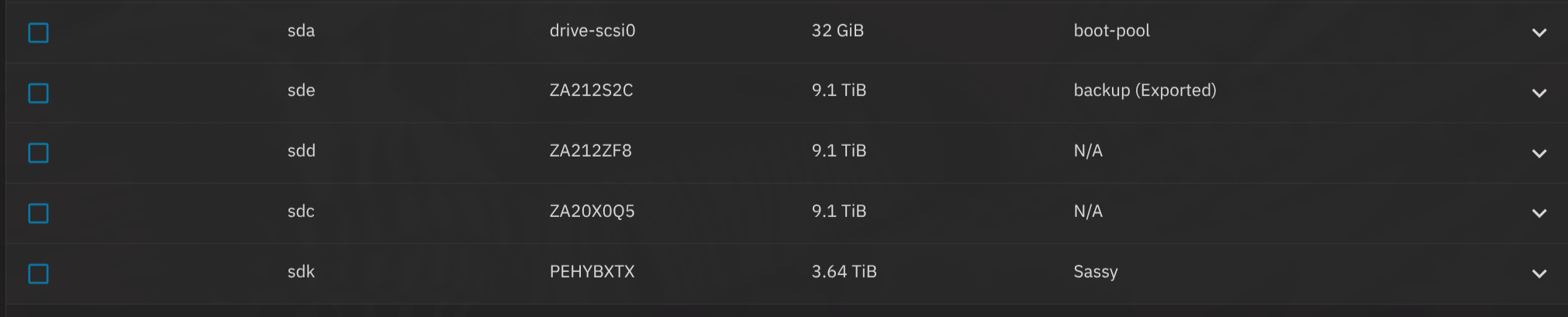
Anyways after power returned and everything came back up my other pool was fine but the one labeled ‘backup’ was offline. I looked at the disk list and all disk were present but two of the three were marked N/A instead of ‘backup’. I’ve tried rebooting the Truenas server with no change. I’ve ‘exported’ the pool and unchecked the destroy data and delete saved configurations in the GUI. When I try to import from the GUI it doesn’t show up so I went to the shell.
With ‘zpool import’ I get:
pool: backup
id: 5273489763793982778
state: UNAVAIL
status: One or more devices contains corrupted data.
action: The pool cannot be imported due to damaged devices or data.
see: Message ID: ZFS-8000-5E
config:
You need to check on all connections and attempt to run SMART long tests on the drives. We need at least two of the drives showing
Full description of your hardware, OS Version and how everything attaches may help. Need to figure out if two drives died due to power, HBA or cables affected, etc.
You can expand the Details section in my sig to get a general idea of the kind of info to post.
As far as what I’m running I’ve got Truenas Community Edition 25.10.1 installed on a Proxmox server in a VM. The server is a Dell R630 with a Xeon E5-2640 v4. 96GB of RAM total. I’m giving Truenas 16GB of that and 4 cores. I’m using a LSI HBA SAS 9207-8e to interface with the EMC KTN-STL3. Connected with a SFF-8088 external mini SAS cable. The three drives I’m using for this pool are Seagate Enterprise Capacity 3.5 HDD, model ST10000NM0016-1TT101, 10TB. They are SATA and not SAS. I think I bought specific adapters to plug them into the backplane of the EMC but it’s been a couple of years since I set this up. I believe the adapters I bought were supposed to be able to do SAS and SATA both. The pool was working just fine until the shutdown and reboot so the adapters were definitely working.
Also thanks for the tutorial tip you DM’d me. Got that done and did they really remove the SMART test from the GUI….
I know I am passing it through to the Truenas VM. I’m not sure about whether I blacklisted it in Proxmox. It’s been so long since I set it up. When I go to ‘Hardware’ on the Truenas VM it has it listed as 'a ‘PCI Device (hostpci0) 0000:81:00,pcie=1’.
When I run ‘lspci -v’ on the host machine I get the below output:
81:00.0 Serial Attached SCSI controller: Broadcom / LSI SAS2308 PCI-Express Fusion-MPT SAS-2 (rev 05)
Subsystem: Broadcom / LSI 9207-8e SAS2.1 HBA
Flags: bus master, fast devsel, latency 0, IRQ 89, NUMA node 1, IOMMU group 12
I/O ports at 8000 [size=256]
Memory at c8040000 (64-bit, non-prefetchable) [size=64K]
Memory at c8000000 (64-bit, non-prefetchable) [size=256K]
Expansion ROM at [disabled]
Capabilities: [50] Power Management version 3
Capabilities: [68] Express Endpoint, MSI 00
Capabilities: [d0] Vital Product Data
Capabilities: [a8] MSI: Enable- Count=1/1 Maskable- 64bit+
Capabilities: [c0] MSI-X: Enable+ Count=16 Masked-
Capabilities: [100] Advanced Error Reporting
Capabilities: [1e0] Secondary PCI Express
Capabilities: [1c0] Power Budgeting
Capabilities: [148] Alternative Routing-ID Interpretation (ARI)
Kernel driver in use: vfio-pci
Kernel modules: mpt3sas
I did the tutorial but still can’t post links or media I guess.
Sorry it’s been like 18 months since I set this up and this is the only issue I’ve had with it so far so I haven’t revisited it since then. My other pool that I use for media files has never had any issues besides a couple of drive failures but I bought those drives used and also had some extras. Because of that I never dug into the issue at all. I was able to swap them out with no problems. I have like 10 4TB HGST SAS drives in that pool.
Both drives passed the long test without any errors. They both have around 21,000 hours on them which makes sense. I bought all three at the same time and used them all together in another setup initially before moving them to the EMC.
I’m not sure what to try to check. I’m not familiar with Proxmox nor EMC. Are all three disks physically showing in TrueNAS for your BACKUP pool? I am wondering if TrueNAS is even seeing them. Not sure if UNAVAIL means physically missing. Maybe check the DISKs tab in the GUI?
I am going to give some time to see if others respond. I’ll check back in a day. I just don’t know the logical next step to try. If no help by then, I will try to get others to check in
You said you had a power outage and truenas safely shutdown but not the whole server, right?
So the disk will still have been powered, until the battery ran out, so maybe that could have damaged the disks, or maybe proxmox was trying to access them in that moment?
So I have Truenas running in a VM on a Proxmox server. The server gets a signal from the battery backup when the power goes out and it starts a total shutdown. So everything was shut down with the exception of the EMC because I don’t know how to tell it to shut down, not for sure you can. The only thing running when the battery backup died would have been the EMC so nothing would have been reading or writing to the disk though they would have had power.
Both disk returned no errors on the long SMART test.
If given proper hardware, ZFS was specifically written to be crash & power loss safe. There is so little chance of loosing data due to a power loss with ZFS, that it is not worth mentioning, UNLESS you virtualize or use hardware RAID.
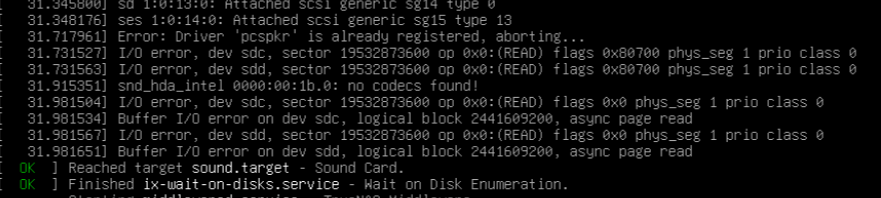
I think I may have something. I got tired of trying to restore the pool so I decided to wipe the drives. I wiped the one that showed up in the pool and then went to wipe the other two and couldn’t due to an input/output error. So I started checking the drives and ran smartctl -x on all three. Save the output and then compared them.
The ATA security on the working drive reads as Disabled. The ATA security on the other two drives read as ENABLED, PW level HIGH, LOCKED [SEC4]. Is this why I’m having this issue? Did the security lock after the reboot and that’s why I can’t do anything with the data?
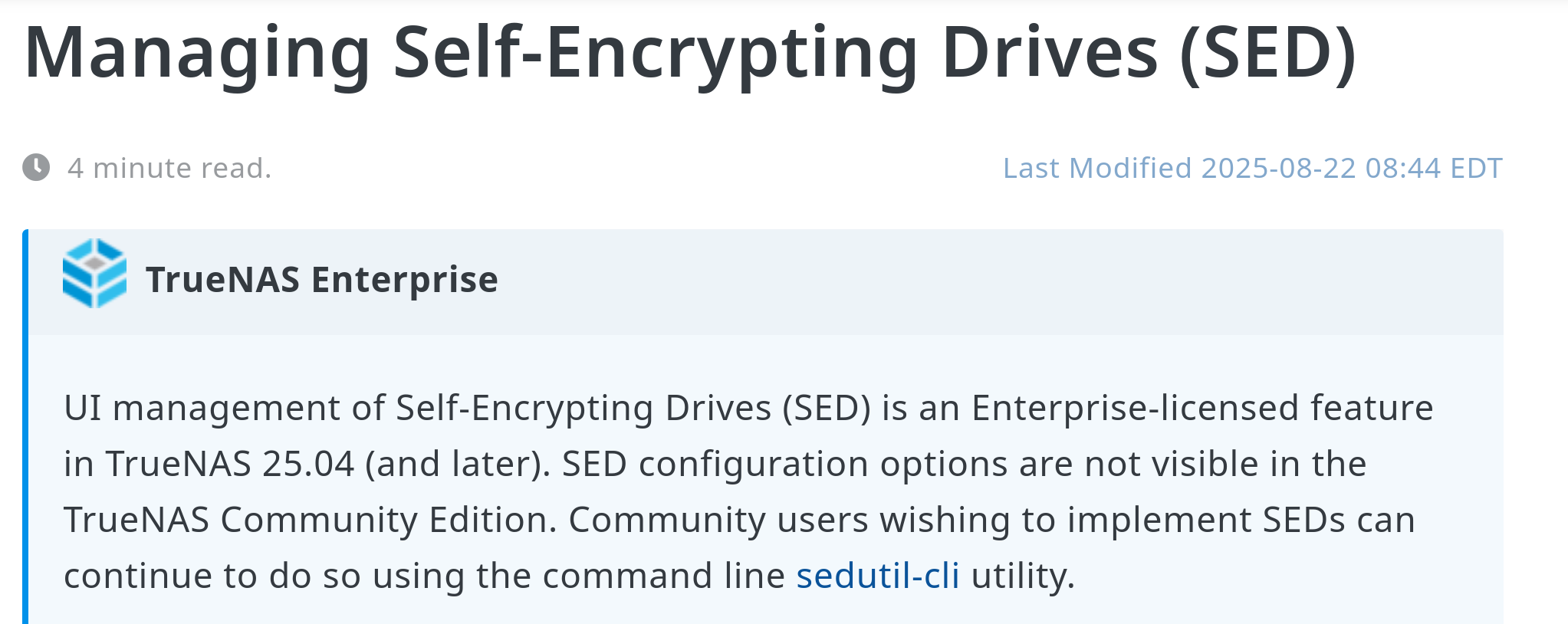
If so, how do I disable this? Everything I’ve found says to go into Advanced Settings and go to SED but it’s not listed there at all. I’m using TrueNAS Community Edition if it makes any difference.
Edit: Looks like I need to use openSeaChest_Security to unlock it. I’m not sure what the password would be though. Will it be my admin account password or some sort of Seagate default password. I don’t remember choosing to encrypt the drives and the one drive doesn’t have security enabled at all so I feel like this was something that was triggered by the power failure.