Upgrade from FreeNAS 11.3 - guidance please

Yeah, I know right. I’ve been out of the loop for a while - last time I checked in it was all talk of core vs scale; but now it seems it’s TrueNAS ‘community edition’? Is that CORE or SCALE or something else? I brief clarification on that would be appreciated.

I’m wanting to update my system from FreeNAS 11.3 RELEASE to the newest stable version of TrueNAS please and would very much appreciate some guidance.

So where am I at currently?

I have FreeNAS running. I have 6 x 3Tb HDD in RAIDZ2 (double parity, if you prefer).

Currently it shows one drive error.

CRITICAL Device: /dev/ada4, 2 Currently unreadable (pending) sectors.

but it is showing the drive as online.

Q!: I’m not sure what this error means so I can only assume that the drive has failed and needs to be replaced?

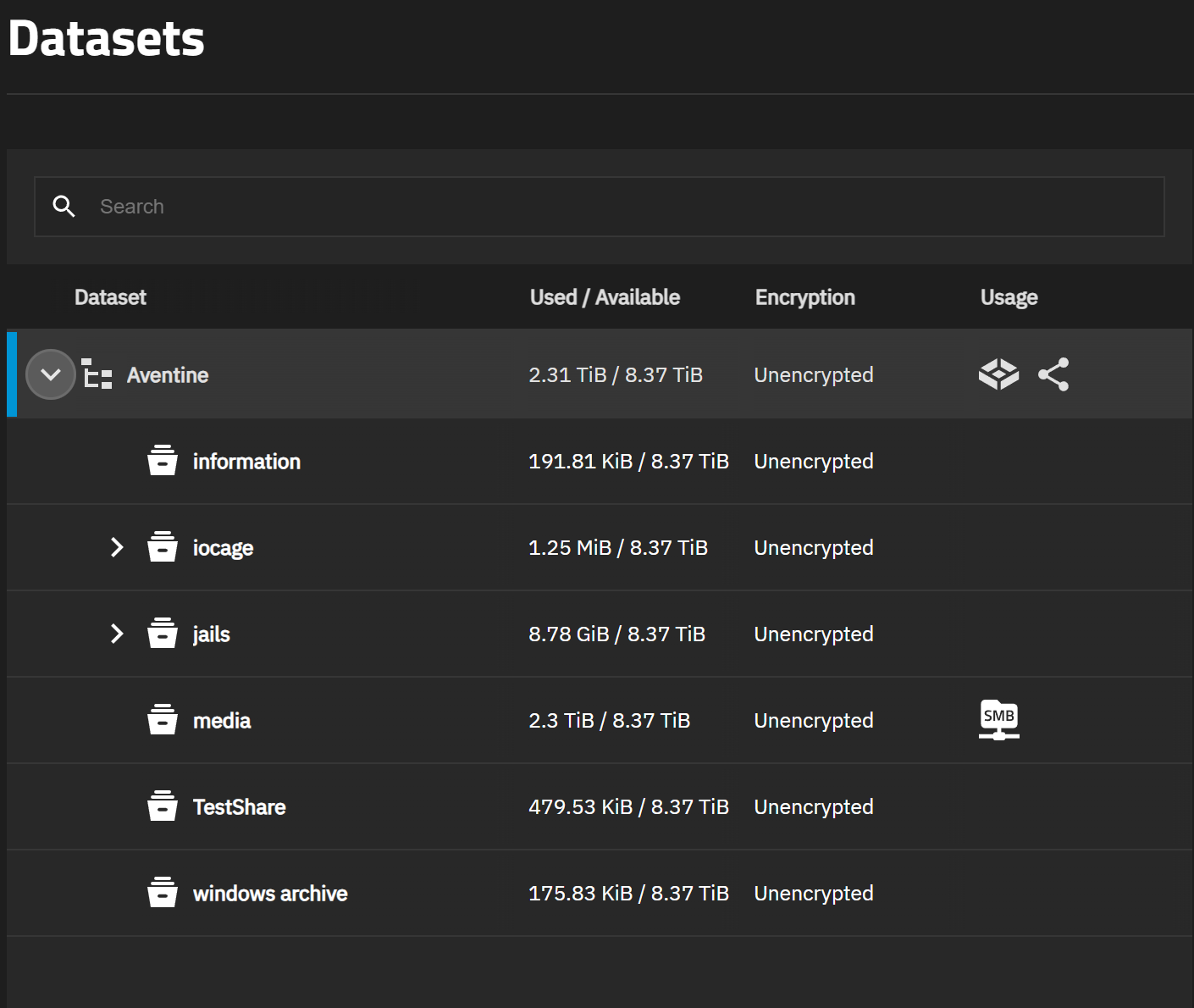
Interestingly with 18TB total storage and raidZ2 there ought to be 12Tb available to be used. It is currently reporting 2.31 TiB used and 8.18 TiB avail for a total of ~10,5, Is the difference teh fact that a drive is faulty / ‘missing’ from the array?

Q2: Do I NEED to replace this drive etc before updating? I’d rather not, if it’s not necessary as it will take me a while to find a replacement and I kinda want to get on with this (I have a spare day or two).

In FreeNAS GUI I have gone into System/General and clicked the SAVE CONFIG button. I ticked both “Export Password Secret Seed” and “Export Pool Encryption Keys” and clicked save. I now have a file titled “Remus-FreeNAS-11.3-RELEASE-20261008224521.tar” in the downloads directory on my Windows machine.

Q3: Is that all I need to download from FreeNAS 11.3 in order to set up TrueNAS without any loss of my data, pools etc? (I am only worried about my media collection which is what I have there, there are no apps or jails or VMs or anything.

I am currently downloading TrueNAS community edition 25.10.7 (I note it is downloading as TrueNAS-SCALE-25.10.7.iso so I suppose that mostly answers my earlier question about what the community edition actuially is).

So looking at Installing TrueNAS | TrueNAS Documentation Hub it seems pretty simple. Burn the ISO to a USB drive, boot from the USB, install it to the SSD on which FreeNAS currently resides.

Q4: Then, I presume, go into TrueNAS and import the .tar file which was exported from FreeNAS?

I THINK I saw somewhere that TrueNAS doesn’t allow ‘root’ to be used as a username anymore.

Q5: Do I need to somehow change my username in FreeNAS to something else and then export a new config file? (or can that all be sorted out during the TrueNAS install?)

As you noticed, SCALE is now the Community Edition. We often prefer FreeBSD-based vs Linux-based in docs for clarity.

You’ll definitely want to read through Migrating from CORE | TrueNAS Documentation Hub rather than just the install guide before doing anything to better understand what does and does not survive the migration.

Our normal upgrade path advises moving from the latest maintenance release of a previous major version to the current release of the next major version, so I’m not fully sure what the best path from FreeNAS would be. I would guess update through TrueNAS CORE 13.0 first and then follow the migration guide, but I’ll leave that to community members who might have more experience with migrating from older versions.

Anyone out there who can guide me on upgrade from FreeNAS please?

Also does anyone happen to have a copy of the FreeNAS 11.3 install media, in case it all goes horribly wrong :slight_smile:

Try here. https://download-core.sys.truenas.net/ This should get your all the Core (BSD) versions

Is the one shown as TrueNAS 13.3 actually what used to be caleld FreeeNAS 13.3? (same same?)
If I need to install that from scratch I assume I go to stable / latest / x64 and download TRUENAS-13.3-U1.2.iso ?

It looks like Version 12 was the start of TrueNAS, going by the folder icons. Usual advice was to upgrade to the last version of 11 (11.3) then upgrade to 12 Release, then last version of 12u8.1 and then do your upgrade to 13. I think 13.0 is slightly more up to date with 13.0u6.8 being the last release of TrueNAS Core. 13.3 was just for users that needed to upgrade Jails at the time but now everything is End-of-life, EOL for the Core series.

Posting details on you system, how you have it set up and what features you are using could help with advice. If you want software that is getting security fixes, you are looking at Scale 25.10 as an end goal. That version is on the General Availability update train. You may have to manually change the drop down once you are on it and before updating to anything newer like a Beta or Release Candidate (RC).

I can’t find any info on how to actually go about the manual upgrade process from FreeNAS to the TrueNAS 13. Obviously the GUI upgrade path is long gone :slight_smile:

I’m unsure what else I can say aside from the hardware and 2 disk redundancy mentioned above. I have a single pool. The only data I have to keep is my media (folders titled movies, music, tv) If you are able to be more specific about what info would be helpful I’ll be happy to provide it :slight_smile:

If you are sharing the root pool dataset for SMB, the method has changed. You create a child dataset and share that for SMB. It’s also recommended to set up a separate user for SMB use as the root user and ‘admin’ users don’t have SMB sharing by default under TrueNAS CE (Scale)

My root or parent dataset is Shay and it’s child dataset, BU, is what I have set up for SMB sharing along with a user just for SMB sharing. You may need to create a child dataset, move files to it and set up the sharing. I am guessing you do not have any Apps or Jails set up from your description.

The manual update files should be located within those folders linked above for the Core versions. You can download and apply those if you don’t have any options for upgrading in the GUI. Another option could be exporting your pool from FreeNAS, doing a clean install of TrueNAS CE 25.10 and then importing the pool, if necessary. You would be switching from a ‘root’ user to an ‘admin’ user. ‘truenas_admin’ is the current default. Docs have info if you wanted to change and use a different name.

Thanks again. Correct I do not have any apps or jails set up.

I found this but as we can’t trust AI I am hoping you can ‘fact check’ it for me.

The Fresh Install Strategy (Moving to TrueNAS SCALE / CE)

If your ultimate goal is to move to the Linux-based TrueNAS SCALE framework for better container/app support and modern hardware optimizations, a clean installation is highly recommended. Trying to migrate automated settings from an 11.3 FreeBSD system directly to Linux will break plugins, jails, and dataset permissions. [1]

:hammer_and_wrench: Execution Steps:

  1. Export the Pool: Go to your FreeNAS 11.3 UI, navigate to Storage ➔ Pools, and select Export/Disconnect. Do not erase the data; just cleanly unmount it from the OS. [1]
  2. Install SCALE: Download the latest TrueNAS SCALE/CE ISO installer onto a bootable USB drive. Wipe your old boot drive and perform a completely fresh install of the new OS. [1, 2, 3]
  3. Import Data: Once inside the new TrueNAS dashboard, go to Storage ➔ Import Pool. Your original data drives will be safely discovered and mounted with your files completely intact. [1]
  4. Reconfigure: You will need to manually recreate your local users, network shares, and any applications you were previously running. [1]

or perhaps the incremental upgrade path is better? Keeping in mind my main concerns are the issue around root user and just keeping my data.

Edit: I created a new user, and then went into ACL and changed the owner of the media dataset
in the pool to that new user, and selected apply recursively. I am hoping that wi;; smooth out nay potential issues with an upgrade…

Your data should be fine but it is always recommended to have a back up of all your data, anyway. I would just export your data pool, do a fresh install of 25.10 over your boot pool and just stick with how the system defaults to the ‘truenas_admin’ user. You use that user to log into the GUI and perform normal administration tasks on the system. You will have to get used to using ‘sudo’ before some commands as that is the Linux way. A fresh install will over write all your users. I don’t know if the System Configuration would be of much use from FreeNAS 11.3 and may make changes that wouldn’t help going forward with your system. If you are uncomfortable, I would suggest installing TrueNAS 25.10 on a test system or a VM and get used to how it is set up. That may help with some of your concerns. You would only need a boot drive and a data drive in a test system so you can get used to using ‘truenas_admin’, instead of ROOT for almost all admin. It would also give you the chance to make a Parent and Child test datasets and confirm how to do SMB sharing with the new system before committing to the changes

Your pool should import and you will have access right away on TrueNAS. I am guessing the only issue will be setting up a new user for SMB access and giving that child dataset the correct permissions. The data is still there even if you can’t access it over SMB right away. You should be able to walk through the online docs to work through the SMB setup.

Does anyone know where the download server is located?
I am downloading the update to 11.3.U5 and getting a blistering 12 Mbps downlaod speed. Yeah thats right a 645 MB file taking 22 minutes…
I’m on a 500/50 broadband plan by the way. Australia. Yay!

@SmallBarky You said

I don’t know if the System Configuration would be of much use from FreeNAS 11.3 and may make changes that wouldn’t help going forward with your system
which confuses me a bit. Surely this is required in order to tell the new install of TrueNAS the structure of my setup - 6 disk array, raid Z2, 1 pool, 1 vdev etc. Otherwise how will it find/structure it so it actually finds all my data?

Exporting the pool in 11.3 and importing, if necessary, under the fresh TrueNAS install provide the pool structure data.

The download servers are through a CDN (content delivery network). I don’t have any direct links to the downloads. I am seeing 1.5 - 2 MB/s download of the “FreeNAS-11.3-U5-manual-update.tar” file at the beginning but it sped up and is almost done. It took a minute or two.

I take it you decided to go through with all the updates instead of a fresh install, then?

Well I have managed to update to 11.3.-U5 and was thinking of following the path noted here:

which involves 11.3-U5 to 12.0-U8.1 to 13.0-U6.8 and THEN an ISO install of 25.10.7 Goldeneye.
(so kind of an intemediate path, as per the top path in that link) as it seems that perhaps that could be the best way to avoid potential glitches in the process.
If I had already been on a more recent version I’d be less reticent about the direct upgrade process (though it woudl almostc ertainly work, I just reckon that coming from FreeNAS this might be ever so slightly lower risk). Maybe. perhaps :slight_smile:

since you only have a smb share, not special network configs, acme configs, apps, or anything else, I would not bother upgrading.

Export the pool, install TrueNAS 25.10.7 onto the SSD, reimport the pool, create a user, create a smb share with read and write rights for said user, done. Don’t forget to setup notifications.

Not entirely sure if TrueNAS will enable the default scrub schedule for importet pools, so check if it is active.

Thanks ive done the interim upgrades anyway so now will do the install of goldeneye using iso image.

OK Up and Running with 25.10 - Thanks everyone!
I can access it vioa the GUII from my web browser.

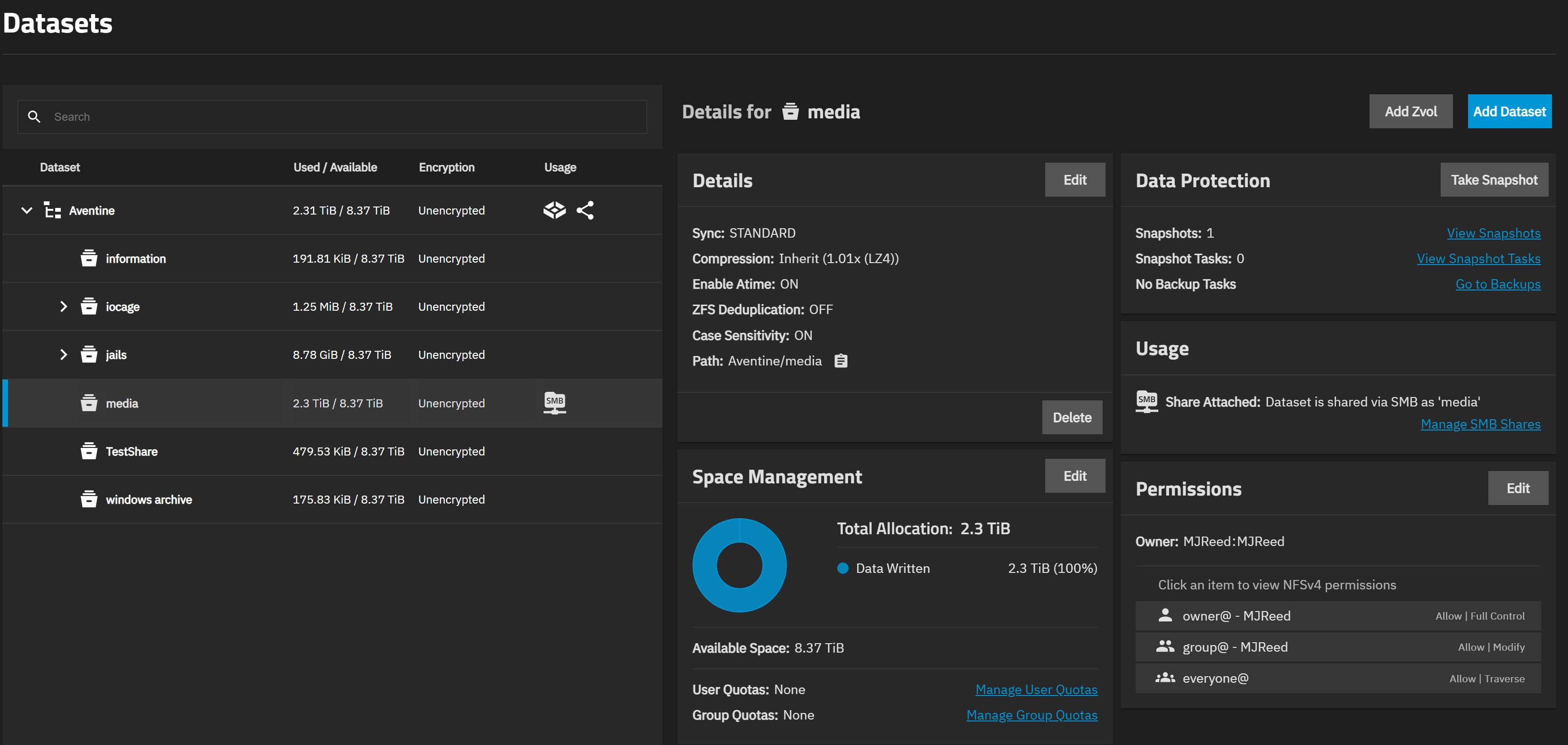
I’ve mounted the pool
created a user MJReed (and agroup with the same name for that user)
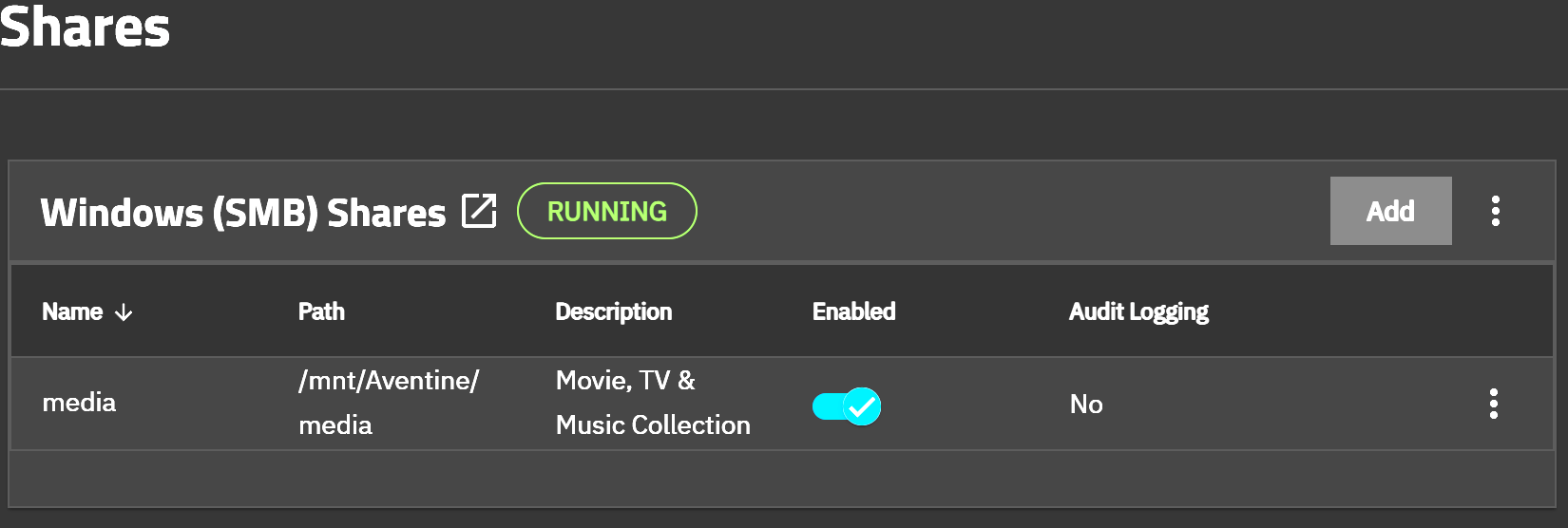
I’ve enabled SMB and created an SMB share ‘media’
I have made MJReed the owner of that share (granting permsisisons recuirsively and to all subdirectories).

HOWEVER my computer cannot see the device on the network.
In Windows in Private network I have everything set to discoverable etc.
(By contrast the Public Network is lcoked down. no discovery etc)

I have put a few screenshots to show how it’s currently set up.
I suspect it’s something simple I’ve overlooked. Any thoughts?


SMB is now working. WHile in the older versions of TrueNAS it found teh share no problem, with this new one it didnt show up until I whitelisted the server IP in Windows Defender.

Weird, but it works.

Next challenge is Jellyfin but that’ll probably end up as a whole new thread.

Marking this one solved and thanks again all. Your help is VERY GREATLY APPRECIATED.

Once you understand how apps / containers work, its actually not that hard. Do you want to use the TrueNAS app? or a docker container? Probably the app?

As i don’t yet know anything about docker containers. Yes. The app.

I’ve set that up and gone into the jellyfin web gui and it also cannot see my server so there’s something else going on…