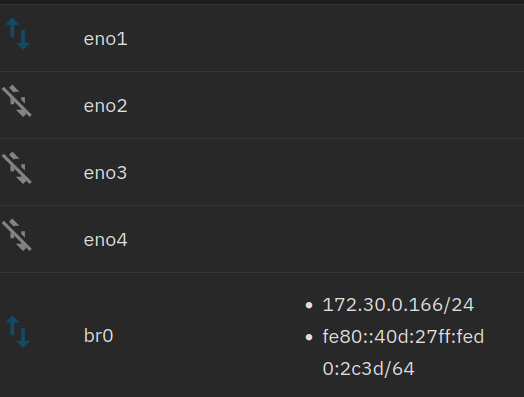
I am using 25.10 on a HP Proliant DL380 and I want to migrate all my KVM/Qemu VMs to this system.
I need DHCP on Truenas and the VMs, I have a DHCP and DNS in my network.
I created a Network bridge, but my VM gets no IP. I followed the official documentation and watched some YT videos and all tell me to give a static IP to my bridge. But I don’t want that. There will be more than one VM in the network and all should use the brige AND get an IP adress from my DHCP.
I am also wondering where the “Use default network settings” is, I can’t find it in my GUI.
The IP address of the bridge interface and the IP address of the VMs are completely separate.
I know, I would expect the bridge has no ip at all. The VMs using this bridge get the IP addresses …
Is the physical interface in that bridge the one you use to connect to TrueNAS or are you using two different ones - one for TrueNAS and one for VMs?
Right now I am using one physical interface. The machine has 4 ethernet ports and later I want some of the machines use a specific interface exclusively.
If you use a single port you must move the IP address configuration from the physical port to the bridge interface. I don’t know if DHCP works, I’d recommend static.
Better yet in your case: configure the bridge on a free port without an address on either port or bridge and connect the VMs to that. This way it’s just a layer 2 connection and you can keep DHCP on your primary port.
DHCP does work on bridges. Vridges in truenas scale are just middleware configurators for linux bridges. Since a bridge becomes the logical entry point to the host when used in Linux, that’s where addresses should be assigned just as was stated.
I watched the video, it is exactly how I configured the network bridge. I just rechecked …
Unfortunately my VM still does not get an IP adress
I did not yet try to use two different nics - no physical access …
My acutal setup is a ubunutu server with KVM/Qemu where all our services (Cloud, PBX, ERP, Wiki, Development VMs) are running and my job is to find out if can migrate all our VMs to a TrueNAS system. I copied one of the qcow2 images to my TrueNas test setup, converted it with qemu-img convert and use this converted image for my VM. The VM starts and AFAIK everything is working beside the IP.
In this actual setup I created one bride with virt-manager and all machines are using this bridge successfully - so it should be possible in Truenas - right?
And you did move the host IP address configuration from the physical member interface to the bridge interface itself? AFAIK this is necessary for VMs to function across the same bridge.
In FreeBSD (TrueNAS CORE) it definitely was. If Linux bridges behave similarly, then …
The request does make it out to the “wire” as far as TrueNAS is concerned.
Now investigate why you are not getting a reply back.
What kind of system is your DHCP server? Consumer router or something a bit more capable? Can you do a packet trace there? Can you check a log file of the DHCP server?