Hey everybody, first of all I am really enjoying trueNAS!
I installed it about a month ago and I am using it for different users to serve smb mounts to my services and my wife is also happy she can watch her series from it =)
Now to my issue:
Pre Info:
Latest software: TrueNAS 25.10.2.1
Yesterday I restarted my opnsense and since I did not have a static IP for my TrueNAS it changed IP.
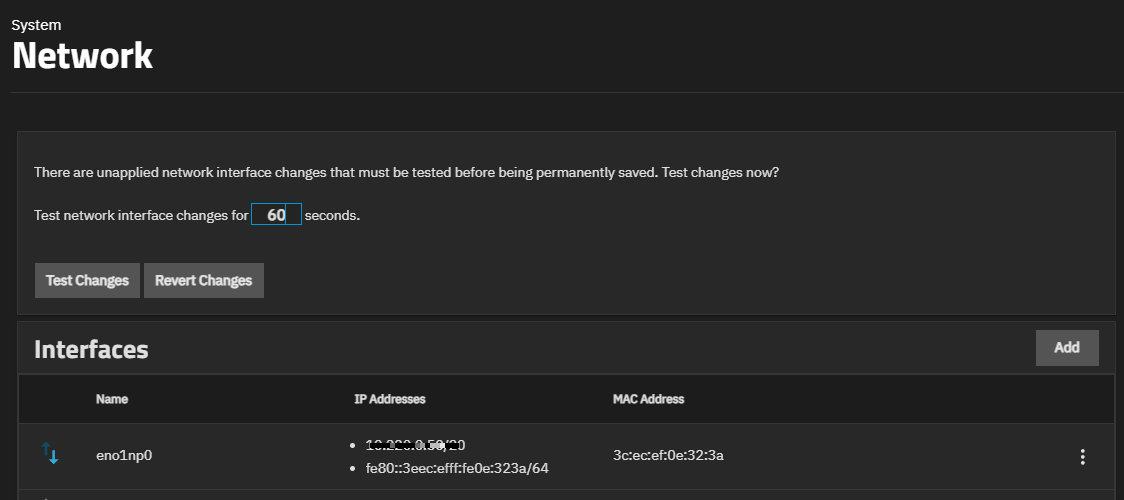
Then I set the static DHCP so all my services can mount the SMB mounts again. I tried to avoid restarting my TrueNAS so I logged in (old IP) and reset the network adapter, the warning came that the changes are only temporary and will reset after a timeout. Since I only reset the adapter in the WebUI I was thinking it should get the correct IP from the DHCP server.
That was true it got the correct IP but when I tried to login again it worked but after about 30sec or so I got a session timeout and the web listener was gone…
It comes back after about 1-2min then when I am fast I can login again but after a short amount of time 10-20 seconds I get a session timeout again and when I reload the page the web listener is gone again.
Now I am stuck in that cycle.
Could you guide me on how to enable ssh so I could maybe look into logs or debug that?
When you get the warning that the changes are temporary, are you pressing the button to commit the changes? It’s not clear to me if you did.
If the timer runs out the changes will be undone, basically reverted, since you couldn’t show that you still have network connectivity.
It’s a failsafe.
Here is the relevant part from the online manual:
Test Changes
These options show above the Interfaces widget after applying changes to a network interface that can affect access to the UI., and are used to test network changes when creating a new or changing an existing network interface
Revert Changes discards changes made within the 60-second period.
Save Changes shows after logging into the UI in a new browser window. Makes network changes permanent. Shows as the final part of the testing network interface changes process.
Specifically pay heed to the last sentence starting with Save Changes and what it instructs you to do.
Thank you for your comment neofusion!
Yes I did commit the changes! Sorry that I let that information out.
I would add that info to the initial post but it looks like I can not edit that.
Yes it was like in the manual you are referencing.
But since the only “change” was that I reset the adapter to get a new DHCP lease there were no actual changes that I could think of that leads to that issue.
So my workflow was I tested the changes → got the new IP → did not login in time (60s) → “changes” were reverted → correct IP lease from dhcp.
The issue I can see now I did not try a new browser right away, I only tried that later. So I was never able to “make the changes permanent”
When I connect a display and keyboard can I check the network config?
Is there a way to check if the webUI service is running or where are the logs that might indicate errors on that behavior?
I accessed the console (keyboard and portable monitor) and 2 (configure network settings) and saved it as it is.
Maybe it resolved itself during the day but it works now.
If somebody needs the information that was the event thats in the audit log: