The person you replied to did not actually use the word “slowness” or any synonym for it either, at all. So this entire part of your post was unnecessary.
I like @joeschmuck RAM idea. Try with the supported amount and see if it helps.
The person you replied to did not actually use the word “slowness” or any synonym for it either, at all. So this entire part of your post was unnecessary.
I like @joeschmuck RAM idea. Try with the supported amount and see if it helps.
Well, my output is showing the last log line per file in /var/log on the day (and in some cases hour or 10s of minutes) of the crash. If you have a better way of pulling out relevant stuff, and other places I could be getting information from, I’d be very happy to try.
I agree with this. My personal rule of thumb with TrueNAS disk layouts is to keep them as simple as possible and NOT use L2ARC, Dedup, Special Metadata vDevs, SLOG etc unless there is a definite and specific performance problem that it will solve.
In this case, 12x 4TB RAIDZ2 is absolutely within the normal guidelines (max 12 wide vDev) and I am unsure exactly what using DRAID does for you over and above this. (DRAID is AFAIK designed for huge arrays with many many more drives than 12.)
Sadly it seems I just picked the wrong option and didn’t realise it. My storage dashboard does confirm Data VDEVs 1 x DRAID | 12 wide | 3.64 TiB. (But I can’t see anywhere that confirms I have 2 drives of redundancy.)
I still have the opportunity to rsync back to the original NAS I’m replacing, wipe my TrueNAS, and start over with RAIDZ2… but it’s a lot of time and effort. Is it worth it?
For the benefit of @sendu I think it might help to explain why PCIe switches and muxes are not good news for ZFS. (And I am not a ZFS expert so I may have got the whole of this wrong or at least some of the finer details wrong).
ZFS is a Copy on Write filesystem, which means it copies and changes a block, writes that new block to disk and then finally changes the pointers so that the file now points to the new block rather than the old one.
To achieve this safely ZFS writes things to disk in a very specific order. The problem with muxes etc. (like the issue with RAID HBAs) is that the hardware can decide to “optimise the performance” of switched / muxed NVME e.g. to reduce the overheads of switching between drives and this could potentially lead to data corruption. And whilst I wouldn’t expect it to lead to data corruption in normal operation, in the event of a power cut or O/S crash things could be corrupted. Plus in the event of e.g. a resilver, the stress of this could make things go wrong.
ASUSTOR boxes come as standard with software called ADM which does not support ZFS (it supports BTRFS instead for a CoW filesystem). So Asustor have not tested TrueNAS on their boxes, nor do they provide any software support or warranty for it. That said, other people seem to have tried it without any issues (in normal operation), but they may not have tested or had experience of power cuts or resilvers.
My advice with this unusual hardware would be to run ADM rather than TrueNAS.
I was expecting the dashboard to say DRAID1/2/3 - perhaps you can do a sudo zpool status -v and copy and poaste the results here so we can see what the CLI tells us (rather than the UI).
However an explanation of DRAID can be found here and its purpose is primarily to allow for faster resilvering when you have a hot spare (which you don’t have).
So, IMO yes, you should move your data off and reconfigure. (If you ever do this again, it might be easier to ask for advice before you build and go into production rather than afterwards.  )
)
You won’t need to wipe TrueNAS, but you will need to destroy and rebuild your NVMe pool.
Hum, I’m not hardware expert but the CPU can only address 16GB of RAM. Unless there is paging being done using a software and hardware combination, I don’t see that working. But like I said, not a hardware engineer.
As for what you could do with some certainty, you could look up the previous memory utilization before the system crashed. That should still be on your system, in the GUI. Hopefully it will show a spike in RAM utilization.
As for tests you can run to validate, I don’t know if this will do what you want, but I know it will fill up the RAM and you can watch your Dashboard fill up. If it can fill up the RAM it will exit nicely and the RAM is cleared. If it exits poorly, you will have a broken pipe error message, this terminates the commands and your RAM is cleared again.
As I said, I don’t know if this will prove if the RAM above 16GB is valid. This command takes only a few minutes to run. For me I filled up 20GB in about 10 seconds. I set the value at 24GB in the command below.
yes | tr -d '\n' | head -c 24G | tail > /dev/null
The only other way I could tell you to verify it, is to create some VMs to use up some RAM. Find a way to use up all that RAM and then verify the system continues to work.
When you say “I am sure that…” I suspect that what you are actually saying is “I am guessing that…” rather than “I have researched and found hard evidence that…”
And just because other people haven’t run into problems in normal usage may just be because they haven’t actually had a power cut or a resilver or something else that does cause problems.
I am guessing that you were guessing that @Farout “doesn’t have much experience with…”
I am also guessing that this means you are bragging that you do. Unfortunately some of what you say after this is incorrect, calling your own expertise into question. For example…
It is actually quite common for slowness of a system to cause a crash. When a system slows down, the queue of work waiting to be processed can grow exponentially and eventually crash the O/S due to memory exhaustion etc.
PCIe switches aren’t inherently bad for ZFS - PCIe acts like a packet-based network.
You can have issues with congestion in the sense that all of the downstream devices will not be able to go “full throttle” at the same time, but ZFS is still able to address each NVMe device on the end of the chain individually - the switch chip is transparent to it much the same that the higher levels of the IP stack aren’t fussed about which physical link their packets travel over, they just care that $Destination_IP replied rather than TTL expiring in transit.
If you stack high-performance NVMe devices behind multiple PCIe switches (assuming you’re able to do this inside of allowable trace/cable lengths) then yes, you’re going to hamper performance - but from ZFS’s perspective, it’s not materially different than direct-attaching slower devices. They’re still individually addressable devices, and nothing in the way will change their behavior of important things like writes or cache flushes.
  pool: NVMes
 state: ONLINE
  scan: scrub repaired 0B in 03:28:02 with 0 errors on Tue Oct 22 08:28:05 2024
config:

        NAME                                      STATE     READ WRITE CKSUM
        NVMes                                     ONLINE       0     0     0
          draid2:10d:12c:0s-0                     ONLINE       0     0     0
            d631d480-7a96-424c-aebb-ead0fae64b52  ONLINE       0     0     0
            8ead91b0-8dac-445c-9702-682d28e01e03  ONLINE       0     0     0
            6b4ce993-3110-4e8a-a405-75debf657a58  ONLINE       0     0     0
            65451b28-7abd-4346-bb76-6f656db6a292  ONLINE       0     0     0
            df74617f-aa76-40ba-92b3-334c57132ec4  ONLINE       0     0     0
            c41d3daf-944d-40a4-a3f0-cee8b8ca979f  ONLINE       0     0     0
            331a4359-2ed3-47da-8c3b-546d6b24d26b  ONLINE       0     0     0
            b4a73189-d7e4-4b26-8f30-ff2bb3b4d7e1  ONLINE       0     0     0
            355aa972-8e89-42e5-8afd-d42f5d86b2db  ONLINE       0     0     0
            0cecde06-ab3e-4db4-86ae-81ee016681ae  ONLINE       0     0     0
            0528ce0c-d6a0-4497-b528-5f9d5df713a7  ONLINE       0     0     0
            09548712-cf39-4a49-a62f-04392623aebd  ONLINE       0     0     0

errors: No known data errors

  pool: boot-pool
 state: ONLINE
  scan: scrub repaired 0B in 00:00:08 with 0 errors on Mon Oct 28 03:45:10 2024
config:

        NAME        STATE     READ WRITE CKSUM
        boot-pool   ONLINE       0     0     0
          sda3      ONLINE       0     0     0

errors: No known data errors
Yup, so it’s DRAID2.
It exited cleanly and seemed to work as expected:
It failed again some time last night. But now I have a bit more information. By “failed” I mean the UI times out and SMB shares can’t connect. I tried to use and noticed this situation some time around midnight.
In trying to connect a monitor to see if the HDMI console still worked, I accidentally disconnected the power, so that’s a test I’ll have save for another day. I’ve now plugged the boot drive in to a normal USB slot, so will see if that affects uptime. But on powering up and checking the reporting UI, I found:
CPU, memory, disk and system processes all stopped reporting at about 19:58 on the 28th, with no spike before they stopped.
Network traffic was actually lost from 19:05 to 19:06, then started spiking continously until 00:15
I got an alert on booting up this morning: Scrub of pool 'boot-pool' finished. 2024-10-28 03:45:10 (Europe/London) (as confirmed by the sudo zpool status -v output above).
So the failure is something like:
So what does this mean? Bad NIC? Is there perhaps a driver update I could install? Or what USB NIC would people recommend I try, to see if that solves the problem?
So in essence there is nothing architecturally bad about the ASUSTOR hardware design, just a throughput bottleneck that prevents you getting full NVMe performance from the NVMe cards.
For small environments, where responsiveness is the requirement rather than throughput, this would not seem to be a problem.
I have experienced thes exact symptoms - a network ping works, but UI and SMB are unavailable.
I tracked this down to the USB SSD going offline due to a USB3 disconnect.
The default failmode for the boot-pool is wait which means any I/O to the boot-pool after it goes offline causes the process to wait so if e.g. SMB or the UI processes write to a log, they hang. Alternative settings are panic i.e. crash the O/S or continue i.e. return an I/O error to the calling process.
I tried setting failmode to continue but it didn’t help, so I moved the USB SSD to a different USB port and my system stabilised again.
Ideally Linux / Debian would have USB3 drivers that didn’t disconnect, or if not then functionality to attempt to reconnect USB3 devices if they get disconnected before failing any I/O, but this does not currently exist. In the absence of this core functionality…
It is beyond my skills to code, but what is needed is a continuously running script that at start-up looks up USB connection(s) and the pool(s) on those USB port(s), and then periodically (say every 1 sec or 5 secs) checks the USB connection(s) and if they have become disconnected then it reconnects them and does a zpool clear pool-name to bring the pool back online. It will obviously need to avoid writing anything to disk if there has been a disconnect in order to avoid hanging itself. It should syslog its discovery when it starts, and then syslog again at the end of every recovery (but obviously not sysloging whilst the pool is disconnected).
If anyone else in the community is able and willing to code such a script, that might be very helpful. (Or even better, someone to code a fix in the Linux USB3 drivers.)
The USB->SATA bridge in my USB SSD did not support Trim commands - so I had to set the pool autotrim to off.
I had a feeling (due to timing) that the disconnects may have been triggered by running a SMART Long Test on the SSD - but I was unable to gather any hard evidence to support this theory (because the system had hung and syslog was unavailable to log any errors).
Use a multi-meter to test the 12V rail under load.
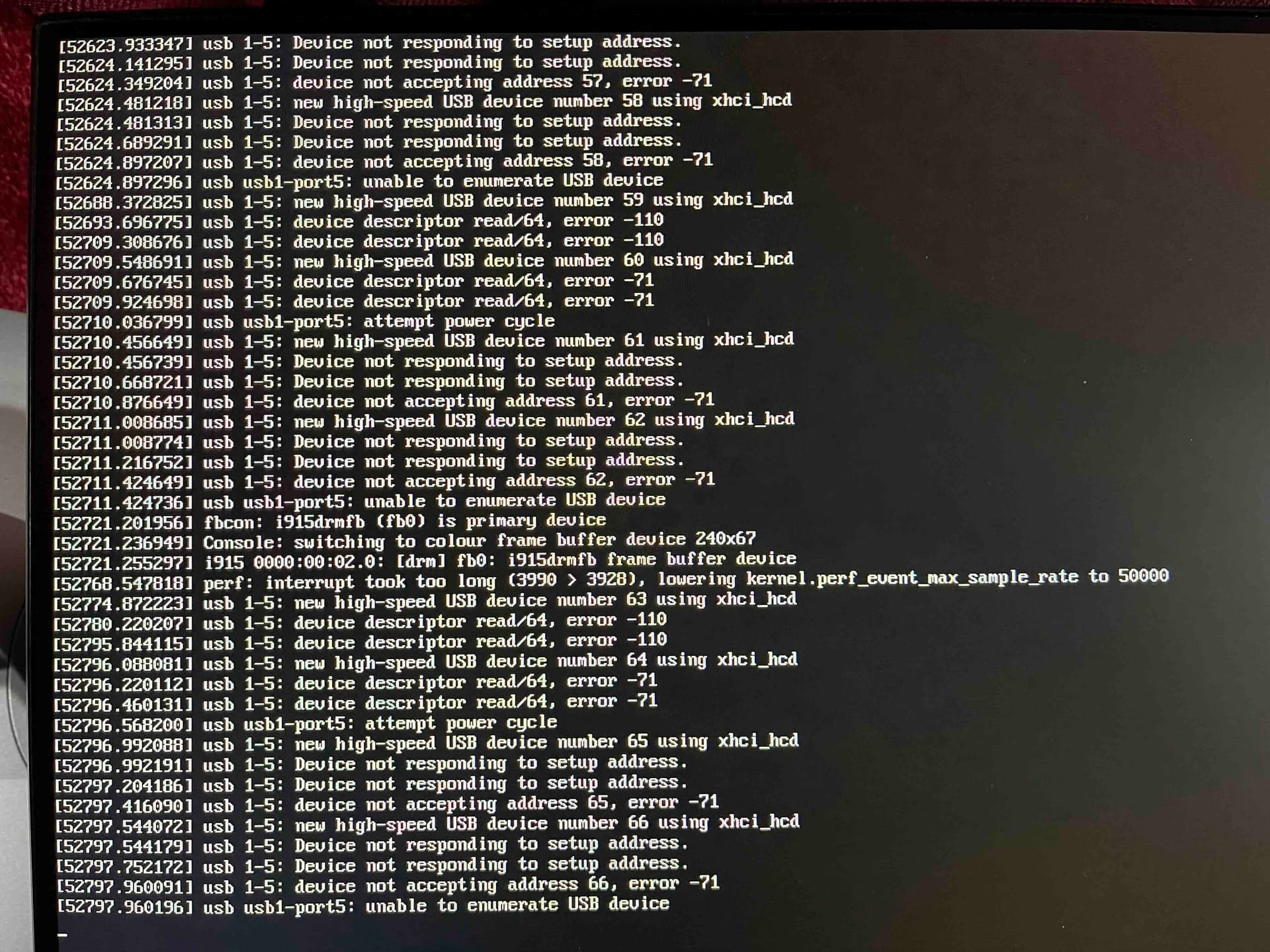
It failed again and this time I was able to connect a monitor and keyboard to it while it was “down”. Wasn’t able to type anything, but I could change TTY. They either showed blank, or one of these 2 (with new messages being sent every 10 seconds or so):
So I’m guessing this confirms a USB boot drive issue. I’ve tried my NVMe-in-external-USB-enclosure in 2 of my 4 USB slots (one 3.2, one 2.0) to no avail. I’m guessing trying the other 2 isn’t going to help.
I have a USB flash stick arriving tomorrow, so fingers crossed that works better than my current solution.
One reason to use draid is to get parity back the fastest before another drive fails. So, if 1 drive dies out of a z2 or draid2 setup, draid is back to functional with 2 parity drives much much faster. The difference becomes massive on huge arrays. It’s not fully resilvered mind you, but, it’s got 2 parity drives again. In other words, it’s a 2 step resilver process for draid. But as you said, draid is awfully new and I wouldn’t use it for just that reason. Just like I would use array expansion either until it’s proven.
This is not the same message as I used to receive, but it has similar consequences.
Did you try a USB2 port for your boot drive as previously suggested?
This is only true when you have a hot spare - with DRAID the hot spare is not left idle, but instead is actively used to store another level of parity and it is this that makes resilvering faster. See the link I posted previously to the openZFS DRAID explanation.
And even if you have a hot spare, DRAID only makes sense when you use it across 2 or more RAIDZ1/2 vDevs:
Yes, that failure was on the USB2 port.
From my very limited understanding of my error messages, it looks like it is automatically trying to restart the USB devices, but there’s something wrong with it. So I’m hoping it’s a bad drive enclosure issue. So I’m going to try various options to see if any give better results.
Normal USB stick, the SSK you recommended in another thread, and a different enclosure for my current boot NVMe.
Normal USB stick is not supported as a boot device and is a really bad idea.
First of the screen shots references several devices using xhci_hcd but I am assuming that this is some sort of automatic increment and that these are all referring to the same USB stick.
Nevertheless it is still xhci_hcd suggesting USB3.
Yes, I know of course. You literally said “I am unsure exactly what using DRAID does for you over and above this” so I was throwing out something it gives. The main use is very large pools where raidz is no so great. But you know that. Definitely not odeal for the OP.
Yes - however whilst 2 days ago I said in post 23:
well before you pointed the resilvering speed out to me in post 35, I had already said in post 26:
Still, we are in agreement and it doesn’t hurt for both of us to be pointing out that is only of benefit when you have a hot-spare.