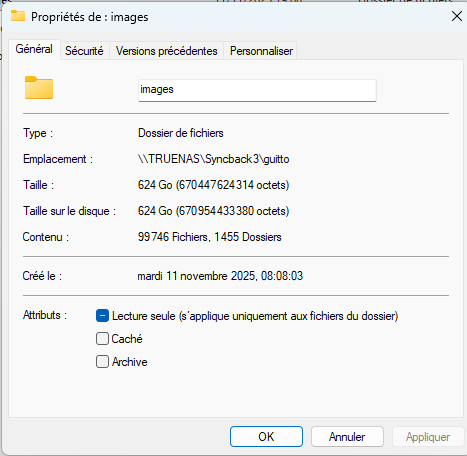
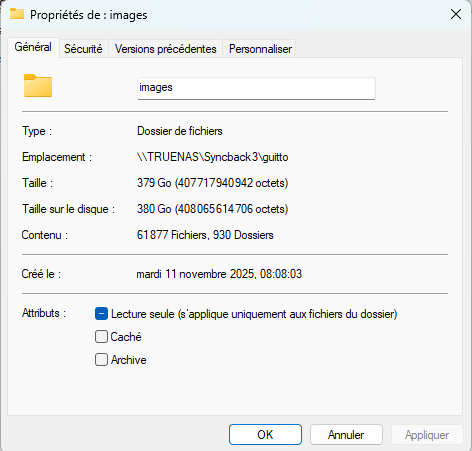
I have a “Syncback3” dataset. Within this dataset, there is an “images” folder shared via SMB. This “images” folder is a replica of an “images” folder on my wife’s laptop (Windows Pro 11 25h2). On this laptop, if I check the properties of the “images” folder, I get 112,613 files, 1,465 folders, and 676 GB.
On the same PC, if I check the properties of the “images” folder shared on TrueNAS, I get 61,877 files, 930 folders, and 380 GB.
On my PC, if I check the properties of the “images” folder shared on TrueNAS, I get 99,370 files, 1,455 folders, and 624 GB. The properties of the shared folder in Windows display random values, sometimes showing 0.
In all cases, Midnight Commander on TrueNAS always shows 113,513 files and 692,536 MB.
I have noticed random issues like this with SMB before on Windows, I don’t think I have ever seen it happen on Linux when accessing the share. I think it might be an issue with Windows.
In this case client walks the filesystem over SMB protocol and so counts can be impacted if (for example) the currently authenticated user lacks permissions to access a subdirectory.
The problem only occurs on Windows 11. I have two Ubuntu systems, one running in Docker within TrueNAS and the other running standalone. The properties of the shared “images” directory are correct in both cases. The good news is that there is no data loss on the TrueNAS side. However, at this point, I don’t know if Windows 11 is processing all the data.
I downloaded and installed TreeSize Free on a Windows workstation.(Windows properties for shared SMB folders are incorrect - #11 by awalkerix) The number of files and directories, as well as the size of the “images” directory, are correct, identical to the properties shown by my two Ubuntu installations.
It therefore seems to be a problem with Windows File Explorer. I don’t know if Truenas 25.10.0 is affected.