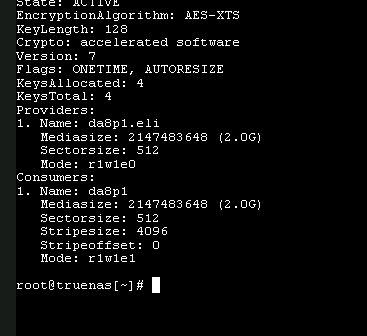
however I can see some stuff in the log file mentioned previously. Can someone confirm if this means it failed even the -F import? I think that’s what the last few lines mean but not an expert.
No error is supposed to mean (potential) success, but the log seems to imply otherwise. In ‘dry-run’ (-n) nothing will happen anyway.
This is where @HoneyBadger or @Arwen could contribute a more informed look at the log.
If you want to try, drop the -n but add readonly zpool import -fF -o readonly=on ISCSI
The errors seem to indicate that the root block pointer, rootbp, is damaged. Later it mentions labels are damaged. Neither is good because a RAID-Z2 should be able to survive 2 disks of failure, and even more redundant metadata failures without data loss.
Some of the ways for extreme corruption like this to occur:
Hardware RAID controller which was doing elevator writes during a power loss
Using TrueNAS as a VM without proper disk controller pass through
Serious memory faults
In your case, it probably is the hardware RAID controller. But, you can check the firmware on the boot time messages. If it says something like MegaRAID and not IT, then it’s hardware RAID firmware.
Yes and no. If the problem is on the disks, regular ZFS scrubs can detect and fix it. But, if the corruption is happening during writes, like out of order writes, and then a power loss occurs before the final write is complete, well, bad things happen.
ZFS purposefully writes data and metadata in a specific order, using copy on write to free space. This means until the very last write, the changes are not active. However, an out of order write, like with hardware RAID card doing elevator writes, can activate garbage because the highest level block pointers, points to not yet written directory entries. And during a power loss, those lower level directory entries remain garbage.
Now a single power loss with out of order writes probably should not corrupt a pool. ZFS should be able to roll back transactions to something that is good. However, we always recommend rock stable hardware, (aka no hardware RAID controllers), just to avoid things like this.
You could try this below, and see what it has to say:
zpool import -FfXn ISCSI
Or you could look at all the disk labels using something like below. Then maybe temporarily remove a disk or 2 that appears radically different from the others. Mostly the first txg: number should be the same for all disks.
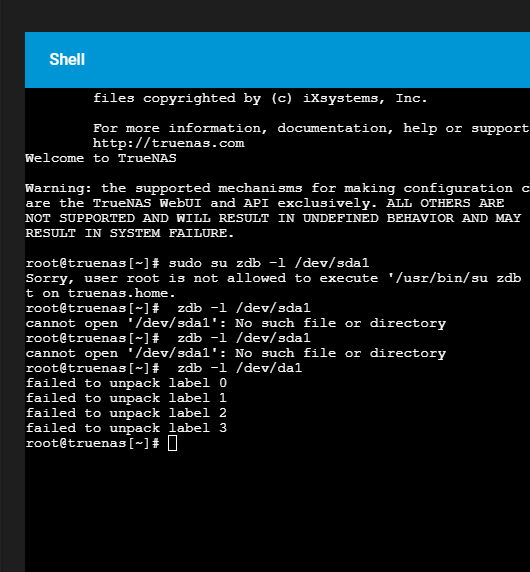
zdb -l /dev/sdX
To clarify for all, including future readers, ZFS should never corrupt a pool on power loss:
i have had a look at the log and looks like it just keeps complaining that the the corrections/discards it needs to make are larger then possible. I’m not really an expert but i do like to understand what is happening. So correct me if I’m wrong
I really like truenas for a lot of reasons but seems like there are a lot of gotchas when it comes to hardware. I went back to my original purchase and the raid card was sold to me as IT mode. I believe it was IT mode firmware but as many have suggested the raid card still looks like its doing something weird.
If i ran a -F import would I get anything back? or would it just fail at this point. If it’s not going to result in anything I’ll just pull and wipe my drives. Looking at moving to an off the shelf NAS unit. At least it will eliminate me as a factor with doing a weird hardware setup. Might mean I get a simpler overall setup.
zdb -l /dev/sdX I get failed to upack label 0,1,2,3
was able to get storcli to work finally
storcli show all
CLI Version = 007.1207.0000.0000 Sep 25, 2019
Operating system = FreeBSD 13.1-RELEASE-p2
Status Code = 0
Status = Success
Description = None
Number of Controllers = 1
Host Name = truenas.home
Operating System = FreeBSD 13.1-RELEASE-p2
StoreLib IT Version = 07.1300.0200.0000
System Overview :
Ctl Model Ports PDs DGs DNOpt VDs VNOpt BBU sPR DS EHS ASOs Hlth
There is a raid 1 on that controller but it is just for the boot drive from memory. nothing to do with ISCSI pool. I just wanted audible beeping from the controller if I have boot drive failure so I could change it out. Was the simplest way I could think of to do that. hence 11 drives 9 plus the two SSD’s in raid 1.
Might be part of the problem? but truenas is still booting fine.
IT mode does not allow any RAID, so the indication of one VD, Virtual Disk, (for your boot pool), is proof it is RAID. However, the BBU, Battery Backup Unit, is N/A so it implies MPT / IR style RAID firmware not the MegaRAID style. MPT / IR RAID does not support RAID-10, RAID-5/6/50/60 and should generally pass through unused disks fine. But, I don’t know much about the IBM version of the firmware.
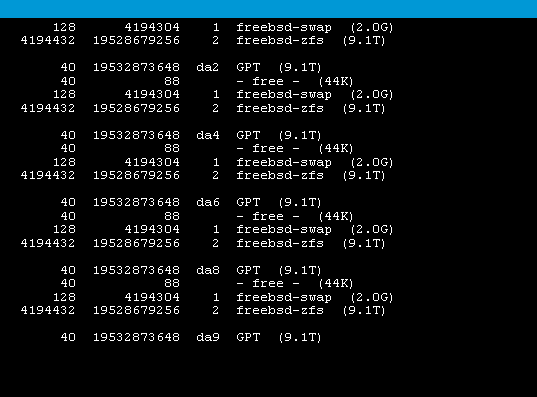
The zdb -l /dev/sdX requires you to replace X with the drive letter, (and partition number if needed), of each of the ZFS pool disks. (But, not any import pool like the boot-pool…)
Last, the errors keep referring to a disk with a radically different TXG number. We need to see if that is 1 or 2 disks, (it appears just 1). If so, we can physically remove the disk and see if the improves the ability to import the pool.
If that is the correct paths to the ZFS disks and partitions for the affected pool, missing labels is REALLY BAD ™.
I don’t have the TrueNAS Core commands handy to determine which disks and partitions belong to which pools. That would help clarify your setup and check for use with ZDB.