Extreme slow copy (<1mb/s average) within samba share after core to scale upgrade

I had a truenasCore 13.0-U6.8 system named Joshua with a 4 disk raidz2 pool. I use samba to share it with windows clients. I upgraded it to SCALE 24.04.2.5 and then quickly to 24.10.2.3. All seemed well until a few days later I got reports of copying files between folders within the same share being extremely slow, like spending a lot of time in the hundreds of kilobytes/s range, and only sometimes getting up to 3 or 4 MB/s. The folders exhibiting this behavior have hundreds of small mp3 files in them and are 1-2GB in total size. Copying these same folders before the upgrade, on 13.0, gave an average speed of 30MB/s or more. So it cannot be hardware related, as nothing was changed during the upgrade.

I had another system, named Igal, that I had upgraded from 13.0 to 24.10.0.2, and it did NOT exhibit this problem. I then upgraded it to 24.10.2.1 and the problem appeared; it too had extremely slow copies for large directories with small files. Returning to 24.10.02 made the problem go away.

Back on Joshua, I have found that copying the same directory from a local hard drive to the samba drive is still fast, as is copying from the samba drive to the local hard drive. Only copies from one folder in a share to another folder in a share on the same server are slow (same or different share doesn’t matter). Unfortunately, this is a common operation for us.

These copies were being done with windows explorer, as that is how users will do them. However, if I make the same copies with robocopy or rclone, they copy fast! Same exact files and src/dest.

> robocopy D1 "copy dir" /E

...
               Total    Copied   Skipped  Mismatch    FAILED    Extras
    Dirs :        10         9         1         0         0         0
   Files :       240       240         0         0         0         0
   Bytes :  714.25 m  714.25 m         0         0         0         0
   Times :   0:00:09   0:00:07                       0:00:00   0:00:01


   Speed :           96,750,879 Bytes/sec.
   Speed :            5,536.130 MegaBytes/min.

Also, smb shares mounted on Linux are fast.

Further, on Joshua, I created a new pool from one extra disk, just for testing, and it does NOT exhibit the problem!

I’m really stumped. The fact that I can make the problem appear and disappear with an OS version change indicates that it’s not a pool level problem, since that stays the same. But the fact that, at the same version, I can make one pool have the problem, and one not have the problem, tells me there is something pool related. I’ve read some posts saying that samba is just slow with small files, but robocopy is still using samba and is fast.

I have since upgraded Joshua to 25.04.2.1, but the problem remains.

I read this post, which sounded like a similar problem. The conclusion there was that the problem went away several reboots. I’ve rebooted this system 3 times now, but no luck.

Any ideas?
Perhaps maybe good to get a packet capture on the network to see what’s going on that level from the clients POV.

If you can still do this, I’d recommend reporting a bug.

The only thing I can think of is that fast file copy (block cloning) was enabled around this time.

However, your system is old and might have older pool settings which are somehow incompatible. Can you confirm your pool feature flags?

Here are the pool features:

# zpool get all Main|grep feature
Main  feature@async_destroy          enabled                        local
Main  feature@empty_bpobj            active                         local
Main  feature@lz4_compress           active                         local
Main  feature@multi_vdev_crash_dump  enabled                        local
Main  feature@spacemap_histogram     active                         local
Main  feature@enabled_txg            active                         local
Main  feature@hole_birth             active                         local
Main  feature@extensible_dataset     active                         local
Main  feature@embedded_data          active                         local
Main  feature@bookmarks              enabled                        local
Main  feature@filesystem_limits      enabled                        local
Main  feature@large_blocks           enabled                        local
Main  feature@large_dnode            enabled                        local
Main  feature@sha512                 enabled                        local
Main  feature@skein                  enabled                        local
Main  feature@edonr                  enabled                        local
Main  feature@userobj_accounting     active                         local
Main  feature@encryption             enabled                        local
Main  feature@project_quota          active                         local
Main  feature@device_removal         enabled                        local
Main  feature@obsolete_counts        enabled                        local
Main  feature@zpool_checkpoint       enabled                        local
Main  feature@spacemap_v2            active                         local
Main  feature@allocation_classes     enabled                        local
Main  feature@resilver_defer         enabled                        local
Main  feature@bookmark_v2            enabled                        local
Main  feature@redaction_bookmarks    enabled                        local
Main  feature@redacted_datasets      enabled                        local
Main  feature@bookmark_written       enabled                        local
Main  feature@log_spacemap           active                         local
Main  feature@livelist               enabled                        local
Main  feature@device_rebuild         enabled                        local
Main  feature@zstd_compress          enabled                        local
Main  feature@draid                  enabled                        local
Main  feature@zilsaxattr             active                         local
Main  feature@head_errlog            active                         local
Main  feature@blake3                 enabled                        local
Main  feature@block_cloning          active                         local
Main  feature@vdev_zaps_v2           active                         local
Main  feature@redaction_list_spill   enabled                        local
Main  feature@raidz_expansion        enabled                        local
Main  feature@fast_dedup             enabled                        local
Main  feature@longname               enabled                        local
Main  feature@large_microzap         enabled                        local

Last Thursday morning, I did a pool upgrade and rebooted the machine. I tested the copy speed a few times that day and it was still the same, very slow. After not touching it at all since then, I just now tested it this Monday morning, and the problem is gone! The same copy test is now much faster, getting up to 40MB/s.

Perhaps some maintenance process did something in the background? The machine had been exhibiting this problem for a whole week before, so it seems like either the pool upgrade, or the reboot triggered soemthing.

1 Like

Unexpected, but that’s good. I’ll mark it as solution.

Block Cloning is enabled, so I’m assuming that is working for file copies.

If the problem reappears, you would need to run tests to confirm that and see how the system behaves with small and large files.

So, actually, about 4 hours after I posted it was working again, it went back to being slow and has remained so since then. I wanted to make sure it wasn’t some other process on the machine causing it, since the problem stopped and then started again like that. But I’ve tested it at several different times of the day over a few days now and it remains slow.

I’m happy to run any tests you can suggest. I have tested with large files and they always copy fast. In fact, when doing a copy of a 1GB file onto the same share, it’s nearly instantaneous, which I suppose is from the block cloning feature?

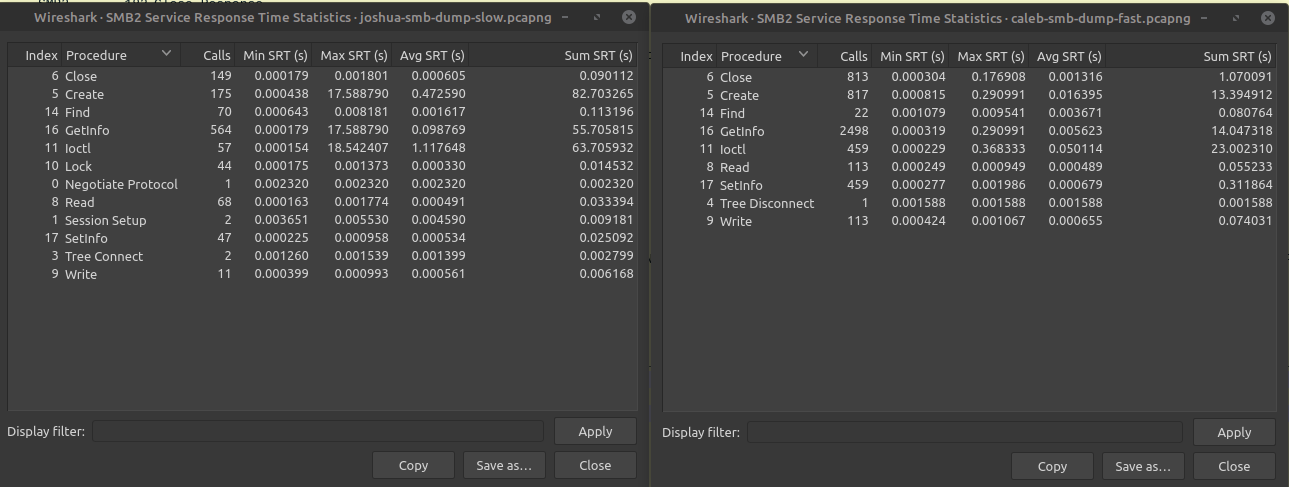
I did a wireshark dump of the slow server, and another fangtooth system that does not have this problem, copying the same directory each time.
After 65s, the slow system (Joshua) had captured 2,200 packets, while after 30 seconds, the fast system (Caleb) had captured over 10,000 packets.

I pulled up the Service Response Time Statistics view in wireshark, which might be instructive. Below is a screen shot of the two system next to each other (slow on the left, fast on the right):

You can see that the average response times for the “Create”, “GetInfo”, and “Ioctl” commands are all much higher on the slow system.

Let me know what else I should look for, or if it would be helpful to upload the captures here.
Thanks for the help!

Any update?
I’m running 25.10.0 - Goldeye, with a Tailscale to connect from away and I get less than 1mb/s, around 355kb/s. Sending from windows 11 with a Samba share.

I cleared off and re-created the pool that was acting so slow, and it seemed better for a few weeks, and then became slow again. Very strange behavior. I can’t find any difference now between the setup I have and the clean installed system that remains fast (though, maybe it would become slow if it was used more? I don’t know). This system is still at version 25.04.2.1.

The work-around I finally settled on (for directories with many small files) was to overcome the slowness with parallelism. Using robocopy for example, I can initiate up to 128 parallel transfers, so while one transfer is hanging for some unknown reason, others can still make progress. This results in a decent transfer rate. Windows file explorer uses only one thread, making it very slow.

Of course, it would great to figure out why there is so much more overhead for each file in this situation.