Networking help on TrueNAS Core jail

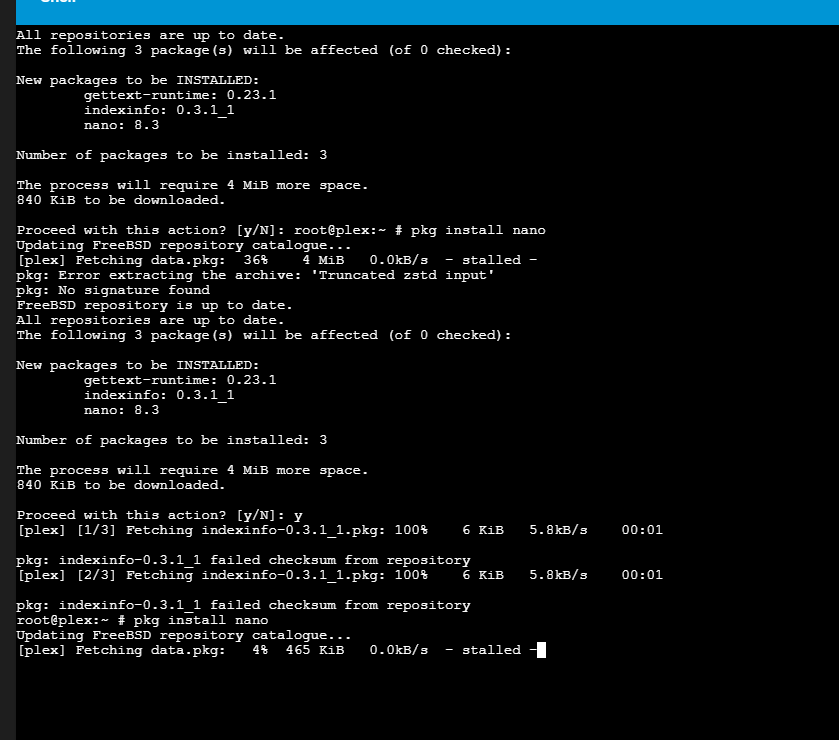
Hi I have TrueNAS Core running on an esxi VM. Within that I have a Jail that used to be able to fetch package pkg upgrade but no long can after some disaster recovery (I think some network settings were reset during my clumsy handling of this).

Any help debugging this would be great, I get the same issue when creating a new jail from scratch. Some details below. Thanks in advance.

The jail (192.168.50.213) can ping:

  • esxi (192.168.50.211)
  • the Truenas host (192.168.50.212)
  • other jails I made while trying to figure this out (192.168.50.214)

It cannot ping the default gateway (192.168.50.1)

When starting the jail this is logged repeatedly “epair0b: a looped back NS message is detected during DAD for fe80:3::20c:29ff:fe14:fa0a. Another DAD probes are being sent.”

Host ifconfig

root@freenas[~]# ifconfig
vmx0: flags=8963<UP,BROADCAST,RUNNING,PROMISC,SIMPLEX,MULTICAST> metric 0 mtu 1500
        description: vmx0
        options=4a400b9<RXCSUM,VLAN_MTU,VLAN_HWTAGGING,JUMBO_MTU,VLAN_HWCSUM,VLAN_HWTSO,RXCSUM_IPV6,NOMAP>
        ether 00:0c:29:05:1b:d2
        inet 192.168.50.212 netmask 0xffffff00 broadcast 192.168.50.255
        media: Ethernet autoselect
        status: active
        nd6 options=9<PERFORMNUD,IFDISABLED>
vmx1: flags=8863<UP,BROADCAST,RUNNING,SIMPLEX,MULTICAST> metric 0 mtu 9000
        description: Storage Network
        options=4e403bb<RXCSUM,TXCSUM,VLAN_MTU,VLAN_HWTAGGING,JUMBO_MTU,VLAN_HWCSUM,TSO4,TSO6,VLAN_HWTSO,RXCSUM_IPV6,TXCSUM_IPV6,NOMAP>
        ether 00:0c:29:05:1b:dc
        inet 10.55.1.2 netmask 0xffff0000 broadcast 10.55.255.255
        media: Ethernet autoselect
        status: active
        nd6 options=9<PERFORMNUD,IFDISABLED>
lo0: flags=8049<UP,LOOPBACK,RUNNING,MULTICAST> metric 0 mtu 16384
        options=680003<RXCSUM,TXCSUM,LINKSTATE,RXCSUM_IPV6,TXCSUM_IPV6>
        inet6 ::1 prefixlen 128
        inet6 fe80::1%lo0 prefixlen 64 scopeid 0x3
        inet 127.0.0.1 netmask 0xff000000
        groups: lo
        nd6 options=21<PERFORMNUD,AUTO_LINKLOCAL>
pflog0: flags=0<> metric 0 mtu 33160
        groups: pflog
bridge0: flags=8843<UP,BROADCAST,RUNNING,SIMPLEX,MULTICAST> metric 0 mtu 1500
        ether 58:9c:fc:10:ff:9c
        id 00:00:00:00:00:00 priority 32768 hellotime 2 fwddelay 15
        maxage 20 holdcnt 6 proto rstp maxaddr 2000 timeout 1200
        root id 00:00:00:00:00:00 priority 32768 ifcost 0 port 0
        member: vnet0.22 flags=143<LEARNING,DISCOVER,AUTOEDGE,AUTOPTP>
                ifmaxaddr 0 port 7 priority 128 path cost 2000
        member: vmx0 flags=143<LEARNING,DISCOVER,AUTOEDGE,AUTOPTP>
                ifmaxaddr 0 port 1 priority 128 path cost 2000
        groups: bridge
        nd6 options=9<PERFORMNUD,IFDISABLED>
vnet0.22: flags=8963<UP,BROADCAST,RUNNING,PROMISC,SIMPLEX,MULTICAST> metric 0 mtu 1500
        description: associated with jail: plex as nic: epair0b
        options=8<VLAN_MTU>
        ether 00:0c:29:14:fa:09
        hwaddr 02:63:bd:8b:6a:0a
        groups: epair
        media: Ethernet 10Gbase-T (10Gbase-T <full-duplex>)
        status: active
        nd6 options=2b<PERFORMNUD,ACCEPT_RTADV,IFDISABLED,AUTO_LINKLOCAL>

Jail ifconfig

root@plex:~ # ifconfig
lo0: flags=8049<UP,LOOPBACK,RUNNING,MULTICAST> metric 0 mtu 16384
        options=680003<RXCSUM,TXCSUM,LINKSTATE,RXCSUM_IPV6,TXCSUM_IPV6>
        inet6 ::1 prefixlen 128
        inet6 fe80::1%lo0 prefixlen 64 scopeid 0x1
        inet 127.0.0.1 netmask 0xff000000
        groups: lo
        nd6 options=21<PERFORMNUD,AUTO_LINKLOCAL>
pflog0: flags=0<> metric 0 mtu 33160
        groups: pflog
epair0b: flags=8863<UP,BROADCAST,RUNNING,SIMPLEX,MULTICAST> metric 0 mtu 1500
        options=8<VLAN_MTU>
        ether 00:0c:29:14:fa:0a
        hwaddr 02:63:bd:8b:6a:0b
        inet 192.168.50.213 netmask 0xffffff00 broadcast 192.168.50.255
        inet6 fe80::20c:29ff:fe14:fa0a%epair0b prefixlen 64 tentative scopeid 0x3
        groups: epair
        media: Ethernet 10Gbase-T (10Gbase-T <full-duplex>)
        status: active
        nd6 options=23<PERFORMNUD,ACCEPT_RTADV,AUTO_LINKLOCAL>

Jail settings

root@freenas[~]# iocage get all plex
CONFIG_VERSION:28
allow_chflags:0
allow_mlock:0
allow_mount:0
allow_mount_devfs:0
allow_mount_fusefs:0
allow_mount_nullfs:0
allow_mount_procfs:0
allow_mount_tmpfs:0
allow_mount_zfs:0
allow_quotas:0
allow_raw_sockets:1
allow_set_hostname:1
allow_socket_af:0
allow_sysvipc:0
allow_tun:0
allow_vmm:0
assign_localhost:0
available:readonly
basejail:0
boot:1
bpf:0
children_max:0
cloned_release:11.3-RELEASE-p14
comment:none
compression:lz4
compressratio:readonly
coredumpsize:off
count:1
cpuset:off
cputime:off
datasize:off
dedup:off
defaultrouter:192.168.50.1
defaultrouter6:
depends:none
devfs_ruleset:4
dhcp:0
enforce_statfs:2
exec_clean:1
exec_created:/usr/bin/true
exec_fib:0
exec_jail_user:root
exec_poststart:/usr/bin/true
exec_poststop:/usr/bin/true
exec_prestart:/usr/bin/true
exec_prestop:/usr/bin/true
exec_start:/bin/sh /etc/rc
exec_stop:/bin/sh /etc/rc.shutdown
exec_system_jail_user:0
exec_system_user:root
exec_timeout:60
host_domainname:none
host_hostname:plex
host_hostuuid:plex
host_time:1
hostid:A9064D56-017E-CD19-37CD-E076DC164792
hostid_strict_check:0
interfaces:vnet0:bridge0
ip4:new
ip4_addr:vnet0|192.168.50.213/24
ip4_saddrsel:1
ip6:disable
ip6_addr:vnet0|accept_rtadv
ip6_saddrsel:1
ip_hostname:0
jail_zfs:0
jail_zfs_dataset:iocage/jails/plex/data
jail_zfs_mountpoint:none
last_started:2025-10-10 10:09:05
localhost_ip:none
login_flags:-f root
mac_prefix:000c29
maxproc:off
memorylocked:off
memoryuse:off
min_dyn_devfs_ruleset:1000
mount_devfs:1
mount_fdescfs:1
mount_linprocfs:0
mount_procfs:0
mountpoint:readonly
msgqqueued:off
msgqsize:off
nat:0
nat_backend:ipfw
nat_forwards:none
nat_interface:none
nat_prefix:172.16
nmsgq:off
notes:none
nsem:off
nsemop:off
nshm:off
nthr:off
openfiles:off
origin:readonly
owner:root
pcpu:off
plugin_name:none
plugin_repository:none
priority:99
pseudoterminals:off
quota:none
readbps:off
readiops:off
release:13.1-RELEASE-p9
reservation:none
resolver:/etc/resolv.conf
rlimits:off
rtsold:0
securelevel:2
shmsize:off
stacksize:off
state:up
stop_timeout:30
swapuse:off
sync_state:none
sync_target:none
sync_tgt_zpool:none
sysvmsg:new
sysvsem:new
sysvshm:new
template:0
type:jail
used:readonly
vmemoryuse:off
vnet:1
vnet0_mac:000c2914fa09 000c2914fa0a
vnet0_mtu:auto
vnet1_mac:none
vnet1_mtu:auto
vnet2_mac:none
vnet2_mtu:auto
vnet3_mac:none
vnet3_mtu:auto
vnet_default_interface:vmx0
vnet_default_mtu:1500
vnet2_mac:none
vnet2_mtu:auto
vnet3_mac:none
vnet3_mtu:auto
vnet_default_interface:vmx0
vnet_default_mtu:1500
vnet_interfaces:none
wallclock:off
writebps:off
writeiops:off

which version of core are you running? Jails on core 13.0 are eol and cant be updated anymore. You’d have to update your jail to 13.4 or 13.5 and that’s only possible if you update your truenas to the community release of 13.3. That update is not available through the truenas webui, you’d have to download the manual update file from the truenas homepage.

We won’t even be able to update our jails or packages after April 2026.

come to the dark (scale) side, we have cookies (and docker)

I might do that, but only after I upgrade from my rock solid 32GB of RAM to 128GB. :wink:

@BlownCapacitor first of all the IP address 192.168.50.212 must be on the bridge interface bridge0, not on the member interface vmx0.

I’m on TrueNAS-13.0-U6.8
I’m not sure how to update the Jail while its in this state, it fails via the UI. My test jail has the same issue and is on 13.5

Checking if this is correct, the Jail’s IP is supposed to be 192.168.50.213
192.168.50.212 is the Truenas IP and it is working correctly. I also cannot see the bridge in the network devices in the UI for TrueNas

Please do this on the host:

  • deactivate autostart at boot time for all your jails
  • reboot your TrueNAS
  • manually create bridge0 with vmx0 as the member
  • move all IP configuration - IPv4 and IPv6 - from vmx0 to bridge0
  • put “up” into the options field of vmx0 and check “Disable Hardware Offloading”

In your jail configuration:

  • set vnet_default_interface to “none”
  • check that IPv4 interface and IPv6 interace are set to “vnet0”
  • set interfaces to “vnet0:bridge0” (down in the Network Properties section)
  • re-enable autostart

This is the only correct way to configure VNET jails on TrueNAS CORE. Please just believe it - I don’t want to go on a pages long explanation again …

iXsystems’ implementation was broken from the introduction of VNET jails in FreeNAS 8. Most importantly in FreeBSD a bridge member interface must not have any layer 3 address. All IP addresses must go on the bridge, not any of the members.

Configuring your TrueNAS the way I outlined ensures it is running according to FreeBSD constraints which are not debatable. Specifically the “IP address on bridge member” bit. No, not permitted, definitely not working.

4 Likes

Thanks for the detailed steps, I have followed them but have the same issue. Happy to accept advice on what the right way is, unfortunately I would be unable to entirely follow an explanation so don’t worry about that!

Jail ifconfig

root@plex:~ # ifconfig
lo0: flags=8049<UP,LOOPBACK,RUNNING,MULTICAST> metric 0 mtu 16384
        options=680003<RXCSUM,TXCSUM,LINKSTATE,RXCSUM_IPV6,TXCSUM_IPV6>
        inet6 ::1 prefixlen 128
        inet6 fe80::1%lo0 prefixlen 64 scopeid 0x1
        inet 127.0.0.1 netmask 0xff000000
        groups: lo
        nd6 options=21<PERFORMNUD,AUTO_LINKLOCAL>
pflog0: flags=0<> metric 0 mtu 33160
        groups: pflog
epair0b: flags=8863<UP,BROADCAST,RUNNING,SIMPLEX,MULTICAST> metric 0 mtu 1500
        options=8<VLAN_MTU>
        ether 00:0c:29:14:fa:0a
        hwaddr 02:ff:ad:54:40:0b
        inet 192.168.50.213 netmask 0xffffff00 broadcast 192.168.50.255
        inet6 fe80::20c:29ff:fe14:fa0a%epair0b prefixlen 64 tentative scopeid 0x3
        groups: epair
        media: Ethernet 10Gbase-T (10Gbase-T <full-duplex>)
        status: active
        nd6 options=23<PERFORMNUD,ACCEPT_RTADV,AUTO_LINKLOCAL>

truenas ifconfig

root@freenas[~]# ifconfig
vmx0: flags=8963<UP,BROADCAST,RUNNING,PROMISC,SIMPLEX,MULTICAST> metric 0 mtu 1500
        description: vmx0
        options=8000b8<VLAN_MTU,VLAN_HWTAGGING,JUMBO_MTU,VLAN_HWCSUM>
        ether 00:0c:29:05:1b:d2
        media: Ethernet autoselect
        status: active
        nd6 options=9<PERFORMNUD,IFDISABLED>
vmx1: flags=8863<UP,BROADCAST,RUNNING,SIMPLEX,MULTICAST> metric 0 mtu 9000
        description: Storage Network
        options=4e403bb<RXCSUM,TXCSUM,VLAN_MTU,VLAN_HWTAGGING,JUMBO_MTU,VLAN_HWCSUM,TSO4,TSO6,VLAN_HWTSO,RXCSUM_IPV6,TXCSUM_IPV6,NOMAP>
        ether 00:0c:29:05:1b:dc
        inet 10.55.1.2 netmask 0xffff0000 broadcast 10.55.255.255
        media: Ethernet autoselect
        status: active
        nd6 options=9<PERFORMNUD,IFDISABLED>
lo0: flags=8049<UP,LOOPBACK,RUNNING,MULTICAST> metric 0 mtu 16384
        options=680003<RXCSUM,TXCSUM,LINKSTATE,RXCSUM_IPV6,TXCSUM_IPV6>
        inet6 ::1 prefixlen 128
        inet6 fe80::1%lo0 prefixlen 64 scopeid 0x3
        inet 127.0.0.1 netmask 0xff000000
        groups: lo
        nd6 options=21<PERFORMNUD,AUTO_LINKLOCAL>
pflog0: flags=0<> metric 0 mtu 33160
        groups: pflog
bridge0: flags=8843<UP,BROADCAST,RUNNING,SIMPLEX,MULTICAST> metric 0 mtu 1500
        ether 58:9c:fc:10:ff:9c
        inet 192.168.50.212 netmask 0xffffff00 broadcast 192.168.50.255
        id 00:00:00:00:00:00 priority 32768 hellotime 2 fwddelay 15
        maxage 20 holdcnt 6 proto rstp maxaddr 2000 timeout 1200
        root id 00:00:00:00:00:00 priority 32768 ifcost 0 port 0
        member: vnet0.1 flags=143<LEARNING,DISCOVER,AUTOEDGE,AUTOPTP>
                ifmaxaddr 0 port 6 priority 128 path cost 2000
        member: vmx0 flags=143<LEARNING,DISCOVER,AUTOEDGE,AUTOPTP>
                ifmaxaddr 0 port 1 priority 128 path cost 2000
        groups: bridge
        nd6 options=9<PERFORMNUD,IFDISABLED>
vnet0.1: flags=8963<UP,BROADCAST,RUNNING,PROMISC,SIMPLEX,MULTICAST> metric 0 mtu 1500
        description: associated with jail: plex as nic: epair0b
        options=8<VLAN_MTU>
        ether 00:0c:29:14:fa:09
        hwaddr 02:ff:ad:54:40:0a
        groups: epair
        media: Ethernet 10Gbase-T (10Gbase-T <full-duplex>)
        status: active
        nd6 options=2b<PERFORMNUD,ACCEPT_RTADV,IFDISABLED,AUTO_LINKLOCAL>

Looks good so far. Did the IPv6 DAD related error messages go away, now?

Then to your core problem - can you ping the default gateway from the jail and at the same time run on the host e.g.

tcpdump -n -i bridge0 host 192.168.50.213

and post the output?

The IPv6 DAD error persists.

Jail ping to default gateway yields ping: sendto: Host is down

Host tcpdump

root@freenas[~]# tcpdump -n -i bridge0 host 192.168.50.213
tcpdump: verbose output suppressed, use -v or -vv for full protocol decode
listening on bridge0, link-type EN10MB (Ethernet), capture size 262144 bytes
13:21:34.722155 ARP, Request who-has 192.168.50.1 tell 192.168.50.213, length 28
13:21:34.722324 ARP, Request who-has 192.168.50.1 tell 192.168.50.213, length 46
... (repeating)
12 packets captured
83 packets received by filter
0 packets dropped by kernel

Then the gateway is not connected to the same network. Or the gateway has a netmask different from 255.255.255.0 aka /24.

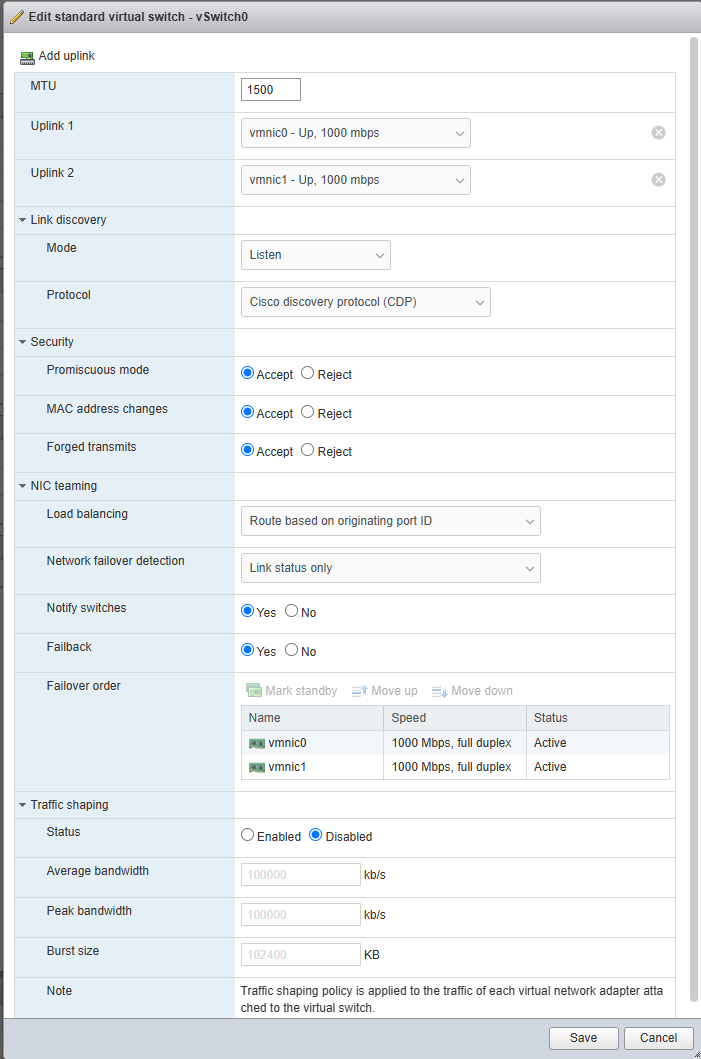
Ah … waitaminute … VMware. What are you vSwitch settings in terms of promiscuous mode and MAC address spoofing? Both need to be allowed. If I remember correctly this can be done on the vSwitch, the port group, or even the VM and interface level. Pick what suits you best.

1 Like

Accepted, I was aware of this facet so has been enabled all along

ah but I had neglected to restart the esxi host after toggling this and that appears to be necessary. Its working now.

Thank you so much for the support, TrueNAS has an amazing community that I have been very impressed by!

Bonus content if you have any ideas. The IPv6 DAD issue persists, I don’t use ipv6 and disabled it I thought but it appears to keep trying to auto configure?

Maybe I spoke too soon, pkg upgrades keep stalling out

Back to tcpdump on the bridge, then :wink:

BTW: to run FreeBSD 13.5 inside the jail you must also upgrade your TrueNAS to the final 13.3 release.

1 Like

Here’s the output :pray:

root@freenas[~]# tcpdump -n -i bridge0 host 192.168.50.213
tcpdump: verbose output suppressed, use -v or -vv for full protocol decode
listening on bridge0, link-type EN10MB (Ethernet), capture size 262144 bytes
21:17:13.887287 IP 192.168.50.213 > 192.168.50.1: ICMP echo request, id 60438, seq 6, length 64
21:17:13.887940 IP 192.168.50.1 > 192.168.50.213: ICMP echo reply, id 60438, seq 6, length 64
21:17:14.899395 IP 192.168.50.213 > 192.168.50.1: ICMP echo request, id 60438, seq 7, length 64
21:17:14.900005 IP 192.168.50.1 > 192.168.50.213: ICMP echo reply, id 60438, seq 7, length 64
21:17:15.953695 IP 192.168.50.213 > 192.168.50.1: ICMP echo request, id 60438, seq 8, length 64
21:17:15.954336 IP 192.168.50.1 > 192.168.50.213: ICMP echo reply, id 60438, seq 8, length 64
21:17:16.987510 IP 192.168.50.213 > 192.168.50.1: ICMP echo request, id 60438, seq 9, length 64
21:17:16.988191 IP 192.168.50.1 > 192.168.50.213: ICMP echo reply, id 60438, seq 9, length 64
^C
8 packets captured
112 packets received by filter
0 packets dropped by kernel

I also updated to 13.3 and now get these logs repeating

Oct 21 22:28:31 freenas kernel[1014]: Last message 'bridge0: mac address' repeated 1 times, suppressed by syslog-ng on freenas.local
Oct 21 22:28:31 freenas kernel: bridge0: mac address 00:0c:29:14:fa:0a vlan 1 moved from vmx0 to vnet0.1
Oct 21 22:28:31 freenas kernel[1014]: Last message 'bridge0: mac address' repeated 1 times, suppressed by syslog-ng on freenas.local
Oct 21 22:28:31 freenas kernel: bridge0: mac address 00:0c:29:14:fa:0a vlan 1 moved from vnet0.1 to vmx0
Oct 21 22:28:32 freenas kernel[1014]: Last message 'bridge0: mac address' repeated 1 times, suppressed by syslog-ng on freenas.local
Oct 21 22:28:32 freenas kernel: epair0b: a looped back NS message is detected during DAD for fe80:3::20c:29ff:fe14:fa0a.  Another DAD probes are being sent.

Duplicate MAC address? Check the MAC address of your jail and make sure it is unique.

ifconfig in the jail only has it for the epair0 device.
it doesn’t appear in the hosts ifconfig.
Also the connectivity in the jail has failed again…

anywhere else I should look?

Any thoughts on disabling ipv6 for the jail? Settings on jail are as below but it still seems to be trying to enable based on the DAD

ip6:disable
ip6_addr:vnet0|accept_rtadv
ip6_saddrsel:1