
Ok, you convinced me: no sVDEV. Or at least, a mirroed one.
Can I make a single SMB share combining 2 9-wide Z2s?
Auto nego is off, I use 100G, fec91 and full duplex
Yes, the pool would consist of two VDEVS, each VDEV being 9 drives Raid-Z2
Pool layout whitepaper may help you.
Not sure of you knowledge of ZFS. Basics but also has some links for performance and VDEVS
Yes. Your pool can consist of multiple VDEVs, each of which ideally has the same config, ie nine drives in a z2, for example. All drives in each VDEV should have the same capacity, but each VDEV can have different capacities. - ie one VDEV can consist of 10TB drives, the next of 18TB drives, etc.
How you share that pool will then depend largely on the datasets and how you decide to parcel them out. For example, I have some datasets dedicated to Time Machine, others to images, etc. and each has its own share, all from within one pool.
One nice thing about sVDEVs is how it speeds up metadata operations and small file writes, but ideally plan ahead to maximize your benefit. See the guide.
1 Like
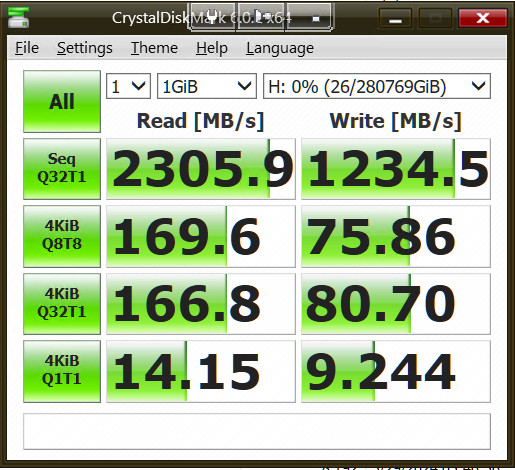
Here is Crystal results with 2x9 VDEVs, and no metadata SSD set:
And here adding a metadata SSD:
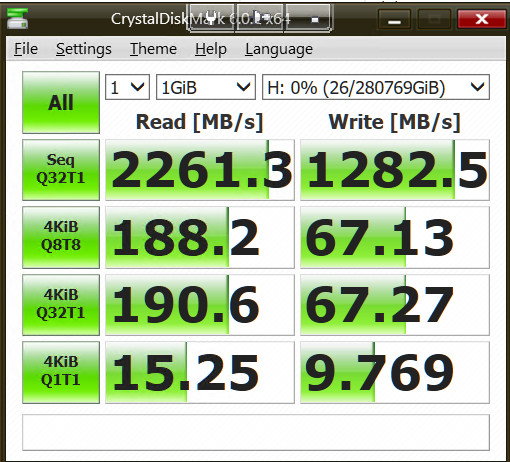
That does not change much, I was mistaken thinking it did an improvement.
And here is a single 18x VDEV without metadata SSD:
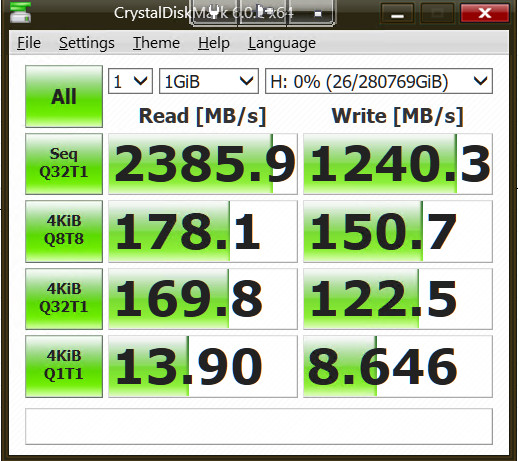
With a single large VDEV apparently, 2 write values are quite better.
The only caveat is longer resilvering time, which is acceptable with 3 parity drives and 100% reliable LTO-9 backups.
I might give up completely about metadata SSD VDEV, thanks for the warning.
And a more realistic 32G test:
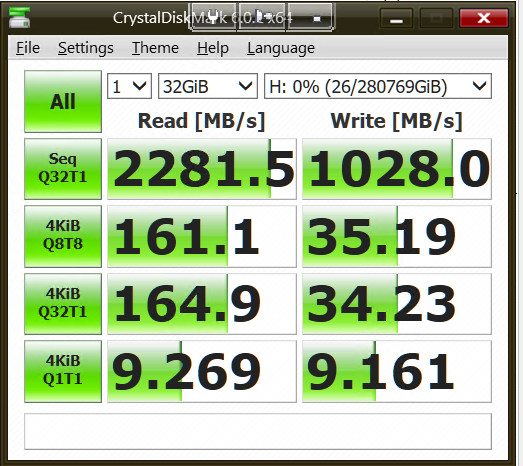
Still pretty good.
There is still a question: network can run at 2281 MB/s. Direct write test on the array gives 3500 MB/s. Why does write cap at 1000?
If you look through my sVDEV resource, I have links to tests I did way back with sVDEV vs. L2ARC vs. nothing and my results were quite a bit different. I am surprised your sVDEV did little - what were the small file cutoffs and record sizes, for example?
For large files (images, video) you want the record size to be 1M. Databases and like content usually benefit from smaller record sizes than the 128kB default.
As for your write speed issue, I’d expect that to be a function of the parity writes? What doesn’t make sense is that there aren’t massive write jumps as you move to 2VDEVs. Something is off.
Unfortunately, I don’t have the experience with your system components to be of help. FWIW, I am getting up to 600 MB/s transferring files to my NAS and that is with a single VDEV z3 consisting of 8 HDDs and a sVDEV.
I wonder if your metadata SSD is perhaps not as fast as it could be? Also, MikroTik being MikroTik, I’d hard set the transfer speeds, duplex, flow control settings, not auto-nego.
Might be an issue with sambad. Still mostly single threaded, although you see peeks at 8% CPU: did you ever check the load per core? One core utilised 100%, the remaining almost iddle?
The E5-2673V4 single thread performance is far from impressive, around 2100 passmark points. This might be the bottleneck for your single user CIFS transfer.
If you can get your hands on a second clients to do CIFS transfer in parallel you might see better (combined) results as your pool seems to be able to handle those.
Good thinking, but that’s not it.
I am uploading a ton of stuff from different external drives now, up to 9 at the time in parallel from 2 different PCs.
When I look at the network reporting, speed is capped at 10G.
CPU is even amongst the 80 (!) threads.
If I try a 10G network card instead of the 100G one, speed is capped at 1G.
Both cards run at 10% of their limit.
That’s vexing, I really would like to find why and correct the problem.
Does the info about the 10G card give you any idea?
Given that you run a Mikrotik, do you mind doing a test bandwidth transfer (with the 100G card) and meanwhile grabbing the equivalent of the Status and Traffic panels from the Mikrotik UI, showing the stats related to the interface connected to your TrueNAS server?
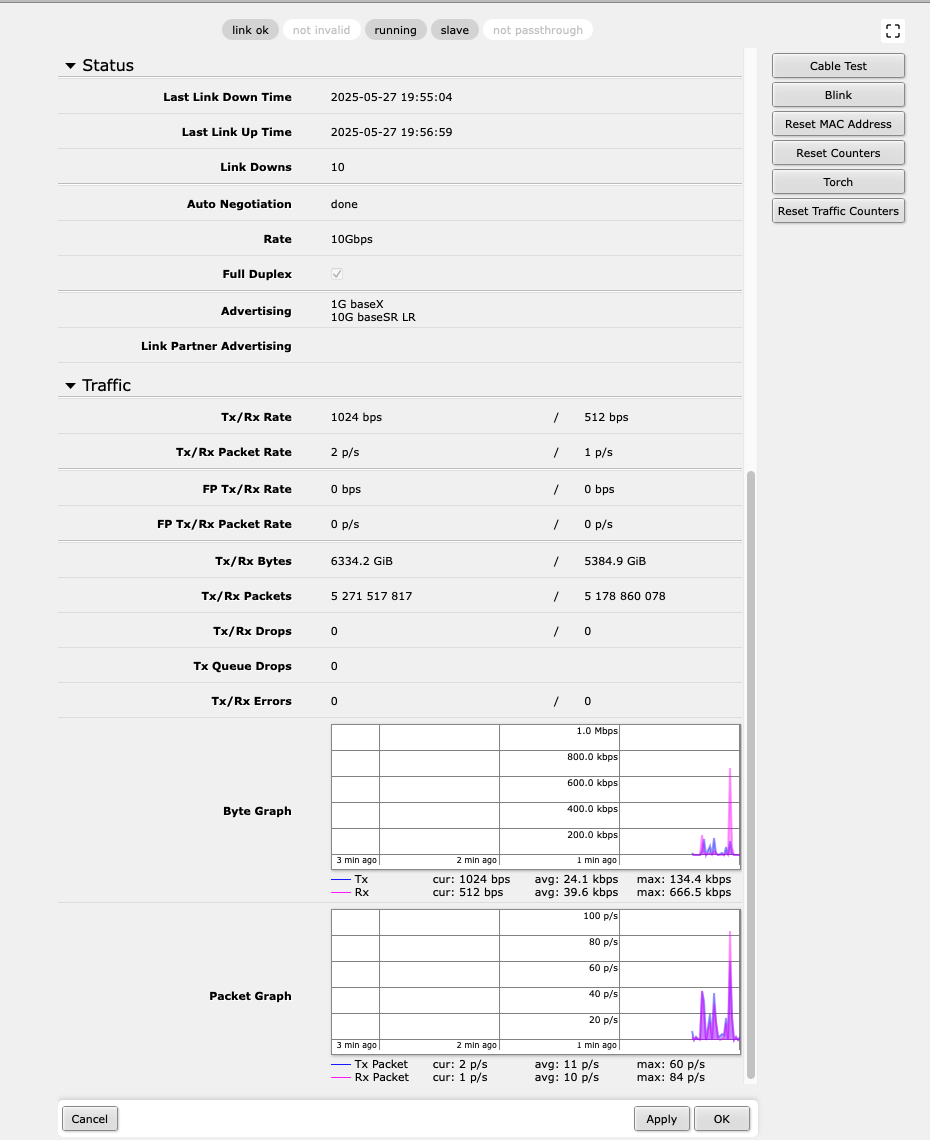
Here.
You can see on the Traffic capture first a run with one PC making large file copies from a Gen 5 NVME SSD, and then what happens when I start the same from another PC USING A Gen 4.
Te first PC was peaking at 600 Mbs, and with the second, it went up 1200, so 10G speed. I don’t have another PC to try a third stream. If I use several tasks by PC, the total does not change.
I’m not sure if the problem is Windows 10 22H2 on the PCs, the Mikrotik or the TrueNAS.
But as I said, if I use a 10G card on the TrueNAS, then the speed drops to 1G while the PCs have no problem going to 10G (using a Netgear M4300, no Mikrotik), so with the 10G card, the limit is TrueNAS.
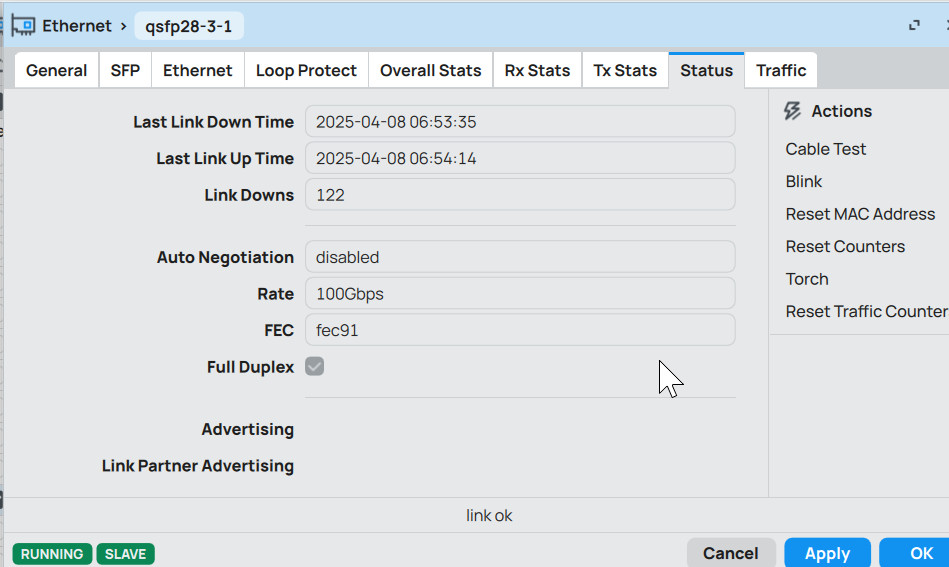
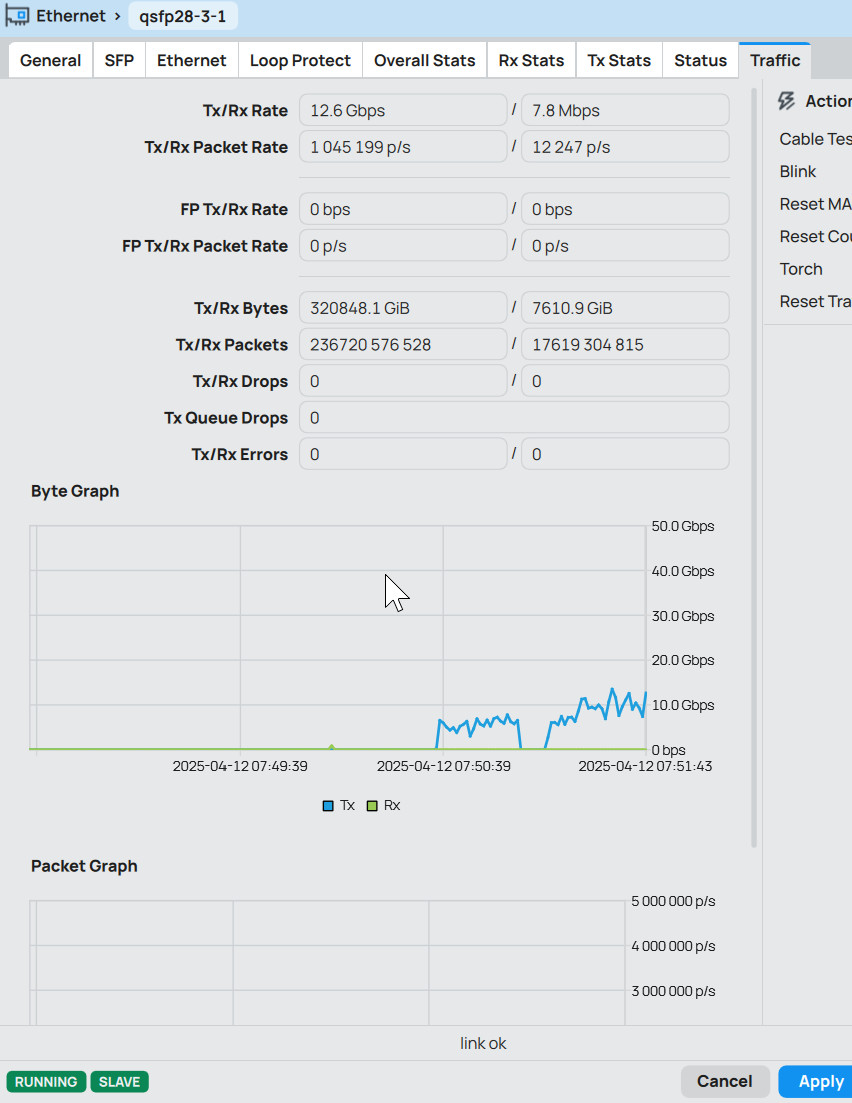
I going to test a 40G card on TN.
Meantime another observation: I am also restoring from LTO-7 tapes. It’s hard to tell how much, but it’s really slow when doing so to the TN compared to doing it on a QNAP.
With the QNAP (connected in 10G) the LTO deck led blinks continuously. With TN, it starts, stops a while, starts gain and so on.
Thank you.
While likely unrelated, consider correcting the date/time on your Mikrotik gear.
Mellanox ConnectX-2 10G
I wouldn’t call that high end, in any way.
18 Toshiba 22TB Enterprise drives configured as RAIDZ3 with 3 parity drives
That means the IOPS of a single drive, that explains a lot of your performance issues.
2 Likes
Did you ever run that iperf3 as @joeschmuck suggested a week ago?
I haven’t found any output posted.
I did not run iperf3, but I ran:
fio --name=test --filename=/mnt/pool/testfile --rw=write --bs=1M --size=10G --numjobs=4 --iodepth=32 --direct=1
that gave:
WRITE: bw=3522MiB/s (3693MB/s), 880MiB/s-882MiB/s (923MB/s-925MB/s), io=40.0GiB (42.9GB), run=11604-11630msec
That shows that the raid itself runs pretty fast, near 40G performance.
About the Mellanox ConnectX-2 10G, that’s for testing only.
The actual card for max perf is a Fujitsu MCX455A-ECAT 100GbE ConnectX-4. Not as up to date as a ConnectX-5, but it should be pretty fast.
Here you go:
iperf3.exe -c 192.9.200.224
Connecting to host 192.9.200.224, port 5201
[ 4] local 192.9.200.16 port 5270 connected to 192.9.200.224 port 5201
[ ID] Interval Transfer Bandwidth
[ 4] 0.00-1.00 sec 788 MBytes 6.61 Gbits/sec
[ 4] 1.00-2.00 sec 779 MBytes 6.53 Gbits/sec
[ 4] 2.00-3.00 sec 723 MBytes 6.06 Gbits/sec
[ 4] 3.00-4.00 sec 899 MBytes 7.54 Gbits/sec
[ 4] 4.00-5.00 sec 738 MBytes 6.19 Gbits/sec
[ 4] 5.00-6.00 sec 738 MBytes 6.19 Gbits/sec
[ 4] 6.00-7.00 sec 761 MBytes 6.38 Gbits/sec
[ 4] 7.00-8.00 sec 819 MBytes 6.87 Gbits/sec
[ 4] 8.00-9.00 sec 637 MBytes 5.34 Gbits/sec
[ 4] 9.00-10.00 sec 669 MBytes 5.61 Gbits/sec
[ ID] Interval Transfer Bandwidth
[ 4] 0.00-10.00 sec 7.37 GBytes 6.33 Gbits/sec sender
[ 4] 0.00-10.00 sec 7.37 GBytes 6.33 Gbits/sec receiver
iperf Done.
That’s coherent to the file transfer tests I published here, and well below what the raid itself can achieve.
Testing now a direct connection with a 40G card.
With a standard 1500 MTU, same results. With a 9000 one (impossible to use on the whole network, I would have to configure each device), I get a single file transfer speed of 1.3GBs.
And I get:
iperf3.exe -c 192.9.203.224
Connecting to host 192.9.203.224, port 5201
[ 4] local 192.9.203.37 port 11738 connected to 192.9.203.224 port 5201
[ ID] Interval Transfer Bandwidth
[ 4] 0.00-1.00 sec 1000 MBytes 8.39 Gbits/sec
[ 4] 1.00-2.00 sec 1.05 GBytes 9.01 Gbits/sec
[ 4] 2.00-3.00 sec 1006 MBytes 8.44 Gbits/sec
[ 4] 3.00-4.00 sec 1017 MBytes 8.53 Gbits/sec
[ 4] 4.00-5.00 sec 1019 MBytes 8.55 Gbits/sec
[ 4] 5.00-6.00 sec 976 MBytes 8.19 Gbits/sec
[ 4] 6.00-7.00 sec 988 MBytes 8.29 Gbits/sec
[ 4] 7.00-8.00 sec 1.01 GBytes 8.67 Gbits/sec
[ 4] 8.00-9.00 sec 1.02 GBytes 8.80 Gbits/sec
[ 4] 9.00-10.00 sec 1.01 GBytes 8.67 Gbits/sec
[ ID] Interval Transfer Bandwidth
[ 4] 0.00-10.00 sec 9.96 GBytes 8.55 Gbits/sec sender
[ 4] 0.00-10.00 sec 9.96 GBytes 8.55 Gbits/sec receiver
Twice the speed for a large file transfer is already nice, even though iperf3 does not show the same improvement.
Still 1/3 of the RAID internal raw speed.
That is not a healthy 10Gbps network nor 40Gbps. Your 40Gbps test shows results that I expect for a 10Gbps test.
2 Likes
And that is my problem!