I recently made some changes and cleaned up my TrueNAS network.
I wanted it to look nicer and set some good looking IPv6 in the VLAN51.
2aXX:XXXX:XXXX:51::13
I disabled DHCP and SLAAC, set the gateway 2aXX:XXXX:XXXX:51::1
I was pulling my hair out, why the remote host discovery did not work.
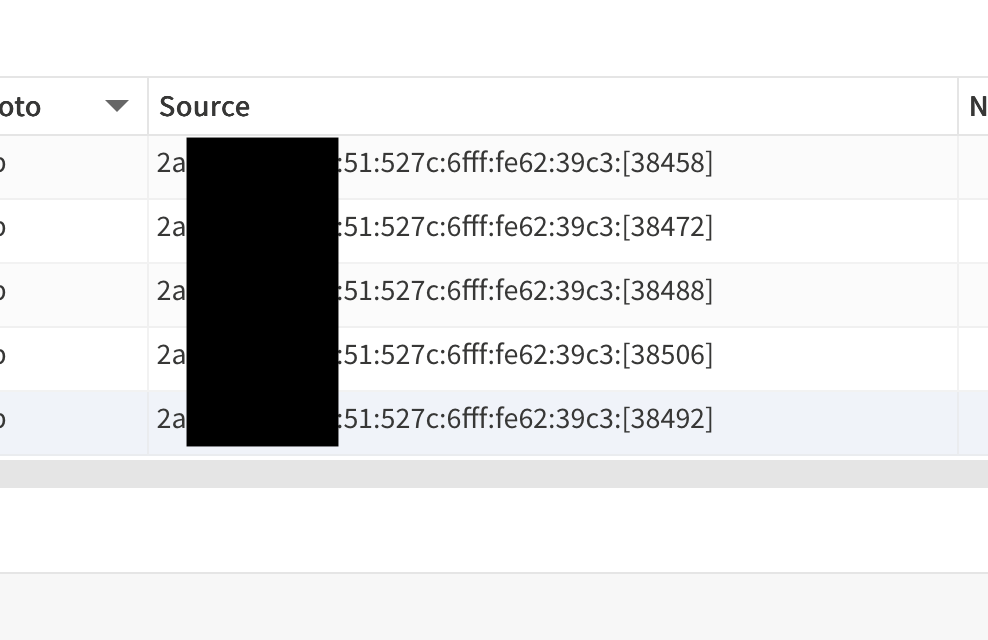
Finally took a look at the remote firewall, turns out TrueNAS gets blocked, because it is still using (I guess) old SLAAC IPv6. See here:
Running ip -6 route get remoteIPv6
shows remoteIPv6 from :: via 2aXX:XXXX:XXXX:51::1 dev vlan51 proto static src 2aXX:XXXX:XXXX:51:527c:6fff:fe62:39c3 metric 1024 pref medium
After a reboot, the system instantly was able to instantly send an alert mail. So I assume not only the snapshot sending was broken, also the alert mails.
Although the issue is now solved, not only was this a PITA to hunt down the issue, but also a little bit worrisome (alerts).
I don’t understand why TrueNAS is using such obscure settings for something so simple. Interfaces or netplan work perfectly fine. Proxmox (although also having some networking quirks) does a good job, offering the user a webGUI for interfaces and showing a preview of what /etc/network/interfaces will be changed to.
Even after the reboot, the snapshot replication is still trying to use the old IPv6 and fails! It was only remote key discovery that worked, not remote replication.
I am currently not even able to log me in (with Apple)
When did Jira become so bad? I used it at work 15y ago, and it was fine back then. Now it is always either broken or dead slow.
Edit: Incognito did the trick… I can’t find it, so my guess is it did not work.
I wonder if my random on boot ipv6 assigned to bridge member interface (which should have no IPs & has none showing in GUI) is related… Would be nice if this was a bug & got fixed in a future update - would make it worth updating.
I see png files attached to those tickets, but no debugs. This ticket (Jira) was created at about the same time, also appears to have come from the UI, and it has both a png and a debug attached, so it doesn’t look like a universal problem.
@Sara can you use the link in the bugclerk comment to manually attach a debug from the right system to the 25.10.1 ticket?
Maybe the problem is also related to the network? I don’t know how to be honest, since even the SLAAC is allowed to reach the internet, but maybe the debug works differently than sending the ticket.
I attached the debug to both IPv6 tickets.
And also to my third “debug not working” ticket.
Ironic that I have to manually attach a debug to my “debug did not work” ticket, since attaching the debug did not work
BTW Jira is working ok again, much better than yesterday.
Your original IPv6 ticket is still open. The second was closed as a duplicate and linked to it, as is standard. In the future in a similar situation I’d suggest filing one ticket for the more recent TrueNAS version and if you want to include information about the second system, you can do that and manually attach a second debug from that system.
The person triaging the attach debug ticket clearly didn’t have all the information needed to understand the situation, so I’ll reopen it for further investigation, but keep in mind that without evidence of a widespread issue or a clear reproduction case there may not be much they can do with that one.