
I recently messed up my truenas because I was using 80 watts (I know that’s too low.) I am using 700 watts now. I’m not worried about it messing up, I’ve been wanting to reset it for a while now. I’ll start with how the issue started initially.
Got a notification saying I had a corrupt file so I ran the command “zpool status -v CFO” found the corrupted file, and deleted it. After deleting it and restarting I ran the command again but it still said that same file that no longer exists is corrupt so I decided to do a scrub. About 0.3% into the scrub my web interface went down and I was never able to access it again. Ive done a couple updates so I went back to an older version and I still couldn’t connect.
TrueNas is running
MB: msi b550m pro-VDH
CPU: Ryzen 7 5600G
32 GB of ram (I can get the info on the if needed)
1TB nvme for my OS drive
3 drives
16TB, and two 8 TB all WD red
Today, since I was having issues, I figured I would reinstall it fresh. Now that I’ve reinstalled I still cant access the web interface. The info I can give you off the bat is
One static IP and one Dynamic
interface setting:
Name enp42so
description:
ipv4_dhcp: yes and no respectively
ipv6_dhcp: No
aliases
other settings:
disable_offload_capabilities:
mtu
Network Configuration: TRUENAS
domain: local
ipv4 gateway: 192.168.12.1
Namerserver1: 8.8.8.8
nameserver2: 8.8.4.4
namerserver3 :
Attach a monitor to the server so you can see the screen output, does it show an web interface IP to use?
What do you mean by “can’t access web interface”?
It seems to me you have bad ram. Run memtest86 for a day.
Currently have my tv attached. I always keep a monitor on it.
web interface shows
http/https
192.168.12.126
192.168.12.223
Dont know how to connect to the IPV6 but they are
2607:fv90:2dac:4139:67c:16ff:fee4:72b7
fcdA:BBFF:DAA6:0:67C:16FF:72B7
I’ll download, install, and it and give it a shot right now
Do you have two network interfaces there? And you can’t access it at either/none?
It’s a bootable disk image, you don’t install it, you boot from it and run tests.
You are showing two network addresses on the same subnet. That isn’t a valid network config in TrueNAS. Can you explain your network configuration and why you have it set as one DHCP and one Static and what you are trying to accomplish?
I have my pc connected to one port on my router and a USB to etthernet plugged into a different port on my router. I just kind of like to have 2 different connections. I can get rid of one and reinstall if you think that’ll help but Ive tried that already. If it matters I have Scale 22.02.0 because the stable version (25.04.1) wont lauch on my system for some reason.
Well, it usually doesn’t work that way. You should stay with one connection for now. No need to reinstall.
Yes I have 2 intwork interface and no I cant connect to either
Yea I saw that, Its writing now
Ok I’ll unplug the usb as soon as I try memtest
Ran memtest86 and got back 0 errors
Then I shut it down, unplugged the USB to Ethernet. Now I have it back on with Ethernet connected directly to my motherboard. I have my IP as a static address set to 192.168.12.157
Still unable to connect
Are you able to ping the TrueNAS machine at 192.168.12.157 from another machine on your network.
Do you have sharing set up? If so, can you connect to your shares?
Describe your network equipment and setup in detail. Have you check to see that you get activity lights on switch ports, etc?
Also. If it’s a static address, which subnet mask did you set? I’m asking just in case.
I tried to ping it on my pc, 100% loss, If I use a program to scan my network it sees it
Share to what?
T-Mobile Home internet router model: FAST 5688W. I have a 50-foot cat7 wire running to a 5 port switch (Linksys SE3005V2). Then an 8ft cat8 from the switch to my server.
There’s no lights on my router, I know that’s unusual. The ports that are active right now on the switch are flashing green, maybe strobing. the lights on my server has a solid orange with a flashing green
Nothing else has internet issues and Ive tried different ethernet cables.
I turned off DHCP and set the address, assuming you set your address as the alias as the route I want it to go to.
I’m glad you asked about the subnet. I’ve been up quite a while, so I forgot about that. I know I should be able to set it but I cant find out where. I see ‘configure network interfaces’ and ‘configure network settings’ and maybe "configure static routes’. I’m not sure what the last one is but it says no static route found.
You can try logging into your router and seeing what devices are currently in use. Look for ip addresses and device names.
You can try changing the settings on your NIC to DHCP using the console menu. It should be option 1. You may have to reboot after.
If not, you may have a bad NIC on the motherboard. That’s why I asked about the lights.
Ok. Can you post the output of the ip a command in shell (option 9 presumably)?
You were corrector it doesn’t show on my router even when I’m using the ethernet to usb which I find odd. Guess in the mean time I’ll install windows and see if it work on there…
I did try changing to dhcp and it was still no good. Thank for all your help I’ll check my router first next time. Feel like I wasted you timeso I’m sorry but thank you so much!
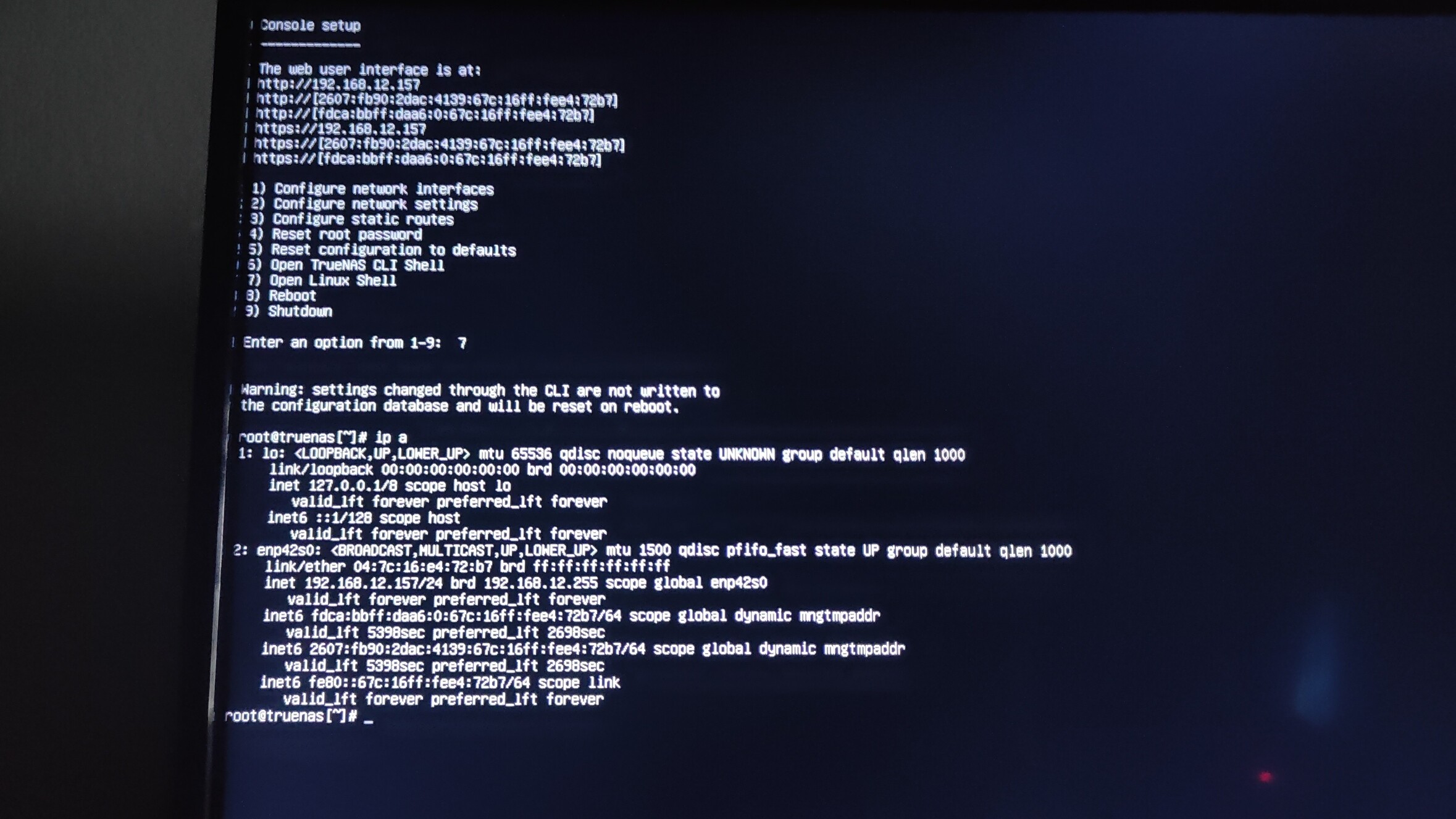
Theres a photo but the last guy told me to check my router and its not showing up on my router so I don’t think there’s much to be done at that point, unless you have another idea
Ok, good. Can you ping your router now? With something like ping -c 10 192.168.12.1. I assume that 192.168.12.1 is your router ip. If it’s not, tell the actual ip as well.