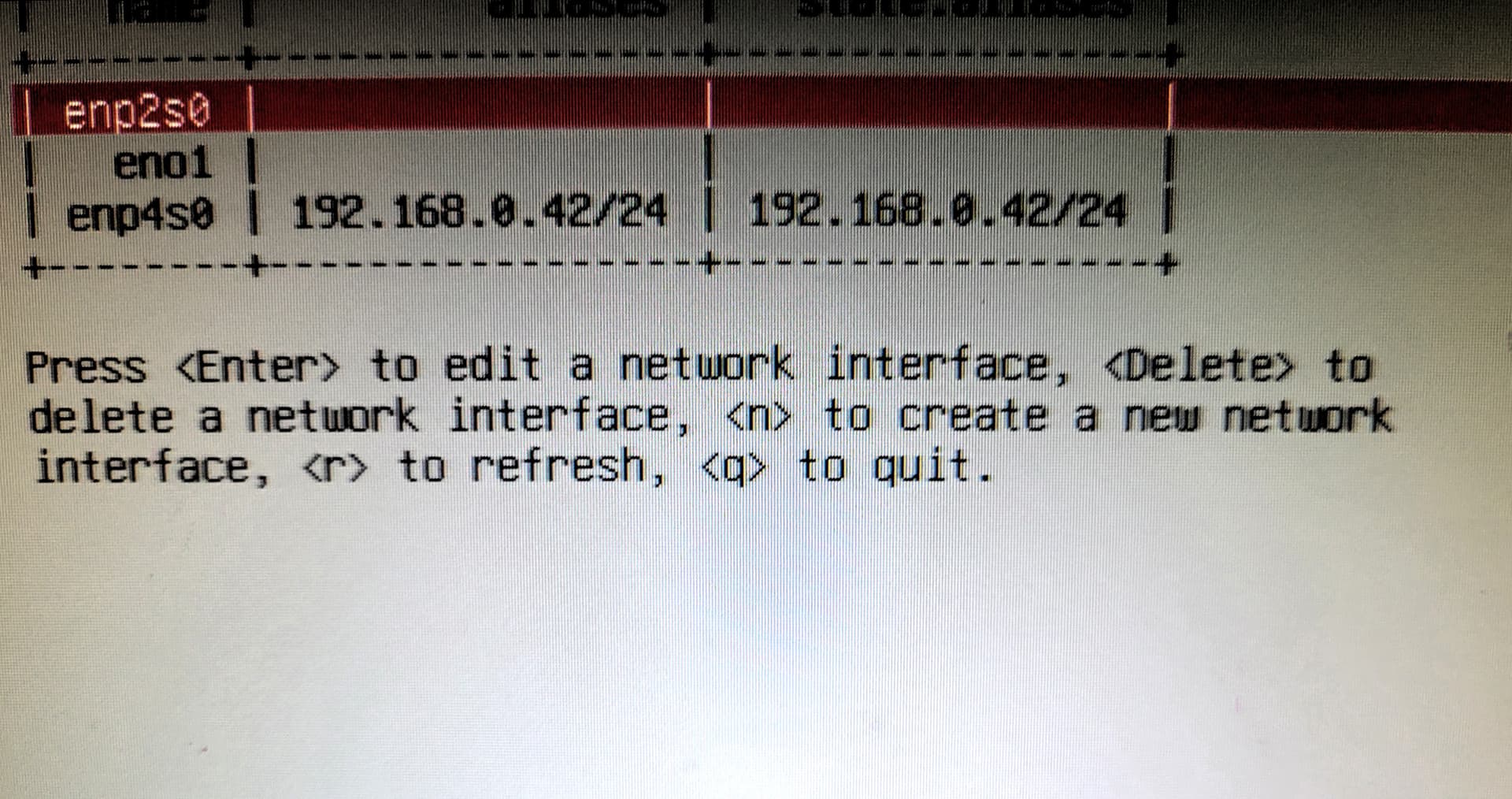
I have installed a new 2.5gbe NIC, and want to use that instead of the existing lan port which is called eno1 with a static ip address. The new NIC is enp4s0. When I add an ip address of 192.168.0.44 which is different from the exsisting one, and save it, I get a message telling me that 192.168.0.0 is already in use.
So how do I actually tell TrueNAS that I want to use the ip address I gave it.
Thanks
You only want to use the new 2.5 Gbps NIC?
You would copy over all the info from your existing NIC. Write your settings down. You will remove the current settings, added them to the new NIC and then you have to TEST and ACCEPT in the GUI.
When testing, if you don’t ACCEPT the changes, it reverts back to before those changes. You may lose the GUI for a bit.
If you are trying to do something different, explain
1 Like
Do I have to change my lan cable from the existing nic to the new nic when testing or just leave it until it’s finished testing
You would have to change it. You need to do the confirm. It might be easier to do the reconfiguration with the Console screen. Copying down all NIC settings on old. Disable old NIC. Putting in all setttings for the new NIC and then power up fully and make sure you can access the GUI.
Which console screen do you mean, as I tried it with a monitor attached,option 1, but it didn’t happen
Yes, option 1. The NICs can’t be on the same subnet at the same time. Did you copy down all you info, remove it from the default NIC and then add to the new? Another option would be to disable the onboard NIC in the BIOS/UEFI and then set up the new one with the same information.
Just glanced. It may be options 1 and 2 to complete what you desire.
I have now got the new nic working, ie used the existing ip address of the other nic using option 1 . I saved the settings , then applied them.
The lights are flashing on the new nic when the lan cable is plugged in, but I don’t have a connection to the TrueNAS web page or GUI.
The new nic is this: XikeStor 2.5Gb PCIe Network Card with Intel I226-V Chip, 2.5GBase-T Network Adapter NIC, PCIe 3.1 X1, PCI Express Gigabit Ethernet Card for Windows 10/11, Linux Kernel 5.16.18/RHEL8.6, VMware ESXi8.0
I rebooted TrueNAS, using a monitor and keyboard, and when it booted back up, the ip address was showing, but no TrueNAS webpage.
I googled what 2.5Gbe nic for TrueNAS, and the new nic was what came up.
Edit:
I’ve just added supermicro, my motherboard, to the 2.5Gbe nic for TrueNAS, and this one came up:
Intel I226-T1 Internal Ethernet 25000 Mbit/s
Any ideas??
Can you ping the address of TrueNAS from another computer? If you log into your router does it show that ip address as active? Can you connect to any file shares? Trying to narrow down if GUI problem or entire computer isn’t reachable and set up. You might try to power cycle TrueNAS, keeping the same settings, and see if it becomes reachable.
You are also checking the Console page to see if any other ip addresses show. Is the Console showing the GUI on that ip address and no others.
You can also post an image of the Console page here if your not certain what is showing.
I powered down my TrueNAS server after I changed the ip address to the new nic, then rebooted it.
I cannot ping the ip address of TrueNAS as it is unreachable from 2 other computers. Also it is not showing up in my router’s connections or network. I can’t connect to any file shares.
A picture of the settings from option 1. The green leds are flashing, as tho’ data is flowing but what??
Do all the other devices on your network use DHCP. I think setting the new NIC to use DHCP would be the easiest to see if it is working. Once we can connect, then we can check if you are at 1G or 2.5G speeds
Only 2 computers use static ip addresses, and everything else as far as I know uses DHCP
Obviously , for the moment TrueNAS is using the existing nic on the motherboard, but when the resilvering has finished I’ll try whatever you suggest.
Resilvering now done, and all pools are healthy.
This time I changed the nic in the network tab of TrueNAS. I deleted the settings from the existing nic, and set the new 2,5Gbe nic to DHCP, but when I checked 5 minutes later ,TrueNAS webpage or GUI had basically closed, saying unable to connect.
I rebooted TrueNAS to check if the ip address was still there for the new nic, and it was.
I rebooted again and saw that on the console setup, it said that The web interface could not be accessed. Please check network settings.
On bootup I noticed job ix-netif..service start seemed to take some time and TrueNAS was beeping.
I changed back to the motherboard nic, rebooted then had a look in the network tab, and the new nic which I set for DHCP had an ip address of 192.168.0.246. I used Angry IP scanner to check whatip address Truenas had or was allocated, but it wasn’t showing.
It now would seem that my new 2.5Gbe nic is not compatible with TrueNAS, yet there were a few links or post saying it was ok for TrueNAS.
Anything else I can do before I return it
Thanks
Just to let you know, late yesterday I ordered a TP-Link TX201 2.5Gbe network card for my TrueNAS server. It arrived earlier and after trying 1 final time with the Intel nic, I removed it and plugged in the TP-Link nic. I then removed the ip address from the existing nic and assigned to the new TP-Link nic.
Rebooted and no problem seeing or accessing the network interface with the new nic, but the said ip address is not showing up in Angry ip scanner.
I can access the server from Network on my Linux computer, but there are no shares showing.
Also on the TP_Link nic there are no leds flashing as there were on the Intel nic. Puzzled I will be.
Thanks
Just an update, and nothing to do with TrueNAS, but the intel 2.5Gbe nic I thought would work with TrueNAS and doesn’t works just fine in my Linux computer
I am using the TP link version you have without issue. It took a bit of guesswork in the console but I got it going same day it arrived. You basically need to remove all settings from the existing one first. Then save. Then go back and add them to the new one. Of course you must have a monitor connected to do this.
Doing it from the GUI seemed impossible to me.
What version of TrueNAS are using , as I am using TrueNAS Scale 24.10.2 or something.
I also tried in the console by removing all the settings from eno1, then saved, and then using the same details in or to enp5so. I saved them , applied the new setting, and then, I wasn’t sure about press p to persist, but I did. I then rebooted, but when it booted to the final stage, it said it couldn’t connect to the ip address.
Just to add my board has an Intel chip, so I thought the Intel v226 2.5Gbe nic would also work but it produced the same no connection error.
Thanks
The “My TrueNAS Lab” section expands in Trevor68 post. Says 25.10-RC.1 but I would guess server is on a full release and that is just were the signature wasn’t updated.
You might consider upgrading to 25.04 and trying again with the NIC. It is listed as General and Mission Critical on the Software Status page so it everything should be sorted out on that version. 25.10 is still Early Adopter.
Yes I am on the latest 25.1 now. It sounds like you might have issues with your router and mac addresses to me. have you been clearing the ip and mac address from the router?
The router prob has a lease on the old mac address .
How do I clear the ip and mac address from my router, which is supplied by my ISP
Thanks
I think a power cycle is one way. Power it off for about 15 seconds or more and then back on. Do you have control over the router settings like DHCP range settings, static IP assignments, etc? I don’t remember if we ever covered your model and menus. If you don’t have control, DHCP across the board would be best.
1 Like
I found out how to do it , and with my router it says to leave it for 30 seconds.
Just had a look at the ipv4 settings in my router and the server address range is set at 192.160.0.64 - 192.168.0.253.
One other thing is that my supermicro board has intel chipset, so I would think that an intel nic would suit or be recognised better than any other.
In my linux computer the drivers were already embedded in the kernel, so I had little to do
I don’t know why it is that but I’ll look into it