
I can’t copy and paste as per instructions. Linux Truenas 6.6.44 production + Truenas #1 SMP preempt_dynamic Turs jan 28 03:
14:06 UTC 2025 x86_64
Is the above what you need
will some one help me please!
Post a screenshot of your TrueNAS dashboard. I usually use the Snipping Tool in Windows 10 or 11.
That should give us the version of TrueNAS you are on and maybe a clue as to your current setup.
This Linux kernel means it should be a TrueNAS 24.10 version
Enter the command, highlight the result, then us CTRL+Insert to copy

I was hoping you were going to post the majority of the dashboard so we could get as much information about your setup as possible.
Please post the the entire view of the Storage tab and the same with the Datasets tab.
Storage Dashboard
Import Pool Disks Create Pool
max
Export/Disconnect Expand
Topologycheck_circle
Manage Devices
Data VDEVs
1 x RAIDZ2 | 5 wide | 12.73 TiB
Metadata VDEVs
VDEVs not assigned
Log VDEVs
VDEVs not assigned
Cache VDEVs
VDEVs not assigned
Spare VDEVs
VDEVs not assigned
Dedup VDEVs
VDEVs not assigned
Usagecheck_circle
0%
Usable Capacity: 37.55 TiB
- Used: 1.68 GiB
- Available: 37.54 TiB
ZFS Healthcheck_circle
Scrub
Pool Status:
Online
Total ZFS Errors:
0
Scheduled Scrub Task:
Set
Auto TRIM:
Off
Edit Auto TRIM
Disk Healthcheck_circle
Disks temperature related alerts:
0
Highest Temperature:
44 °C
Lowest Temperature:
35 °C
Average Disk Temperature:
39.148 °C
Failed S.M.A.R.T. Tests:
0
max1
Export/Disconnect Expand
Topologycheck_circle
Manage Devices
Data VDEVs
error1 x DISK | 1 wide | 14.91 GiB
Metadata VDEVs
VDEVs not assigned
Log VDEVs
1 x DISK | 1 wide | 447.13 GiB
Cache VDEVs
VDEVs not assigned
Spare VDEVs
VDEVs not assigned
Dedup VDEVs
VDEVs not assigned
Usagecheck_circle
0%
Usable Capacity: 14.05 GiB
- Used: 468 KiB
- Available: 14.05 GiB
ZFS Healthcheck_circle
Scrub
Pool Status:
Online
Total ZFS Errors:
0
Scheduled Scrub Task:
Set
Auto TRIM:
Off
Edit Auto TRIM
Disk Healthcheck_circle
Disks temperature related alerts:
0
Highest Temperature:
35 °C
Lowest Temperature:
26 °C
Average Disk Temperature:
29.638 °C
Failed S.M.A.R.T. Tests:
0
search
Dataset Name
Used / Available
Encryption
Roles
expand_more
max
1.68 GiB / 37.54 TiB
Unencrypted
share
chevron_right
apps
340.88 KiB / 37.54 TiB
Unencrypted
share
max1
468 KiB / 14.05 GiB
Unencrypted
Dataset Details
Edit
Type:
FILESYSTEM
Sync:
STANDARD
Compression Level:
Inherit (LZ4)
Enable Atime:
OFF
ZFS Deduplication:
OFF
Case Sensitivity:
ON
Path:
max/apps
assignment
Delete
Dataset Space Management
Edit
Total Allocation:340.88 KiB
Data Written170.44 KiB (50%)
Children170.44 KiB (50%)
Space Available to Dataset:
37.54 TiB
User Quotas:
Quotas set for 1 user
Group Quotas:
Quotas set for 1 group
Data Protection
Create Snapshot
Total Snapshots:
0
Snapshot Tasks:
0
Replication Tasks:
0
Cloud Sync Tasks:
0
Rsync Tasks:
0
Roles
share
Child Shares:
This dataset has children with shares
Permissions
Edit
Owner:
root
Group:
root
Unix Permissions
person
root
Read | Write | Execute
people
root
Read | Execute
groups
Other
Read | Execute

I thought you would post screenshots like you did for System Information. The information is good, it’s just hard to read.
max pool is 5x wide Raid-Z2, WD Red Pros of 14TB
max1 pool is strange. I know you have 2x 450 GB SSD from prior postings in other threads. One drive looks to be underprovisioned from being a SLOG device upon ordering. Showing 14.91GiB as Data. Other is attached as a LOG device at 447.13 GiB.
Both pools looks to be pretty much empty at this point. I can’t make out the Datasets info.
I am guessing you meant to create a Mirror VDEV for max1 using the 2x 450 GB SSDs. Were you going to use that for the Applications storage pool? Was that what you wanted?
You certainly are an interesting case of reluctance to replying clearly to questions…
Remember: You’re the one asking for help here. But you’re not really helping us help you.
system, is an xisystem mini plus with 64 gigs of ram and 5 14 tb hard drives and two 450 ssd. I started by creating a pool I named it (max) the created two data sets apps and plex. then I created a share for plex for administration. then I went back and tried to crated or add a Vdev which didn’t work I thought it created a Vdev when you created a pool I guess I was wrong.
Based on the information above do I have enough to start coping my movies over to truenas.
Is Plex going to be the only application you are running?
You already have two VDEVs. max pool has a 5x 14TB hard drives in Raid-Z1 and the other is max1 with the SSDs, but the size is mismatched.
How did you want the SSDs set up? Were you trying to create a pool with the two SSD in a Mirror or were you planing on using them as SLOG and L2ARC devices? That needs to be sorted out either way.
I don’t think you need the SSD as SLOG nor L2ARC with your planned use and having 64GB of RAM. I would suggest we walk you through setting up the two SSD in a Mirror VDEV for a faster data pool. It will require destroying the current SSD setup you have, formatting at full size
right now plex is the only application I’ll ben running. The ssd’s will be for cache. I wasn’t trying to create another pool with them. What is your suggestions. Also at this point t in the process I do not know how to copy my movies over to0 truenas.
I am not familiar with Plex and where it gets its movies from. I’m guessing you would just copy them over to a SMB share that the Plex application has access too. I would wait for another users post, just to make sure.
Can you post a screenshot of the Datasets tab for the MAX pool? I just want to confirm you have the datasets or SMB sharing set up and the order of the datasets
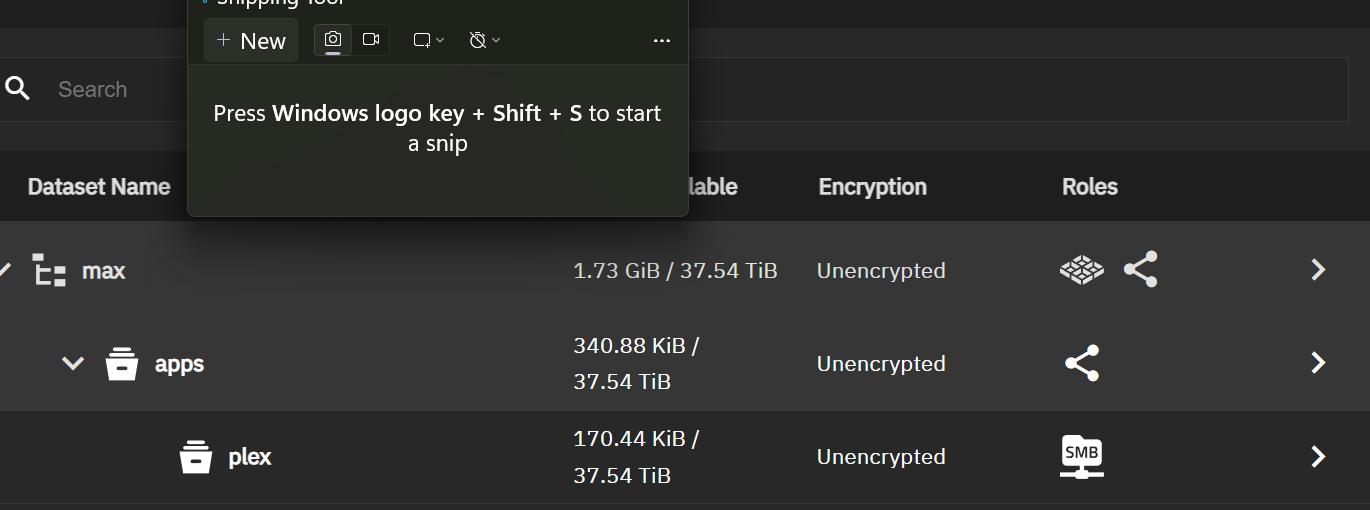
A screenshot is a picture or image. You look to be just copying the data like copying and pasting a paragraph in a word processor
Just saw the image, thanks
for plex to see your movies you have to do this:
- create a dataset on your truenas storage pool for this example let’s call it media. I like to structure my media by movie and series, and therefore created two child datasets in media calle movies and series.
- create an smb user and give that user your desired permissions.
- create a smb share for media/movies and media/series
- add those smb shares as network drives in windows. start to copy your movies to those datasets.
- edit your plex app and add hostpaths for /media/movies and map it to /movies and /media/series and map it to /series
- when the plex app is running again, add
- restart plex and add a new media library for movies and series.
- let plex scan those media libraries.
- you may have to also grand permissions for the user that plex is running for it to find the media.