
Hello to the whole community. I’ve been using Truenas CE for a few months now. I set up a pool with four 2 TB hard drives. I recently noticed that Truenas is displaying the message “Storage Health ⊗” for one of the drives in the pool. I’d like to ask what this message means. Thank you
The most common cause for this is a SMART error, usually an unrecoverable sector. You can verify by providing the output of smartctl -a /dev/<device name of the disk in question>.
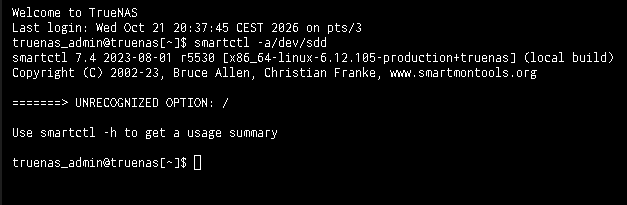
If you’d run the command he suggested, it might have–you missed a space. However, you’d also need to run it as the root user, like this: sudo smartctl -a /dev/sdd.
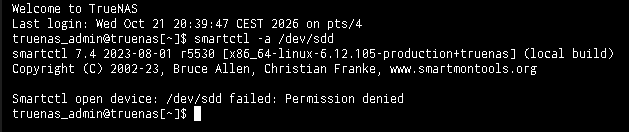
Please redo as root: sudo smartctl -a /dev/sdd.
You need sudo as Dan states. Please return the results using Preformatted Text mode. Just copy the info from the Shell, bring up a reply, hit Ctrl+e or </> on the toolbar and then paste the results of the command.
Now I can see the output of the command. It’s quite long to read.
Are there any specific parameters that indicate the error?
Just cut & paste the whole output here.
smartctl 7.4 2023-08-01 r5530 [x86_64-linux-6.12.105-production+truenas] (local build)
Copyright (C) 2002-23, Bruce Allen, Christian Franke, www.smartmontools.org

=== START OF INFORMATION SECTION ===
Model Family:     Western Digital Red
Device Model:     WDC WD30EFRX-68AX9N0
Serial Number:    WD-WMC1T2686511
LU WWN Device Id: 5 0014ee 0ae31f1ca
Firmware Version: 80.00A80
User Capacity:    3,000,592,982,016 bytes [3.00 TB]
Sector Sizes:     512 bytes logical, 4096 bytes physical
Device is:        In smartctl database 7.3/5528
ATA Version is:   ACS-2 (minor revision not indicated)
SATA Version is:  SATA 3.0, 6.0 Gb/s (current: 6.0 Gb/s)
Local Time is:    Wed Oct 21 20:54:59 2026 CEST
SMART support is: Available - device has SMART capability.
SMART support is: Enabled

=== START OF READ SMART DATA SECTION ===
SMART overall-health self-assessment test result: PASSED

General SMART Values:
Offline data collection status:  (0x00) Offline data collection activity
was never started.
Auto Offline Data Collection: Disabled.
Self-test execution status:      (   0) The previous self-test routine completed
without error or no self-test has ever
been run.
Total time to complete Offline
data collection:                (39600) seconds.
Offline data collection
capabilities:                    (0x7b) SMART execute Offline immediate.
Auto Offline data collection on/off support.
Suspend Offline collection upon new
command.
Offline surface scan supported.
Self-test supported.
Conveyance Self-test supported.
Selective Self-test supported.
SMART capabilities:            (0x0003) Saves SMART data before entering
power-saving mode.
Supports SMART auto save timer.
Error logging capability:        (0x01) Error logging supported.
General Purpose Logging supported.
Short self-test routine
recommended polling time:        (   2) minutes.
Extended self-test routine
recommended polling time:        ( 398) minutes.
Conveyance self-test routine
recommended polling time:        (   5) minutes.
SCT capabilities:              (0x70bd) SCT Status supported.
SCT Error Recovery Control supported.
SCT Feature Control supported.
SCT Data Table supported.

SMART Attributes Data Structure revision number: 16
Vendor Specific SMART Attributes with Thresholds:
ID# ATTRIBUTE_NAME          FLAG     VALUE WORST THRESH TYPE      UPDATED  WHEN_FAILED RAW_VALUE
1 Raw_Read_Error_Rate     0x002f   200   200   051    Pre-fail  Always       -       9
3 Spin_Up_Time            0x0027   182   175   021    Pre-fail  Always       -       5866
4 Start_Stop_Count        0x0032   100   100   000    Old_age   Always       -       433
5 Reallocated_Sector_Ct   0x0033   200   200   140    Pre-fail  Always       -       2
7 Seek_Error_Rate         0x002e   200   200   000    Old_age   Always       -       0
9 Power_On_Hours          0x0032   001   001   000    Old_age   Always       -       79491
10 Spin_Retry_Count        0x0032   100   100   000    Old_age   Always       -       0
11 Calibration_Retry_Count 0x0032   100   100   000    Old_age   Always       -       0
12 Power_Cycle_Count       0x0032   100   100   000    Old_age   Always       -       429
192 Power-Off_Retract_Count 0x0032   200   200   000    Old_age   Always       -       312
193 Load_Cycle_Count        0x0032   200   200   000    Old_age   Always       -       120
194 Temperature_Celsius     0x0022   121   101   000    Old_age   Always       -       29
196 Reallocated_Event_Count 0x0032   199   199   000    Old_age   Always       -       1
197 Current_Pending_Sector  0x0032   200   200   000    Old_age   Always       -       1
198 Offline_Uncorrectable   0x0030   100   253   000    Old_age   Offline      -       0
199 UDMA_CRC_Error_Count    0x0032   200   200   000    Old_age   Always       -       0
200 Multi_Zone_Error_Rate   0x0008   200   200   000    Old_age   Offline      -       0

SMART Error Log Version: 1
No Errors Logged

SMART Self-test log structure revision number 1
Num  Test_Description    Status                  Remaining  LifeTime(hours)  LBA_of_first_error

1  Extended offline    Completed without error       00%     43475         -

2  Extended offline    Completed without error       00%     42731         -

3  Extended offline    Completed without error       00%     42012         -

4  Extended offline    Completed without error       00%     41270         -

5  Extended offline    Completed without error       00%     40598         -

6  Extended offline    Completed without error       00%     39569         -

7  Extended offline    Completed without error       00%     38849         -

8  Extended offline    Completed without error       00%     38105         -

9  Extended offline    Completed without error       00%     37386         -

#10  Extended offline    Completed without error       00%     36645         -
#11  Extended offline    Completed without error       00%     35907         -
#12  Extended offline    Completed without error       00%     35187         -
#13  Extended offline    Completed without error       00%     34580         -
#14  Extended offline    Completed without error       00%     33862         -
#15  Short offline       Completed without error       00%     32551         -
#16  Short offline       Completed without error       00%     32383         -
#17  Short offline       Completed without error       00%     32215         -
#18  Extended offline    Completed without error       00%     32160         -

SMART Selective self-test log data structure revision number 1
SPAN  MIN_LBA  MAX_LBA  CURRENT_TEST_STATUS
1        0        0  Not_testing
2        0        0  Not_testing
3        0        0  Not_testing
4        0        0  Not_testing
5        0        0  Not_testing
Selective self-test flags (0x0):
After scanning selected spans, do NOT read-scan remainder of disk.
If Selective self-test is pending on power-up, resume after 0 minute delay.

The above only provides legacy SMART information - try 'smartctl -x' for more
This is the most concerning result.
This drive is giving you clear warning it’s not long for this world. You’ll need to perform the disk replacement procedure for your pool.
I agree with you. That’s bad news, then. Could replacing it result in the loss of data stored in the pool?
What’s your pool topology? sudo zpool status -v
There are 4 2-TB drives configured in RAIDZ1 mode
Replacing a disk won’t result in loss of data, but you’ll have no redundancy during the replacement. If another disk fails during the replacement, your pool will be gone.
This is why I prefer RAIDZ2 as a minimum, so you have 1 disk worth of redundancy during a replacement. I’ve lost too many RAIDZ1 pools.
Make sure you replace the correct disk.
If you have a way to connect the replacement drive while the failing drive is still connected to the system, it is safer. but not everyone has a spare location to plug in the replacement drive.
@Samuel_Tai provided good advice, post the output he asked for, this will tell us more and we can provide an accurate answer.
I can identify it by its serial number. Otherwise, they are all drives of the same brand. After replacing it, can I replace the RAIDZ1 with a RAIDZ2?
No, the pool topology is fixed on creation. You’ll need to destroy the pool and recreate it as RAIDZ2, and then restore the dataset structure and contents.