
ok my box was running fine. i had a failing disk so i logged into truenas and offlined the disk. did the hardware change. rebooted. i don’t have any display coming out of the hdmi port and i can’t log in on the web gui from either my phone or a network attched computer. does anybody have any ideas?
Ouch - mind providing full hardware details? (see my signature for type of hardware detail that could really help) Can you even get HDMI out to see the bios during boot? Any kind of lights or signs of life on the motherboard?
Seems that your Nas isn’t posting at all anymore… Not having provided any other info, evergreen tips are start tryng unplugging everything not necessary (disk, fan, ecc), and if the situation doesn’t change, i would start to start with only 1 stick of RAM at time.
I’ll get all the hardware specs a little bit later. No display at all out of hdmi or VGA. But I know the box is booting because it emailed me that the pool was degraded and the disk I offline to replace it. It is very frustrating
This sound like a MB issue Likely a chipset/PCIe issue specificly. Can you access the BMC over the network? That doesn’t rely on PCIe bus. I’m assuming you can’t get to it via https or ssh
Also please verify that you can ping the NAS on the network. If the linux kernel loads & basic networking comes up (required to email you) you should be able to ping it. If you can that gives me a lot more to go on. Also if you have the bmc connected try to ping that as well. If you don’t have it configured, they usually pull an IP address via DHCP by default. So just plug it into your switch/router.
When you say the screen is blank, is it completely blank from power on or can you access the BIOS ?
If you can’t even see the BIOS, I’d start by pulling the GPU & see if you can get the display from MB DP/HDMI port.
Finally I’m sure we can resolve this, but try to be patient, we all make more mistakes when frustrated.
I’ll pull the GPU and see if that helps. I tried to plug into all the ports on the mb and the GPU. Just totally blank screen
I can ping it. What is a bmc?
A BMC (baseboard management controller) is a small separate computer on a server motherboard that provides an independent way to access the main motherboard’s BIOS and console and control the main motherboard’s power status. Frequently, this out-of-band management channel is via an Ethernet port, which provides a web interface.
Trying to run a server without a BMC is like driving a car without a spare key.
Can you post full detailed hardware info? Take a look at @Samuel_Tai, @oxyde and @Fleshmauler for their system details. Just click on the triangle in their posts for examples. Those details will help narrow down our suggestions
Truenas 25.04.2.5
Hardware specs
Msi pro b550m-vc wifi motherboard
Oloy 8x2 16gb3200 c-16 memory x2=32gb memory
Amd ryzen 5 5600gt with Radeon graphics
1 raid 2 5 wide 8tb total capacity
10gb nic
So I took the GPU out of my truenas box. Hooked a monitor and it works just like it’s supposed to. I was going to try and use the GPU for transcodeing video over jellyfin or plex so we could watch movies on the go. Never really got that figured out. Mainly my box is just a Nas for storage and movie shares to kodi. Why would I get a black screen with the GPU installed and work fine without it
The first possibility is that you plugged the HDMI directly into the motherboard instead of the GPU. Most motherboards disable the iGPU & the output on the motherboard when a GPU is present, so you’d have to plug into the GPU itself.
Second possibility is that in TrueNAS you isolated the GPU (for use with a virtual machine) - this’d then disable the GPU from being used from TrueNAS & it wouldn’t produce any video out unless you had it assigned to a VM that was running.
Either way, you could check your BIOS & make sure you have your iGPU enabled even when your GPU is plugged in. After that is fixed up you could go back to trying to get it setup with Plex or whatever (make sure it is NOT isolated for use with Apps like Plex/Jellyfin/whatever).
…What I’m more confused about is why you couldn’t log into the web GUI, I think I’ve had to use the video output on my nas itself like maybe twice?
the only thing i can think of is the nic has 2 ports. one is disabled. i bet i was just plugged into the wrong port. its reslivering right now and i can log in just like normal. I’d really like to to tell you all thank you for all your responses.
Glad to hear it wasn’t anything crazy & that your data seems to be ok
Usual annoyance…
Create a bridge with the two interfaces and put the fixed IP on the bridge (as it should!). Then the TrueNAS UI will be on its expected address no matter where the cable is plugged.

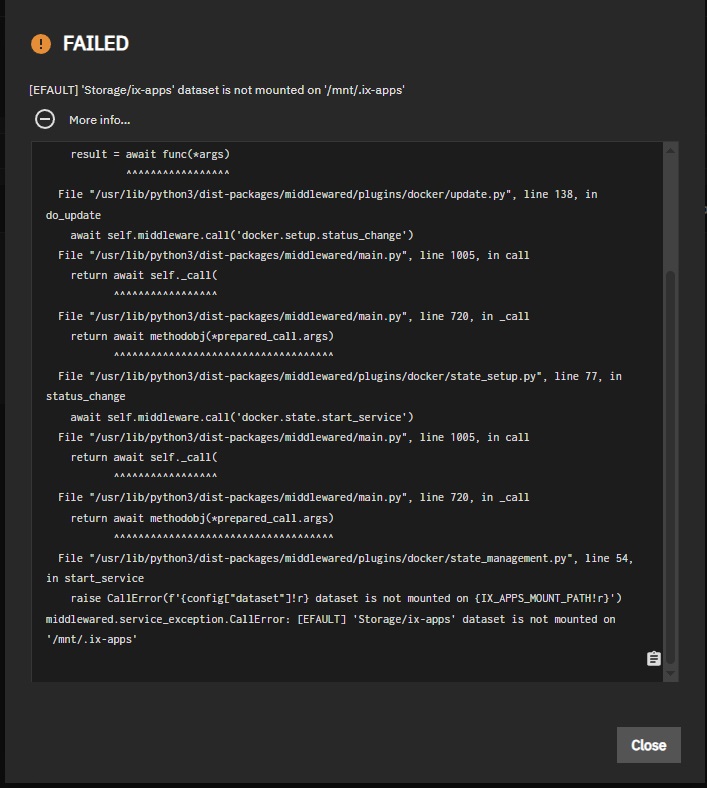
Sounds like an incomplete pool assignment for apps. Unset and then reset the pool for apps, and give it a few minutes to complete the job.
DO you have a perpetual licence for Plex?
I have a monthly plex pass. My main problem is none of my applications are available. I’ve tried to unset and reset the pool. I’m wondering if I just export my pool and do a fresh install and then import it back if that would fix my issue. Or do you think an upgrade thru the gui would do the same thing
Trying a fresh install of 25.04 over the boot device and uploading the System Configuration may help. You could also try doing an upgrade to 25.10 as there have been security updates.
You can make a few, different copies of your System Configuration as you try playing with your system. Just make sure to label them so you know what features were present. Upgrading will leave you with prior boot environments where a fresh install will wipe all those out. A system config from 25.10 will not load onto 25.04 but older to newer is fine.